內容簡介
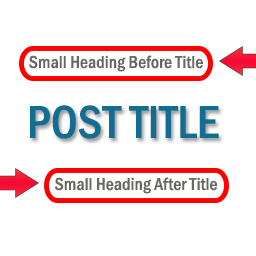
在文章、頁面和其他文章類型的編輯頁面中,顯示標題後的副標題文字欄位。
GitHub
外掛主頁
在模板中獲取並顯示
使用 get_nskw_subtitle() 進行獲取,nskw_subtitle() 進行顯示。
更改標籤
預設的輸入欄位標籤為 "Subtitle"。有一個 hook 可以進行更改。
add_filter( 'nskw-fat-meta_label', 'nskw_changeLabel' );
function nskw_changeLabel() {
return '新標籤';
}
在特定文章類型中隱藏
預設情況下,除了附件之外,副標題欄位會出現在每個文章類型的編輯頁面中。
要在特定文章類型頁面中隱藏,有一個 hook。
// 在 'attachment'、'page' 和 'newposttype' 的文章類型中隱藏副標題欄位
add_filter( 'nskw-fat_post_type', 'nskw_hide_subtitle' );
function nskw_hide_subtitle() {
return array( 'attachment', 'page', 'newposttype' );
}
外掛標籤
開發者團隊
原文外掛簡介
Displays subtitle text field after the title in post, page and other post type edit page.
GitHub
Plugin Homepage
Retriving and displaying in templates
Use get_nskw_subtitle() to retrieve and nskw_subtitle() to display.
Change label
By default the label of the input field is "Subtitle". There's a hook for changing it.
add_filter( 'nskw-fat-meta_label', 'nskw_changeLabel' );
function nskw_changeLabel() {
return 'new label';
}
Hide in specific post types
By default, subtitle field appears in every post type edit pages except for attachment.
To hide in particular post type pages, there’s a hook.
// hide subtitle field in posttype 'attachment', 'page'、''newposttype'
add_filter( 'nskw-fat_post_type', 'nskw_hide_subtitle' );
function nskw_hide_subtitle() {
return array( 'attachment', 'page', 'newposttype' );
}