內容簡介
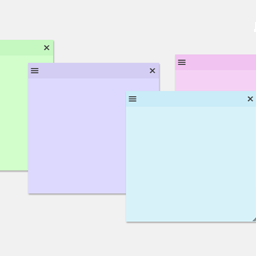
總結:ST Admin Notes 外掛為 WordPress 管理區添加了一個浮動、可拖曳的筆記畫布,允許授權使用者在管理區螢幕上直接創建、編輯、移動和管理便利的筆記。筆記安全地存儲為網站選項,並在管理頁面之間持久存在,方便您或您的團隊留下提醒、待辦事項或內部筆記。
1. 什麼是 ST Admin Notes 外掛所提供的功能?
- 提供管理員的浮動可拖曳筆記覆蓋層
- 輕鬆地創建、編輯和刪除筆記
- 筆記在管理頁面之間持久存在
- 使用管理列來顯示或隱藏筆記
- 筆記按網站保存(不是按瀏覽器)
- 使用 jQuery UI 實現拖曳和調整大小
- 輕量且性能友好
- 符合 WordPress.org 審查要求
2. 誰是這個外掛的理想使用對象?
- 網站管理員、開發人員和團隊希望在 WordPress 儀表板內快速提醒或內部筆記的人。
Markdown 範例:
- 有序列表:
1. 創建新筆記
2. 將其拖動到螢幕的任何位置
3. 在不再需要時進行編輯或刪除
- 無序列表:
- 持久筆記
- 僅供管理者查看
- 輕巧且快速
- 易於使用
外掛標籤
開發者團隊
原文外掛簡介
ST Admin Notes adds a floating, draggable notes canvas to the WordPress admin area, allowing authorized users to create, edit, move, and manage sticky notes directly on admin screens.
Notes are stored securely as site options and persist across admin pages, making it easy to leave reminders, to-do items, or internal notes for yourself or your team.
Features include:
Floating draggable notes overlay in the admin
Create, edit, and delete notes easily
Notes persist across admin screens
Show or hide notes using the admin bar
Notes saved per site (not per browser)
jQuery UI powered drag & resize
Lightweight and performance friendly
WordPress.org review friendly
This plugin is ideal for site administrators, developers, and teams who want quick reminders or internal notes inside the WordPress dashboard.
A brief Markdown Example
Ordered list:
Create a new note
Drag it anywhere on the screen
Edit or delete when no longer needed
Unordered list:
Persistent notes
Admin-only visibility
Lightweight and fast
Easy to use