
內容簡介
### 摘要:
想要擺脫充斥著垃圾 SEO 提案、虛假行銷優惠和機器人提交的 Elementor Pro 表單嗎?通過僅對消息欄進行篩選,您可以消除高達 95% 的垃圾提交。Spam Filter For Elementor Form這個外掛幫助您實現這一目標,並讓您掌握控制權,無需依賴外部服務。
### 問與答:
1. 這個外掛的功能是什麼?
- 可以啟用或停用特定或所有 Elementor Pro 表單的篩選。
- 阻止包含特定單詞或模式的消息。
- 拒絕任何包含鏈接的提交,除非是從允許的域中來的。
- 基於域名允許或阻止電子郵件地址(白名單或黑名單模式)。
- 直接在表單內顯示自定義錯誤消息。
- 沒有第三方服務或API,完全本地並輕巧。
2. 如何使用這個外掛?
- 啟用篩選:前往 Elementor → 設置 → 聯繫表單篩選,並勾選“啟用垃圾郵件篩選器”選項。
- 為正確的表單定位:在“表單名稱”設置中輸入您要篩選的表單名稱。這必須與您的 Elementor Pro 表單設置中的“表單名稱”匹配。
- 設置阻止的單詞:添加一系列被阻止的單詞(每行一個)。任何包含這些單詞的表單提交將被拒絕。
- 篩選網址:僅允許特定域的URL。其他鏈接將觸發驗證錯誤。
- 控制電子郵件域:啟用電子郵件篩選,並在白名單或黑名單模式中進行選擇。添加域或完整電子郵件地址以控制誰可以提交表單。
3. 如果對這個外掛感到滿意,應該怎麼做?
- 如果您認為Spam Filter For Elementor Form對您有幫助,請考慮在WordPress.org上留下評論。您的反饋有助於我們改進並吸引更多用戶。
外掛標籤
開發者團隊
② 後台搜尋「Spam Filter For Elementor Form」→ 直接安裝(推薦)
原文外掛簡介
Tired of spammy SEO pitches, fake marketing offers, and bot submissions flooding your Elementor Pro forms? By filtering only the message field, you can eliminate up to 95% spam submissions.
Spam Filter For Elementor Form do that and gives you the control you need to stop them, without relying on external services.
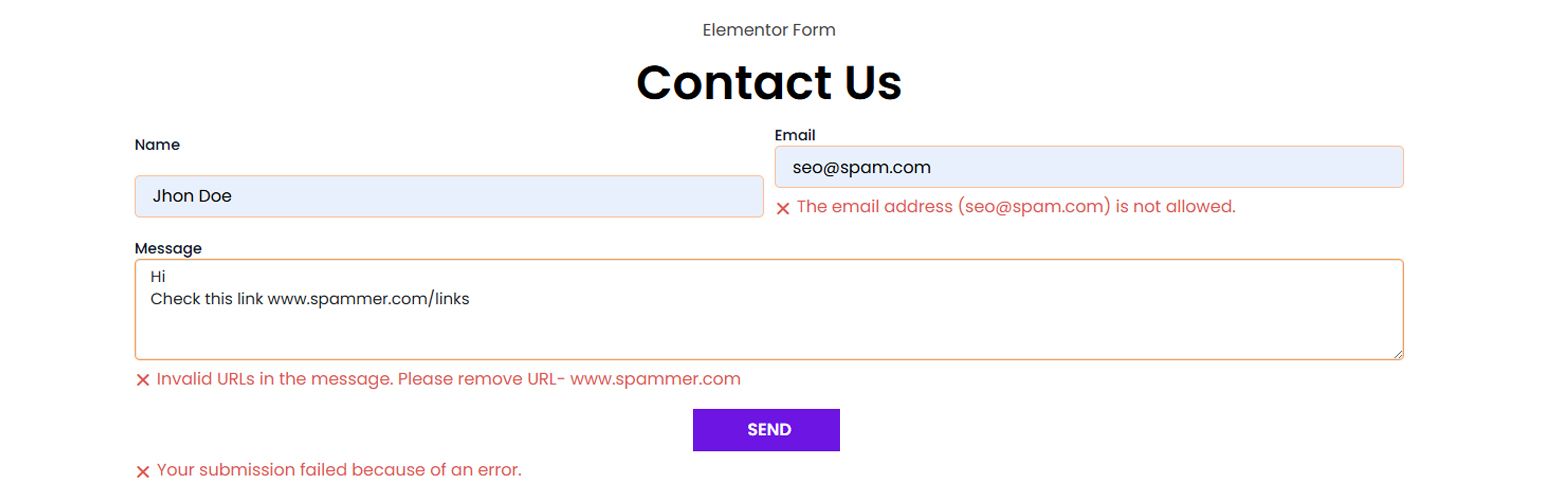
This plugin filters the input field of your forms to block submissions containing unwanted words, suspicious URLs, or emails from unauthorized domains. You can block all URLs except those from your domain or specific domains you allow. If someone tries to submit a form with a disallowed link, they’ll see a clear error message asking them to remove it.
Here’s the beauty of it: real visitors who want to share something useful will usually say, “I have a link to share, can you contact me so I can send it?” Spam bots, on the other hand, just drop links and hit submit. That’s where this filter stops them.
Whether you want to block certain phrases, links, or reject emails from shady domains, this plugin lets you do it easily, right from the WordPress dashboard.
Features:
Enable or disable filtering for specific or all Elementor Pro forms.
Block messages that contain specific words or patterns.
Reject any submission containing links—except those from allowed domains.
Block or allow email addresses based on domain (whitelist or blocklist mode).
Custom error messages shown directly inside the form.
No third-party services or APIs—fully local and lightweight.
Built exclusively for Elementor Pro forms.
Perfect for any site owner who’s fed up with form spam and wants a simple, effective way to stop it.
How to Use:
Enable Filtering:
Go to Elementor → Settings → Contact Form Filter and check the “Enable Spam Filter” option.
Target the Right Form:
Enter the name of the form you want to filter in the “Form Name” setting. This must match the “Form Name” from your Elementor Pro form settings.
Set Blocked Words:
Add a list of blocked words (one per line). Any form submission containing these words will be rejected.
Filter URLs:
Only allow URLs from specific domains. Other links will trigger a validation error.
Control Email Domains:
Enable email filtering and choose between whitelist or blocklist mode. Add domains or full email addresses to control who can submit the form.
Enjoying the Plugin?
If you find Spam Filter For Elementor Form helpful, please consider leaving a review on WordPress.org. Your feedback helps us improve and reach more users.
Other useful and absolutely free plugins from WizBee IT
Easy Duplicate Woo Order: Adds a custom action to duplicate WooCommerce orders easily.
Custom Product in Woo Order: Add custom one-time items directly to WooCommerce orders without adding them to the catalog.
Visit our website for more at WizBee IT
License
This plugin is licensed under the GPLv2 or later license. For more information, see https://www.gnu.org/licenses/gpl-2.0.html.

