內容簡介
The Smart Passworded Pages 外掛增強了 WordPress,並允許創建中央登錄頁面,以授予訪問任意數量的已設定密碼的子頁面的權限。這樣,你可以為每個客戶/成員/組織提供一個中央的地方輸入密碼,他們將被帶到只有他們的信息的頁面中。
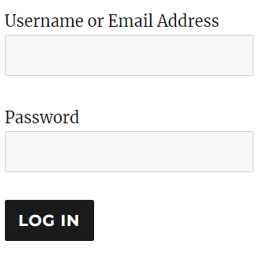
密碼字段顯示為一個字段,後跟一個帶有可自定義文本的按鈕。可以使用 CSS 獨特地修改樣式化表單。從子頁面可以連接到使用相同密碼保護的其他頁面,並且不需要重新輸入密碼。
要向父頁面添加密碼字段,只需輸入短碼 [smartpwpages]
如果您希望為提交按鈕分配唯一標籤或為表單分配CSS識別ID,則可以使用以下示例中的屬性:
[smartpwpages label=\”Login\” ID=\”sppForm1\”]
此外掛不能添加密碼頁。WordPress 具有此功能。在 WordPress 的頁面編輯屏幕右側,您可以將可見性更改為「密碼保護」並輸入密碼。如果您不熟悉在 WordPress 中使用密碼,建議您先閱讀此頁面: https://codex.wordpress.org/Using_Password_Protection
此外掛使密碼處理更加智能並增強它,以便您可以在一個父頁面上輸入一個密碼並使用該密碼訪問所有子頁面。如果您不知道子頁面或子頁面是什麼,建議您在此閱讀有關它的信息: https://codex.wordpress.org/Pages#Creating_Pages
欲了解更多有關 Smart Passworded Pages 的信息,可前往此頁面:http://thecodecave.com/smart-passworded-pages-plugin/
外掛標籤
開發者團隊
原文外掛簡介
The Smart Passworded Pages plugin enhances WordPress by allowing the creation of central login pages that grant access to any number of passworded child pages. In this fashion you can give each client/member/organization a central place to enter a password and they will be taken to the page that has only their information.
The password field is displayed as a field followed by a button with customizable text. The form is can be uniquely stylized with CSS. The child pages can in turn link to other pages protected with the same password and the password will not need to be re-entered.
To add the password field to a parent page, simply enter the short code
[smartpwpages]
If you wish to assign a unique label to the submit button or give the form a unique ID for CSS identification, the attributes in the following example can be used:
[smartpwpages label=\”Login\” ID=\”sppForm1\”]
This plugin doesn’t add the ability to add passwords to pages. WordPress has that built in. On the right hand side of the page editing screen in WordPress, you can change the visibility to Password protected and enter in a password. If you are unfamiliar with using passwords in WordPress, you might want to read this page first: https://codex.wordpress.org/Using_Password_Protection
This plugin does make the password handling smarter and enhances it so that you can enter one password on a parent page and gain access to all the children pages using that password. If you don’t know what children pages or sub-pages are, you might want to read about it here: https://codex.wordpress.org/Pages#Creating_Pages
You can find out more about the Smart Passworded Pages plugin here: http://thecodecave.com/smart-passworded-pages-plugin/