
內容簡介
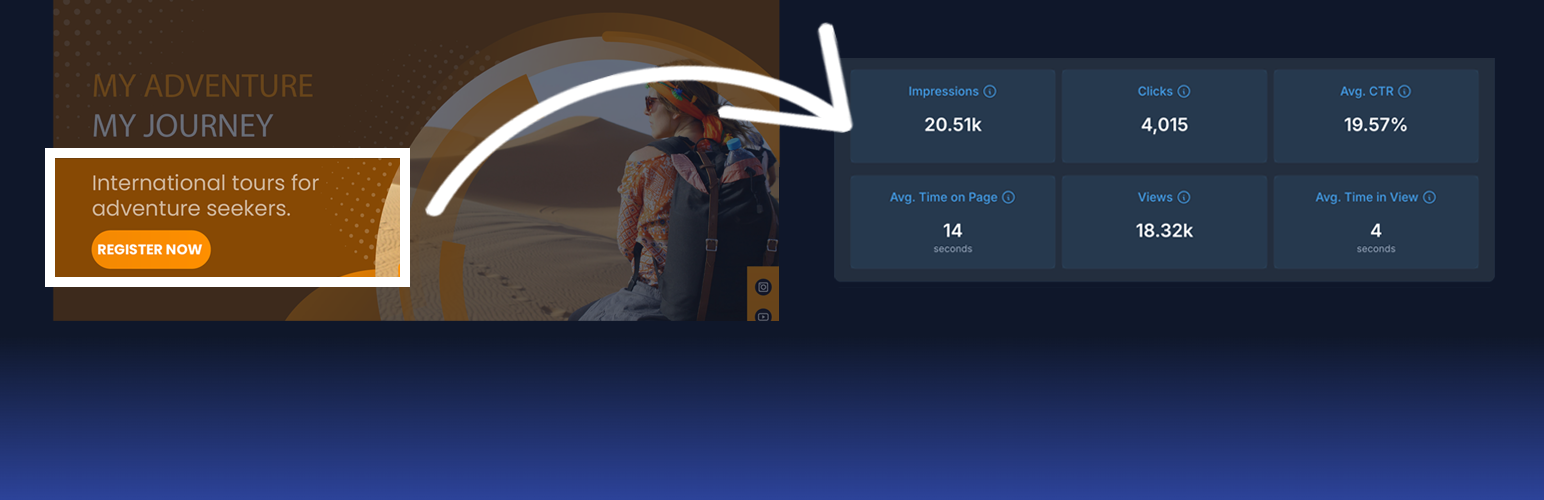
總結: 這個外掛讓您輕鬆將 Tyles 嵌入您的網站。Tyles 是智能內容區塊,可透過 TyleIQ 平台進行創建、編輯和追蹤。所有 Tyles 都帶有內置的分析功能,幫助您了解用戶如何與您的內容互動。
問題與答案:
1. 使用這個外掛的主要功能是什麼?
- 快速輕鬆地將 Tyles 嵌入 WooCommerce 商店的任何位置。
- 使用包括的 Gutenberg 區塊將 Tyles 直接插入帖子、頁面和小工具中。
2. 是否需要編碼來使用這個外掛?
- 不需要編碼,只需將每個 Tyle 的 ID 貼上並發布即可。
3. 如何查看 Tyles 的分析報告?
- 分析功能自動生效,無需額外設置。報告可在 TyleIQ.com 上查看。
4. 是否需要 TyleIQ 帳戶才能使用這個外掛?
- 不需要 TyleIQ 帳戶即可使用外掛或將 Tyles 嵌入網站,但 Tyles 必須是「啟用」狀態才能在網站上顯示。換句話說,Tyle 的創建者需要付費帳戶。
5. 想要創建自己的 Tyles?
- 在 TyleIQ.com 免費註冊即可。
6. 需要哪些文件和資源來幫助開發人員和客製化?
- 開發人員文件、使用案例和客製化提示均可在 TyleIQ Docs 上找到。
外掛標籤
開發者團隊
② 後台搜尋「Smart Content Blocks With Analytics」→ 直接安裝(推薦)
原文外掛簡介
This plugin allows you to easily embed Tyles into your website. Tyles are smart content blocks that can be created, edited, and tracked through the TyleIQ platform. All Tyles come with built-in analytics to help you understand how users are interacting with your content.
Main Features
Quickly and easily embed Tyles anywhere in your WooCommerce store.
Use the included Gutenberg Block to insert Tyles directly into posts, pages, and widgets.
No coding required; simply paste the ID of each Tyle and publish.
Analytics start working automatically and without additional setup. Reports are available on TyleIQ.com.
Tyles are fully compatible with AI models and SEO best practices.
See how your Tyles are performing on TyleIQ.com.
Fully responsive and mobile-friendly.
You don’t need a TyleIQ account to use this plugin or embed Tyles on your website. However, Tyles must be ‘Active’ for them to appear on your website. In other words, the Tyle’s creator needs a paid account.
Want to create your own Tyles?
Sign up for free at TyleIQ.com.
Please also refer to our Privacy Policy and Terms of Service.
Help & Customization
Developer docs, use cases, and customization tips are available at TyleIQ Docs.