內容簡介
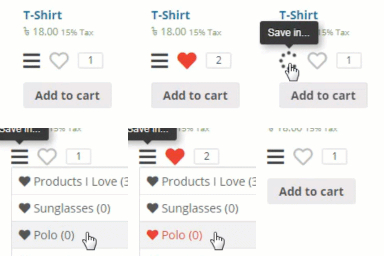
這個外掛可讓您的顧客建立自己的願望清單,從而提高轉換率。
這個外掛可以為您的 WooCommerce 商店添加願望清單功能。
這個外掛是 100% WPML 相容的。
這個外掛允許您重寫其模板檔案:
要重寫按鈕模板檔案,只需添加您自己的檔案:
主題目錄/woocommerce/wishlist-add-button.php
要重寫願望清單模板,只需添加您自己的檔案:
主題目錄/woocommerce/wishlist-page.php
此外掛還允許使用過濾器/操作。
使用方法
只需前往 WooCommerce -> 設定 -> WC 願望清單
您可以選擇顯示願望清單的頁面。
選擇或者取消顧客因此可以將產品添加到購物車的選項。
選擇其他文字串和其他選項。
保存設定。
外掛標籤
開發者團隊
原文外掛簡介
Improve your conversion rate by adding your customers the option to create their own wishlist.
This plugin will allow you to add the wishlist functionality to your woocommerce store.
This plugin is 100% WPML ready
This plugin will allow you to override its template files:
To override button template file just add your file:
theme-directory/woocommerce/wishlist-add-button.php
To override the wishlist template just add your file:
theme-directory/woocommerce/wishlist-page.php
The plugin also allows filters/actions usage
Usage
Simply go to Woocommerce -> settings -> WC Wishlist
You can choose which page will display the wishlist
Select either users can add products to the cart from the wishlist
Select other text strings and other options
Save