內容簡介
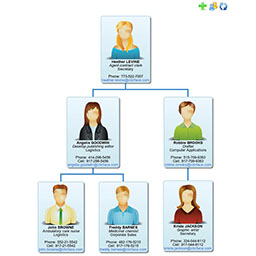
這個外掛可以讓您輕鬆地設置階層式組織圖,也就是組織架構圖,並在您的網站上使用。我們已經整合了拖放功能,以確保過程直觀快速。
圖表能夠顯示 Gravatar 圖像和使用者的顯示名稱。未來,我們還計劃添加一個模板系統,以便顯示更多信息。
現在,組織圖 JSON 可以使用專用端點進行訪問。
JSON 的端點為「{domain.com}/wp-json/org_chart/json」。
JSON 格式可以使用 index.php 中的「parseJSON」功能進行更新。這是一個可插入的函數。
WP Org Chart Pro 已發布。
* 可應對不同大小的螢幕
* 支援 Buddypress
* 多個組織圖
* JSON 存取
* 自訂部門
* 簡單的使用者管理
* 自訂設計用的模板系統
* 用於自訂欄位的掛鉤和過濾器
* 列印圖表
* 取代最高層使用者而不需重置圖表
示範
感謝:
@wesnolte : https://github.com/wesnolte/jOrgChart
外掛標籤
開發者團隊
原文外掛簡介
This plugin allows you to seamlessly setup a hierarchical based organisation chart, otherwise known as an Org Chart, for use in your website. We have integrated drag and drop features to ensure the process is intuitive and fast.
The Chart is able to display a Gravatar image and user’s display name. In the future we are aiming to add a template system which will allow more information to be displayed.
Now chart JSON can be accessed using endpoint.
Endpoint for JSON. {domain.com}/wp-json/org_chart/json
JSON format can be updated using “parseJSON” function in index.php . Its a pluggable function.
WP Org Chart Pro is released.
* Responsive
* Buddypress Support
* Multiple Charts
* JSON Access
* Custom Departments
* Simple user management
* Template system for custom design
* Hooks and Filters for custom fields
* Print Chart
* Replace Top Level user without reset chart
Demo
Credits:
@wesnolte : https://github.com/wesnolte/jOrgChart