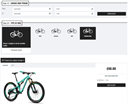
內容簡介
Simple Bike Rental 是一款理想的解決方案,專為小型企業、旅遊業者或租賃服務設計,提供快速且易於使用的系統來管理自行車預訂。
【主要功能】
• 從後端新增及管理自行車
• 日租與時租預訂模式
• 管理面板中的可用性日曆
• 前端預訂表單具 AJAX 驗證
• 管理員與客戶的電子郵件通知
• 無需複雜設置或第三方依賴
外掛標籤
開發者團隊
原文外掛簡介
Simple Bike Rental is the ideal solution for small businesses, tour operators or rental services that need a fast and user-friendly system to manage bicycle bookings.
Main features:
Add and manage bikes from the backend
Daily and hourly booking modes
Availability calendar in the admin panel
Frontend booking form with AJAX validation
Email notifications for admin and customers
No complicated setups, no third-party dependencies
Just install, configure, and start receiving bookings!
Read the full documentation to explore all features and configuration options.
Usage
To display the standard booking form on the frontend, use the following shortcode:
[simpbire_bike_rental]
You can add this shortcode to any post or page. The form will automatically load available bikes and booking options based on your settings.
Tip: Create a dedicated page (for example, “Book a Bike”) and place the shortcode there for easy access.
Bike grid (catalog view)
You can display a grid of available bikes using this shortcode:
[simpbire_bike_grid columns=”4″ type=”e-bike”]
Available attributes:
– columns: number of columns in the grid
– type: filter bikes by type (optional)
Each bike in the grid shows a “Check availability” button.
Single bike page
To display the booking flow for a specific bike, use the single bike shortcode:
[simpbire_bike id=”4″ show_calendars=”true” months=”3″]
Available attributes:
– id: the bike ID (required)
– show_calendars: show availability calendars (true or false)
– months: number of months to display in the calendar
This shortcode is intended to be used on a dedicated bike detail page.
Mini availability calendars
You can display compact availability calendars using this shortcode:
[simpbire_mini_calendar bike_id=”1″ months=”3″ legend=”1″]
Available attributes:
– bike_id: the bike ID (required)
– months: number of months to display
– legend: show the availability legend (1 to enable, 0 to disable)
Linking the bike details page
To use the booking flow “bike grid → single bike page”, each bike must be linked to its detail page.
How it works:
– The [simpbire_bike_grid] shortcode displays a list of bikes with a “Check availability” button.
– If a details URL is set for a bike, the button and the bike image link to that page.
– The destination page must contain the shortcode [simpbire_bike id=”X”], where X is the bike ID.
Required setup:
– Create a dedicated page for the bike (or for each bike type).
– Add the shortcode [simpbire_bike id=”X”] to that page.
– Open the bike settings in the admin panel.
– Set the “Bike details URL” field to the page URL.
Note: If the details URL is not set, the “Check availability” button will be disabled.
For detailed documentation, please refer to the online docs
Links
For more information, support, or to unlock online payments and advanced features, visit: