內容簡介
**摘要:**
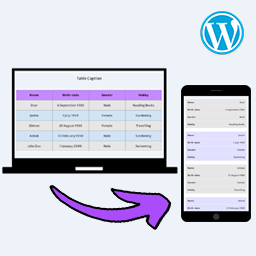
Sheetable - Google Sheets to WP Table 允許您將 Google Sheets 數據嵌入並同步為響應式 WordPress 表格。匯入您的試算表,自定顯示並使用簡碼或 Gutenberg 區塊在任何地方嵌入。無需 API 金鑰,無伺服器負荷,無複雜設置。
- 透過 Sheetable 的現代方法在 WordPress 嵌入 Google Sheets
- 具有尖端表現而不複雜的功能
- 免費功能包含無限表格、Google Sheets 連接、即時搜索等
- 專業版功能包含表頭和尾部控制、自動刷新等進階功能
- 適合專業儀表板、報告和大型資料集
**問題與答案:**
1. Sheetable 提供何種主要功能?
- Sheetable 允許將 Google Sheets 數據嵌入並同步為響應式 WordPress 表格,並具有現代性能,同時無需 API 金鑰、伺服器負荷或複雜設置。
2. Sheetable 的免費功能有哪些?
- 免費功能包括無限表格、Google Sheets 連接、即時搜索、列排序、分頁等,並且支持所有設備包括手機、平板、桌面和可折疊設備。
3. Sheetable Pro 提供了哪些進階功能?
- Sheetable Pro 提供進階功能,如表頭和尾部控制、自動刷新、自定 CSS 編輯器、高度定制的風格控制、範圍選擇、正則表達式搜索、內容保護等。
4. Sheetable 適合用於哪些情況?
- Sheetable 適合用於專業儀表板、報告和大型資料集的製作,也可用於價格表和比較圖表、產品目錄、員工名單、時間表、SEO 比較表、商業儀表板、活動日曆等。
5. Sheetable 如何工作?
- 使用者可將 Google Sheets 設置為「任何有連結者可檢視」,將表 URL 複製並粘貼到 Sheetable 中,再進行外觀自定,並透過簡碼或 Gutenberg 區塊嵌入。
外掛標籤
開發者團隊
② 後台搜尋「Sheetable – Google Sheets to WP Table」→ 直接安裝(推薦)
原文外掛簡介
Website | Documentation
Sheetable – Google Sheets to WP Table lets you embed and sync Google Sheets data as responsive WordPress tables. Import your spreadsheet, customize the display, and embed it anywhere using shortcode or Gutenberg block. No API key required, no server load, no complex setup.
Paste your Google Sheet link, customize, embed – done.
Why Choose Sheetable?
Sheetable takes a modern approach to embedding Google Sheets in WordPress:
Ultra-lightweight (only ~10KB footprint on frontend) – Won’t slow down your site
Client-side caching – Lightning-fast repeat loads
No API key required – No setup, no limits, no OAuth
Zero server processing – All rendering happens in browser
Core Web Vitals optimized – Built for 100/100 Lighthouse scores
Large spreadsheet support – Handles large datasets smoothly, even millions of rows
Formatting support – Checkboxes, links, images, email, phone detected automatically
Modern performance without complexity.
Free Features
Unlimited tables – Create as many as you need
Unlimited Google Sheets – Connect any public sheet
Unlimited rows & columns – No artificial limits like others
Real-time search – Find data instantly
Column sorting – Sort by any column
Pagination – Navigate large datasets easily
Refresh – Update data on demand without loading page
Fully responsive – Works on all devices including mobile, tablet, desktop, folding devices
Rich content support – Links, images, text, numbers, dates, emojis, checkboxes
Smart links – Auto-detect emails and phone numbers as clickable links
Text wrapping options – Control how long text displays in cells
Show/hide title & description – Control what visitors see
Row numbers display – Easy reference
Shortcode support – Embed anywhere
Gutenberg block – Native WordPress editor support
Pro Features
Unlock advanced functionality with Sheetable Pro:
Show/hide header & footer – Full table control
Auto-refresh – Set custom intervals for live sync
Custom CSS editor – Complete styling freedom
Full styling control – Colors, fonts, borders, spacing
Row & column offset – Start from any position
Limit rows & columns – Display exactly what you need
Range selection – Specify A1:F200 or any range
Regex search – Advanced pattern matching
Content protection – Disable text selection & copy
Responsive column visibility – Hide specific columns on mobile/tablet
Responsive column wrapping – Show limited columns with expandable rows
Copy & paste styles – Apply styling from one table to another
Export options:
Excel (XLSX)
CSV
TSV
PDF
HTML
Markdown
JSON
Copy to clipboard
Print
How It Works
Make your Google Sheet public and paste the URL
Customize your table settings and styles
Embed using shortcode or Gutenberg block
SEO & Performance Benefits
Fully indexable HTML output – Search engines can read your data
Ultra-lightweight – Better Core Web Vitals scores
Fast mobile performance – Optimized for all devices
Clean semantic markup – SEO-friendly structure
Lower bounce rate – Fast loading keeps visitors engaged
Sheetable helps both your site speed and search rankings.
External Services
This plugin connects directly to Google Sheets to fetch and display spreadsheet data.
Google Sheets (Google LLC)
What it does: Fetches your spreadsheet data directly to the visitor’s browser (Client-side)
Data sent: The visitor’s browser sends a request to your public Google Sheet URL
Data received: Spreadsheet content (rows, columns, formatting)
When: Each time a visitor loads a page containing your table
Terms of Service: Google Terms of Service
Privacy Policy: Google Privacy Policy
Note: No data is sent to Sheetable servers or any third-party intermediary. All data transfer occurs directly between the visitor’s browser and Google’s servers.
Privacy Policy
Sheetable respects your privacy. The plugin:
Does not collect any personal data from you or your visitors
Does not send any data to external servers (except the direct fetch from Google to the visitor)
Does not use cookies or tracking
Processes all data client-side in the visitor’s browser
Your Google Sheet data is fetched directly from Google’s servers to the visitor’s browser. Sheetable acts only as a display layer.