內容簡介
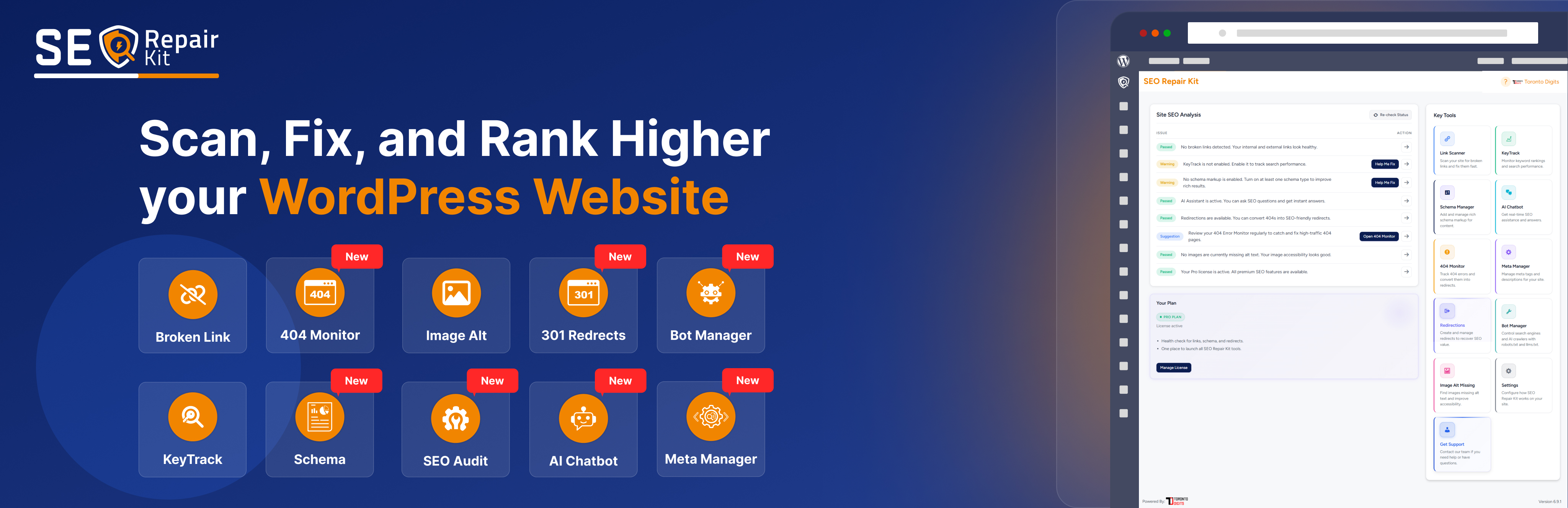
SEO Repair Kit 是一款先進的 WordPress SEO 外掛,旨在自動化和簡化技術 SEO。結合 AI 助手、智能元資料管理、架構生成、關鍵字追蹤和網站監控工具,幫助用戶識別問題、修復 SEO 問題,提升網站的搜尋引擎可見度。
【主要功能】
• AI 聊天機器人:提供即時 SEO 建議與問題解決
• 架構管理器:自動生成和管理多種架構標記
• 斷鏈掃描器:檢測網站內外部的斷鏈
• 關鍵字追蹤:追蹤關鍵字位置及表現數據
• 自動掃描:定期檢查網站的斷鏈情況
外掛標籤
開發者團隊
② 後台搜尋「SEO Repair Kit – AI Chatbot, Schema Manager, SEO Content Monitoring, GSC Integration, Keyword & Rank Tracking」→ 直接安裝(推薦)
原文外掛簡介
SEO Repair Kit v2.1.4 by TorontoDigits is an advanced WordPress SEO plugin designed to automate and simplify technical SEO. It combines AI-powered assistance, smart meta management, schema generation, keyword tracking, and site monitoring tools to help you identify issues, fix SEO problems, and improve your website’s search engine visibility.
Key Features
🧠 AI Chatbot (Pro Feature)
A built-in AI assistant trained to help users improve SEO performance, fix content issues, and receive real-time suggestions — all directly within the WordPress dashboard.
* Context-aware SEO optimization guidance
* Automated troubleshooting support
* Real-time Q&A for schema, redirection, and keyword tracking
🧩 Schema Manager (Pro Feature)
A complete schema management that enables users to automatically generate, validate, and manage schema markups for their content. Supports 15+ schema types including Article, Blog Posting, News Article, FAQ, How To, Video Object, Product, Job Posting, Event, Course, Review, Recipe, Local Business, Organization, Corporation, Reservation, Medical Condition, Medical Web Page, Aggregate Rating, and Website.
The Schema Manager allows users to visually configure, preview, and deploy JSON-LD markups across any post type, ensuring SEO compliance and rich results visibility on search engines.
🔗 Broken Link Scanner
Advanced link scanning functionality that detects broken internal and external links across your website. Features include:
* Scans all post types for broken links
* Real-time HTTP status code checking
* CSV export for broken links
* Direct edit and redirection options
* Scheduled automatic scanning (weekly/monthly)
* Progress tracking during scans
📊 KeyTrack – Keyword Performance Tracking
Comprehensive keyword tracking system integrated with Google Search Console via Google Site Kit plugin:
* Track keyword positions, impressions, CTR, and clicks
* Visual performance insights with interactive charts
* Overview, Pages, Queries, and Settings tabs
* Customizable date ranges for performance analysis
* Threshold settings for custom performance monitoring
* Email reports based on user preferences
* Advanced insights for all pages and queries
🖼️ Alt Text Manager
Efficient management of image alt text for improved SEO and accessibility:
* Scans all media images for missing alt text
* Bulk update functionality for multiple images
* Dedicated page for alt text repair
* Add or update alt text for individual images
* Automatic detection of images without alt attributes
🔄 Redirection Manager
Professional URL redirection management system:
* Create 301 and 302 redirects
* Track redirect hits and performance
* Active/inactive redirect status management
* Most hit redirect analytics
* Regex pattern support for advanced redirects
* Position-based redirect ordering
🚫 404 Error Monitor
Automatic tracking and logging of 404 errors:
* Real-time 404 error detection
* Detailed logging with referrer, user agent, and IP address
* 404 error analytics and reporting
* Easy redirect creation from 404 logs
* Domain-based error tracking
📄 Meta Manager
Powerful on-page SEO meta controls for every major content surface in WordPress:
* Global Settings for title separator, homepage meta, templates, and organization data
* Content Types controls for post type-level title, description, robots, and advanced options
* Taxonomies controls for category/tag/custom taxonomy SEO templates and robots directives
* Archives controls for author/date/search archive metadata and robots behavior
* Advanced robots controls with preview for noindex/nofollow/noarchive, max-snippet, max-image-preview, and max-video-preview directives
* Dynamic SEO variables support including %title%, %excerpt%, %site_title%, %sep%, %date%, %day%, %month%, and %year%
* Per-post SEO meta fields (title, description, robots, canonical) with safe fallback behavior
* Built-in search result preview for SEO titles and descriptions
* Fully integrated with Gutenberg Block Editor, and Elementor page builder for easy metadata management while editing content
🤖 Bot Manager
Comprehensive control over search engine and AI crawler access:
* Manage robots.txt file with visual editor
* Generate and manage llms.txt file for AI model discovery
* Control which AI bots can access your content
* Block or allow specific AI crawlers (ChatGPT, Claude, Google Bard, etc.)
* Server-level bot access control with 403 responses
* Automatic robots.txt rules for blocked bots
* LLMs.txt generator with post type and taxonomy selection
* Real-time validation and preview
* Enhanced robots.txt with security and SEO best practices
📧 Weekly SEO Summary Email
Automated weekly email reports with comprehensive SEO insights:
* Search performance metrics (KeyTrack data)
* Broken links analysis and health scores
* Image alt text optimization status
* Redirection statistics and analytics
* Pro plan status and upgrade reminders
* Beautiful HTML email templates
⚙️ Settings & Configuration
Comprehensive settings management:
* Post type selection for scanning
* 404 monitoring enable/disable toggle
* Weekly report email preferences
* Last report status tracking
* Customizable plugin behavior
📱 Interactive Dashboard
Centralized dashboard for all SEO operations:
* Site SEO analysis with issue detection
* Quick access to all plugin features
* Real-time status widgets
* SEO health score calculations
* Issue severity categorization (critical, warning, suggestion)
🎯 Onboarding Flow
User-friendly guided setup wizard:
* Multi-step configuration process
* Post type selection
* Feature enablement (KeyTrack, Schema, Notifications)
* Link scanning schedule setup
* Email notification preferences
* One-time setup completion
Additional Features
License management system for Pro features
Google Search Console integration via Site Kit
Database migration system for version updates
Comprehensive error logging and debugging
Admin notices and status tracking
REST API endpoints for subscription management
Responsive and modern UI design
Full WordPress coding standards compliance
Configurations & Use
Initial Setup & Onboarding
After activating the plugin, you’ll be guided through an interactive onboarding process.
During onboarding, you can configure:
Post types to scan for broken links
Enable/disable KeyTrack feature
Set up link scanning schedule (manual, weekly, or monthly)
Select default schema types to use
Configure notification preferences (weekly reports, KeyTrack alerts, broken links notifications)
Enable alt text scanning
Enable redirection management
Set notification email address
Complete the onboarding to save your preferences, or skip and configure later in Settings.
Dashboard Overview
Navigate to “SEO Repair Kit” in your WordPress admin menu to access the main dashboard.
The dashboard provides:
Site SEO Analysis with issue detection (critical, warning, suggestion)
Quick access widgets for all major features
Real-time status updates
SEO health score calculations
Direct links to fix identified issues
Use the “Re-check Status” button to refresh the analysis.
Broken Link Scanner
Go to “SEO Repair Kit” > “Link Scanner” in the admin menu.
Select a post type from the dropdown (configured in Settings).
Click “Scan Links” to start the scanning process.
Monitor the progress bar and real-time statistics during scanning.
Review the results table showing:
Post ID, title, and type
Link URL and HTTP status code
Link text context
Direct edit and redirect options
Export broken links to CSV for external analysis.
Create redirects directly from the scan results.
Schedule automatic scans in Settings (weekly or monthly).
Alt Text Manager
Navigate to “SEO Repair Kit” > “Image Alt Missing” in the admin menu.
View all images missing alt text with their details.
Update alt text individually:
Click on an image to edit
Enter descriptive alt text
Save changes
Use bulk update feature to update multiple images at once.
Filter and search images by post type or status.
Monitor alt text optimization progress and statistics.
Redirection Manager
Go to “SEO Repair Kit” > “Redirection” in the admin menu.
Create a new redirect:
Enter source URL (old URL)
Enter target URL (new URL)
Select redirect type (301 Permanent or 302 Temporary)
Optionally enable regex pattern matching
Set redirect status (active/inactive)
Save the redirect
View all redirects in a comprehensive table showing:
Source and target URLs
Redirect type and status
Hit count and last hit timestamp
Position for ordering
Edit or delete existing redirects.
Monitor most active redirects with hit analytics.
Use the redirect logs to track redirect performance.
404 Error Monitor
Navigate to “SEO Repair Kit” > “404 Manager” (or access via Link Scanner).
Enable 404 monitoring in Settings if not already enabled.
View all 404 errors with details:
Requested URL
Referrer information
User agent and IP address
Access count and timestamps
Create redirects directly from 404 logs:
Select a 404 error
Choose target URL
Create redirect with one click
Filter 404 errors by domain, date, or count.
Monitor 404 trends and patterns.
Bot Manager
Navigate to “SEO Repair Kit” > “Bot Manager” in the admin menu.
LLMs.txt Management
Generate an llms.txt file for AI model discovery
Select post types and taxonomies to include
Allow or block specific AI bots
Preview and edit the generated file
Your file will be available at: yoursite.com/llms.txt
Robots.txt Management
Edit robots.txt using the visual editor
Validate syntax and preview changes
Apply enhanced SEO and security rules
Reset to WordPress recommended defaults
Available at: yoursite.com/robots.txt
AI Bot Access Control
Allow or block AI crawlers such as GPTBot, Claude, Gemini, Perplexity, Bing Chat, and others
Blocked bots receive a 403 response
Blocking rules are automatically added to robots.txt
Additional Features
Real-time robots.txt validation
Automatic sitemap detection
Built-in security rules
Easy reset to default configuration
KeyTrack – Keyword Performance Tracking
Install and activate Google Site Kit plugin (required for KeyTrack).
Connect Google Site Kit to your Google Search Console account.
Go to “SEO Repair Kit” > “KeyTrack” in the admin menu.
Create a KeyTrack configuration:
Enter a name for your KeyTrack
Select keywords to track
Choose date range for analysis
Configure threshold settings (optional)
Save configuration
View performance data in multiple tabs:
Overview: Summary metrics (clicks, impressions, CTR, average position)
Pages: Top performing pages with detailed metrics
Queries: Top search queries with performance data
Settings: Manage KeyTrack configurations
Set up email reports:
Configure threshold alerts
Set report frequency
Add recipient email addresses
Analyze trends with interactive line charts.
Export data for external analysis.
Watch the demo video:
Schema Manager (Pro Feature)
Ensure you have an active Pro license (required for Schema Manager).
Navigate to “SEO Repair Kit” > “Schema Manager” in the admin menu.
Select a schema type from the available options (15+ types supported).
Configure schema assignment:
Choose post types to apply the schema
Map content fields to schema properties
Enable/disable specific schema fields
Preview the JSON-LD output
Save the schema configuration.
The schema will automatically be injected into your pages as JSON-LD markup.
Validate schema using Google’s Rich Results Test tool.
Manage multiple schema types for different content types.
Use the visual field mapper to easily configure complex schemas.
Meta Manager
Navigate to “SEO Repair Kit” > “Meta Manager”.
Configure SEO using these tabs:
Global Meta
Set title separator, homepage SEO title & description
Configure default SEO templates and knowledge graph
Content Types
Define title and description templates for posts, pages, and CPTs
Configure robots directives
Taxonomies
Set SEO templates for categories, tags, and custom taxonomies
Control indexing behavior
Archives
Manage SEO settings for author, date, and search archives
Advanced Settings
Configure robots directives (index/noindex, follow/nofollow, preview limits)
Default robots: index, follow, max-image-preview:large
Disable default to manually select directives
Respects WordPress Settings → Reading → Discourage search engines option
Save settings to apply SEO metadata automatically.
Override metadata per post/page using the SEO Repair Kit Meta Manager box.
Editor Support
Works with Gutenberg and Elementor editors.
Per-page options include:
Custom SEO title
Meta description
Robots directives
Canonical URL
Search result preview
If custom metadata is not defined, Meta Manager automatically applies the global template settings as a fallback.
AI Chatbot (Pro Feature)
Ensure you have an active Pro license.
Navigate to “SEO Repair Kit” > “AI Chatbot”.
Ask the AI assistant for SEO guidance, troubleshooting, and optimization tips.
The chatbot can help with:
* Meta Manager configuration and SEO metadata guidance
* Schema Manager setup
* Redirection and broken link fixes
* KeyTrack keyword tracking insights
* General SEO best practices
It provides context-aware responses and real-time suggestions directly inside the WordPress dashboard.
Settings Configuration
Go to “SEO Repair Kit” > “Settings” in the admin menu.
Post Types Settings:
Select which post types to scan for broken links
Choose from all public post types
Save your selection
404 Monitoring Settings:
Enable or disable automatic 404 error tracking
404 errors will be logged when enabled
Weekly Report Email Settings:
Enable or disable weekly SEO summary emails
View last report status and timestamp
Reports are sent to your admin email address
Save all settings to apply changes.
Weekly SEO Summary Email
Enable weekly reports in Settings (enabled by default).
Reports are automatically sent every week to your admin email.
Each report includes:
Search performance metrics from KeyTrack
Broken links analysis and health scores
Image alt text optimization status
Redirection statistics and analytics
Pro plan status and upgrade information
Reports are sent in beautiful HTML format with:
Visual charts and metrics
Actionable insights
Direct links to fix issues
Dashboard access links
View the last report status in Settings to verify delivery.
Advanced Features
Analytics & Reporting:
Track redirect hit counts
Monitor 404 error patterns
Analyze KeyTrack performance trends
View comprehensive SEO health scores
Bot Management:
Control AI crawler access to your content
Generate llms.txt files for AI model discovery
Manage robots.txt with visual editor
Block or allow specific AI bots
Server-level access control
Integration:
Google Site Kit integration for KeyTrack
Google Search Console data access
REST API endpoints for external integrations
Troubleshooting
If KeyTrack doesn’t show data, ensure Google Site Kit is installed and connected.
If weekly emails aren’t sending, check your server’s mail configuration and email settings.
If schema isn’t appearing, verify your Pro license is active and schema is properly configured.
If links aren’t being detected, ensure the post type is selected in Settings.
Check the plugin’s debug logs for detailed error information.