內容簡介
打造美觀而引人入勝的線上課程、課程內容和測驗。
Sensei LMS 是 Automattic 所建立的一個教學及學習管理外掛程式,Automattic 是 WordPress.com、WooCommerce 和 Jetpack 等線上產品的開發公司。事實上,Sensei LMS 也是 Automattic 公司內部員工培訓和教育所使用的系統。
你的知識具有價值,透過 Sensei LMS 免費分享你的知識吧!
強大的學習管理系統功能
與你的 WordPress 網站無縫整合,並以任何佈景主題呈現課程內容。
能夠透過詳細的報告跟蹤學生的進度和表現。
製作引人入勝的課程不需要任何程式設計知識。
可嵌入來自 YouTube、Vimeo 和 VideoPress 的影片來建立影片課程。
加入「課程列表」模組到任何網頁或文章,可以顯示目前課程的資訊。
可客製化外觀和樣式以符合品牌風格。
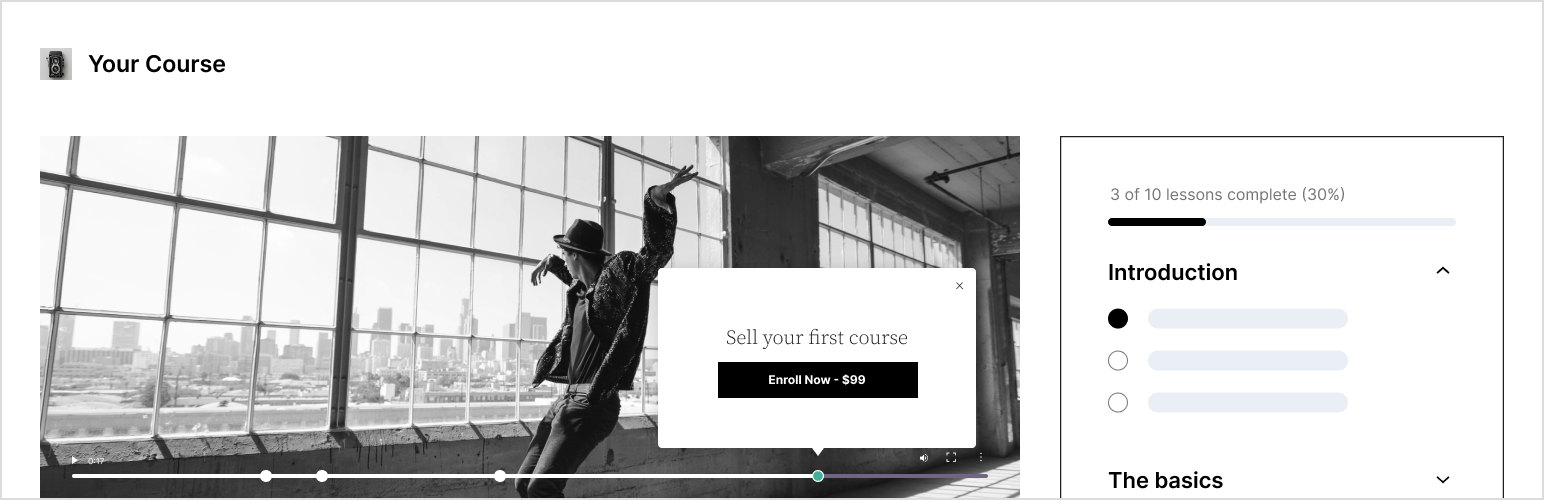
啟用「學習模式」讓學生在沒有干擾的環境中學習,獲得更完整的學習體驗。
加強學生學習的測驗方式
利用測驗來加強學生對於重要概念的理解,以及評估他們的學習進度。
你可以自由選擇多種問題類型和測驗設定,包括多選、填空、是非、自由回答、檔案上傳等方式。
更多功能使用 Sensei Pro 版本
使用 Sensei Pro,你可以做更多事情並銷售課程,包括:
WooCommerce 整合:只需要幾個點擊,就能夠設定價格以及銷售課程。Sensei Pro 能夠完美地與 WooCommerce Subscriptions、Payments、Memberships 和 Affiliates 擴充套件整合。
課程自動散發:針對每個課程單元,你可以指定學生在特定時間內,從開始課程後到固定時間間隔,才能夠進入下一個課程單元的內容。
互動性模組:透過影片、閃卡、圖片熱點和代辦事項等方式,能夠使任何課程單元,以及任何 WordPress 網頁或文章增添互動性。
先進測驗功能:啟用測驗計時器,並新增問題排序類別,以更多元化的方式編輯測驗題目。使用 Pro 版本,你可以將個別的測驗題目新增到任何 WordPress 內容中,而非僅限於測驗中。
群組和班級:將學生按群組和班級分類,以更好地管理應用和客製化學習體驗。
課程存取期限:選擇課程的開始日期、結束日期,或是指定一段特定的時間,規劃課程的存取期限。
條件設定內容:針對不同的群組、學生的報名狀態或日期,控制是否隱藏或顯示課程單元或內容。
優先技術支援:我們的專家團隊隨時準備回答你的問題,提供技術支援和協助。
了解 Sensei Pro 更多資訊。
免費擴充套件
證書:當學生完成課程內容時,會自動產生美觀的可下載 PDF 課程證書。
了解更多 Sensei LMS 證書擴充套件。
媒體和附件:可將媒體和檔案,例如 PDF 文件,上傳到課程或課程內容的外部上傳區域。
了解更多 Sensei LMS 媒體和附件擴充套件。
文章轉換為課程:透過「文章轉換課程創建者」的功能,在只需幾個點擊的情況下,你可以快速將現有的博客文章轉換為課程內容。
了解更多 Sensei LMS 文章轉換課程創建者擴充套件。
外掛標籤
開發者團隊
② 後台搜尋「Sensei LMS – Online Courses, Quizzes, & Learning」→ 直接安裝(推薦)
📦 歷史版本下載
原文外掛簡介
Create beautiful and engaging online courses, lessons, and quizzes.
Sensei LMS is a powerful learning management plugin from Automattic, the company behind WordPress.com, WooCommerce, and Jetpack. At Automattic, we use Sensei LMS to power all our employee training courses.
Share your knowledge and teach freely with Sensei LMS!
Powerful LMS Features
Seamlessly integrate Sensei LMS into your WordPress site. Sensei LMS looks great with any theme and can be customized to match your branding and style.
Create engaging courses with the WordPress Block Editor, fully utilized by Sensei’s free Course Theme.
Enable Learning Mode for an immersive distraction-free learning experience.
Track student progress and performance with detailed reports.
Embed videos from YouTube, Vimeo, and VideoPress for video-based courses.
Add the Course List block to any page or post to display available courses.
Create effective quizzes
Quizzes are a powerful way to improve your students’ understanding of key concepts and track their progress. Select from various quiz question types and settings, such as multiple-choice, fill-in-the-blank, true/false, free response, file uploads, and more.
Showcase your courses
Submit your course to Sensei LMS’ public course showcase at https://senseilms.com/showcase/. Sensei LMS’ course showcase allows you to reach new audiences to expand your course’s visibility.
Discover the power of Sensei Pro
Realize the full potential of your courses with Sensei Pro.
WooCommerce Integration: Effortlessly set a price and sell courses in just a few clicks. Sensei Pro seamlessly integrates with WooCommerce Subscriptions, Payments, Memberships, and Affiliates extensions.
Scheduled Content Drip: Control the pacing of lessons in your courses by specifying when students can access lesson content at fixed intervals after starting the course or on a particular date.
Immersive Interactive Blocks: Enrich your lessons, pages, or posts with engaging videos, flashcards, image hotspots, and task lists.
Enhanced Quiz Features: Set a quiz timer and incorporate an ordering quiz question type. With Sensei LMS Pro, you can include individual quiz questions in any WordPress content, not just quizzes.
Easy Groups & Cohorts: Organize students into groups and cohorts to manage access and customize learning experiences.
Course Access Periods: Define a start date, end date, or a set amount of time that courses will remain accessible to students.
Conditional Content: Personalize the learning journey by hiding or showing lessons and content based on groups, enrollment status, and date.
Dedicated Priority Support: Our team of expert and friendly engineers is always available to provide assistance and ensure your success!
Flashcards: Add text, videos, images, embeds, and more to both sides of the flashcard block type.
Co-Teachers: Share course ownership with co-teachers who can edit course settings, lessons, and quizzes.
Learn more about Sensei Pro.
Free Extensions
Certificates: Automatically generate beautiful downloadable PDF certificates for students when they complete a course.
Learn more about Sensei LMS Certificates.
Post To Course Creator: Create courses quickly by converting existing blog posts into course lessons in just a few clicks.
Learn more about Sensei LMS Post To Course Creator.