[WordPress] 外掛分享: Sayonara – Advanced Popup Builder

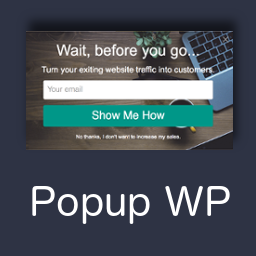
WordPress 外掛 Sayonara – Advanced Popup Builder 的封面圖片。

前言介紹

  • 這款 WordPress 外掛「Sayonara – Advanced Popup Builder」是 2020-02-20 上架。
  • 目前尚無安裝啟用數,是個很新的外掛。如有要安裝使用,建議多測試確保功能沒問題!
  • 上一次更新是 2020-07-03,距離現在已有 2063 天。超過一年沒更新,安裝要確認版本是否可用。以及後續維護問題!
  • 外掛最低要求 WordPress 3.0.1 以上版本才可以安裝。
  • 外掛要求網站主機運作至少需要 PHP 版本 5.6 以上。
  • 尚未有人給過這款外掛評分。
  • 還沒有人在論壇上發問,可能目前使用數不多,還沒有什麼大問題。

外掛協作開發者

bouncingsprout |

外掛標籤

modal | popup | intent | popups | exit popup |

內容簡介

Sayonara這個外掛的存在是因為我花了太長時間去尋找一個完全受到支援、安全且更新到最新版本的彈出窗口建構器,並且能夠在使用者離開網站時觸發。

Sayonara會偵測使用者即將離開時,並顯示一個彈出窗口。如果你需要不同的設定,Sayonara也可以根據使用者在某一頁面上下捲的距離或指定的時間後觸發。

由於某些彈出窗口可以將你網站的訪客轉換為訂閱者和潛在客戶高達40%,所以Sayonara對你的業務非常有用。

讓我知道你想新增哪些功能!

外掛的文件正在開發中─如果你有任何支援問題,請改用支援論壇。

功能

根據使用者離開網站的意圖、在某一頁面上下捲的距離或延遲一段時間來顯示彈出窗口
藉由使用者同樣使用來建立文章和頁面的編輯器,在彈出窗口上顯示各種內容
控制彈出窗口的寬度和高度等帥氣的樣式特徵
指定彈出窗口要顯示的頁面
控制訪客看到彈出窗口的頻率
在一個頁面上擁有多於一個彈出窗口

原文外掛簡介

Sayonara exists because I spent far too long searching for a fully supported, secure and up-to-date popup builder that I could set to trigger when a user exited a site.
Sayonara detects when a user is about to leave, and displays a popup. If you are after something different, Sayonara can also be triggered based on how far down a page a user scrolls, or even after a specified amount of time has passed.
And because some pop-ups can convert up to 40% of your website visitors into subscribers and leads, Sayonara is good for your business.
Let me know what features you want added!
The plugin documentation is being developed – if you have any support questions, please use the support forum instead.
Features

Display popup based on the intent of a user to exit, the amount they scroll down a page, or after a delay
Display almost anything on the popup, using the same editor you use to create posts and pages
Control the width and height of the popup, amongst other awesome style features
Specify which pages the popup will display on
Control how often your visitors see the popup
Have more than one popup per page


各版本下載點

  • 方法一:點下方版本號的連結下載 ZIP 檔案後,登入網站後台左側選單「外掛」的「安裝外掛」,然後選擇上方的「上傳外掛」,把下載回去的 ZIP 外掛打包檔案上傳上去安裝與啟用。
  • 方法二:透過「安裝外掛」的畫面右方搜尋功能,搜尋外掛名稱「Sayonara – Advanced Popup Builder」來進行安裝。

(建議使用方法二,確保安裝的版本符合當前運作的 WordPress 環境。


最新版本

延伸相關外掛(你可能也想知道)

  • Popup builder with Gamification, Multi-Step Popups, Page-Level Targeting, and WooCommerce Triggers 》下面是提供的 WordPress 外掛介紹:, , - 提供一段總結文案:<br><br>, 不再需要與複雜的表格生成器或需要編碼專業知識掙扎。, , - 問題與答案:...。
  • Popup Box – Create Countdown, Coupon, Video, Contact Form Popups 》WordPress 彈出視窗外掛, , WordPress 彈出視窗外掛價格, 免費版彈出視窗外掛DEMO, 專業版彈出視窗外掛DEMO, 專業版彈出視窗外掛使用手冊, , 此短片提供如何...。
  • Popup Maker and Popup Anything – Popup for opt-ins and Lead Generation Conversions 》opups.com/popup-anything/" target="_blank">Demo the Popup Anything Plugin and see how it can benefit your website today!, , 現在立即下載 Popup Anyt...。
  • CartBounty – Save and recover abandoned carts for WooCommerce 》p>所有網上商店都會遭受購物車遺棄的問題。 CartBounty 幫助您在 WooCommerce 中保存遺棄的購物車,並發送有效的遺棄購物車提醒消息,以恢复失去的銷售。, , ...。
  • FireBox Popups – Increase Sales and Grow Your Email List 》火盒是一個WordPress彈出視窗生成器外掛,可提高轉換率。它可幫助您使用引人注目的彈出視窗將訪問者轉換為訂閱者和客戶。精確的定位和智能觸發器可以向正確的...。
  • Popup Maker – Responsive popup, Exit Intent Pop up, Email Optins, Autoresponder & More 》窗出現的位置,如頁面中央、左上角、右下角等等, 選擇何時啟用 Popup Maker,如點擊某個按鈕、滾動到一定高度或在離開網站前彈出視窗等等, 選擇 Popup Maker ...。
  • wBounce 》wBounce 是 WordPress 的免費退出彈出窗口軟體,由 Kevin Weber 發展而成。, 退出彈出窗口不僅流行,它們也可驗證地增加轉換率,進而促進營銷、註冊和銷售。w...。
  • Simple PopUp 》, 這是一款簡單、美觀、不會打擾、極速且輕量級的 WordPress 部落格彈出視窗外掛。支援 Cookies、客製化設計選項、排程及自訂視覺編輯器,讓您可以放置 HTML ...。
  • Exit Popup 》Exit Popup 外掛讓您可以顯示 jQuery 模態視窗,其中可以包含文字、圖片、影片、表單、地圖等,讓訪客在離開您的網站前看到。, Exit Popup 能智慧偵測滑鼠行...。
  • Business Popup 》這個彈出式外掛含有易於使用的版面配置,您可以使用即時編輯器簡單地選擇和添加您的原始內容。插件包含銷售、折扣優惠、交易、商店廣告等版面,您可以在所需...。
  • Simple Exit Notifier 》總結:Simple Exit Notifier 是一個輕量級的外掛,當使用者點擊外部連結時會顯示彈出通知,幫助提醒使用者即將離開網站,確保透明度並改善使用者體驗。, , 1....。
  • Popup – Popup Maker 》Popup Maker by ActiveConvert 是一款 WordPress 插件,旨在協助建立電子郵件收件人列表、轉換流失訪客並發送滴水式電子郵件序列。該插件可在電腦和行動裝置...。
  • WP MultiTasking – WP Utilities 》這個外掛是您的WordPress網站的合成工具:, , 簡碼標記ID,用於錨文本, BBCode, 包含自訂文章類型,供AddQuickTag外掛設定使用, 每個文章、頁面顯示退出彈出...。
  • Popup with exit intent, scroll triggered and anchor click for opt-ins, lead gen & more 》Popper 可以幫助您創建各種彈出窗口,並適用於任何情況。您可以在任何地方顯示彈出窗口,選擇顯示條件,添加多個彈出窗口。, 使用 Popper 彈出窗口生成器,您...。
  • Notifia 》我們結合了領先的行銷工具的功能,讓使用者不必安裝多個外掛程式,就能產生更多潛在客戶、獲取新客戶、優化使用者入門、提高客戶留存率、收集訪客反饋和獲取...。

文章
Filter
Apply Filters
Mastodon