內容簡介
SaveTo Wishlist Lite 是一款專為 WooCommerce 設計的願望清單外掛,讓顧客能夠輕鬆保存喜愛的產品以便日後購買。此外掛提供多種自訂選項,適合各類型的商店,並支援來賓顧客使用。
【主要功能】
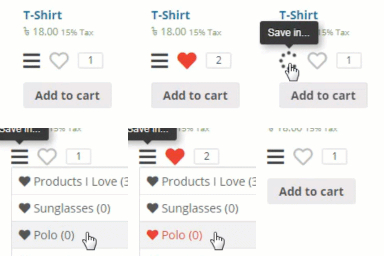
• 自訂「加入願望清單」按鈕樣式
• 支援多個願望清單
• 顧客可隨時管理願望清單
• 後台管理員可為顧客創建願望清單
• 自動移除已加入購物車的產品
• 提供願望清單的公共分享連結
外掛標籤
開發者團隊
② 後台搜尋「SaveTo Wishlist Lite – WooCommerce Wishlist」→ 直接安裝(推薦)
原文外掛簡介
SaveTo Wishlist for WooCommerce is a WooCommerce wishlist plugin that lets your customers save the products they love for later!
It adds everything you need for a robust wishlist feature on your store. Customizable “Save to Wishlist” buttons, positioning controls, wishlist pages and shortcodes – it even supports guest customers.
👉 Adding a WooCommerce wishlist with SaveTo Wishlist is simple:
Install & activate SaveTo Wishlist Lite (it’s free!)
Manage your options under Wishlist > Settings, including controlling wishlist button placement, colors, and designs
Create and save multiple wishlists with as many items as you like as a customer
Create wishlists for your customers on the backend as an admin
View any product and add it into your wishlist. It gracefully handles simple & variable products!
Let customers view and manage wishlists anytime in their My Account
It’s a simple, effective way to add wishlist tools for WooCommerce.
❤️ Free WooCommerce Wishlist Plugin
Our goal is to provide a reliable WooCommerce wishlist plugin; that’s why our free version has features you’d typically find on other paid plugins!
Supports multiple wishlists (completely free!)
Add to wishlist button on standard product pages
Add to wishlist button on product blocks
Supports simple and variable products
Five default wishlist button styles
Configurable “Save To Wishlist” button locations
“My Wishlists” section in My Account
Optionally display wishlists via shortcode or block
Add all to cart / add individual items from wishlists
Optional redirect to wishlist after add
Automatically remove items from the wishlist after being added to cart or purchased
Login/register prompt to create wishlist
Guest wishlists that merge into the customer’s account upon login or registration
Public URL per wishlist for sharing
Admin can edit and create wishlists for customers
Translation ready + WPML config
Manage wishlists using the REST API
Let customers name wishlists
Move items between wishlists
Save the current cart to wishlist
Easy Import From Other Wishlist Solutions
Switching wishlist plugins has never been easier. SaveTo Wishlist lets you migrate your customers’ existing wishlist data from other popular solutions in just a few clicks — no data loss, no manual work.
YITH Wishlist
TI Wishlist (Coming Soon)
🟡 SaveTo Wishlist Pro
Take your wishlist experience to the next level with SaveTo Wishlist Pro. Built on top of the free plugin, Pro unlocks advanced automation, deep analytics, and powerful access controls — giving store owners everything they need to turn wishlists into a growth engine.
Advanced Data Analytics — Stop guessing what shoppers want. Track trending products, category patterns, and seasonal shopping behaviors to make data-driven stock and sale decisions
Wishlist Automations — Put your growth on autopilot. Trigger automatic emails, webhooks, or shopper info updates for price drops, new list creations, or product changes to bring customers back to your store
Real-Time Webhooks — Connect your wishlist data to over 5,000+ apps. Bridge the gap between customer activity and marketing tools like Klaviyo, Mailchimp, or Zapier without writing code
Advanced Sharing & Permissions — Let shoppers share via social media, messaging apps, or unique URL codes to reach new audiences. Enable collaborative lists so friends and family can plan group registries together
Privacy & Visiblity Options — Give shoppers total control with private, shared, or public visibility. When customers feel secure sharing with their inner circles, they drive high-quality referral traffic back to your store
Role-Based Access Control — Simplify management by choosing exactly who can use your wishlist. Limit features based on user roles—the perfect solution for membership sites or creating exclusive VIP store sections
Priority Support — Get dedicated support from the Rymera team
Visit SaveTo Wishlist & Learn More
About Rymera (The Makers)
Rymera is the maker of other popular WordPress and WooCommerce plugins such as Wholesale Suite, Advanced Coupons, AdTribes, WC Vendors and more.
We believe that small stores can grow into big stores and that store owners have something valuable to bring to the world.
But, they do need the right tools to succeed and that’s where we come in. We believe in democratizing access to those tools and leveling the playing field.
Our team has been building WordPress plugins for nearly 15 years and we know the platform extremely well. When you choose a Rymera product, you’re choosing a team that is dedicated to helping you grow your store.