內容簡介
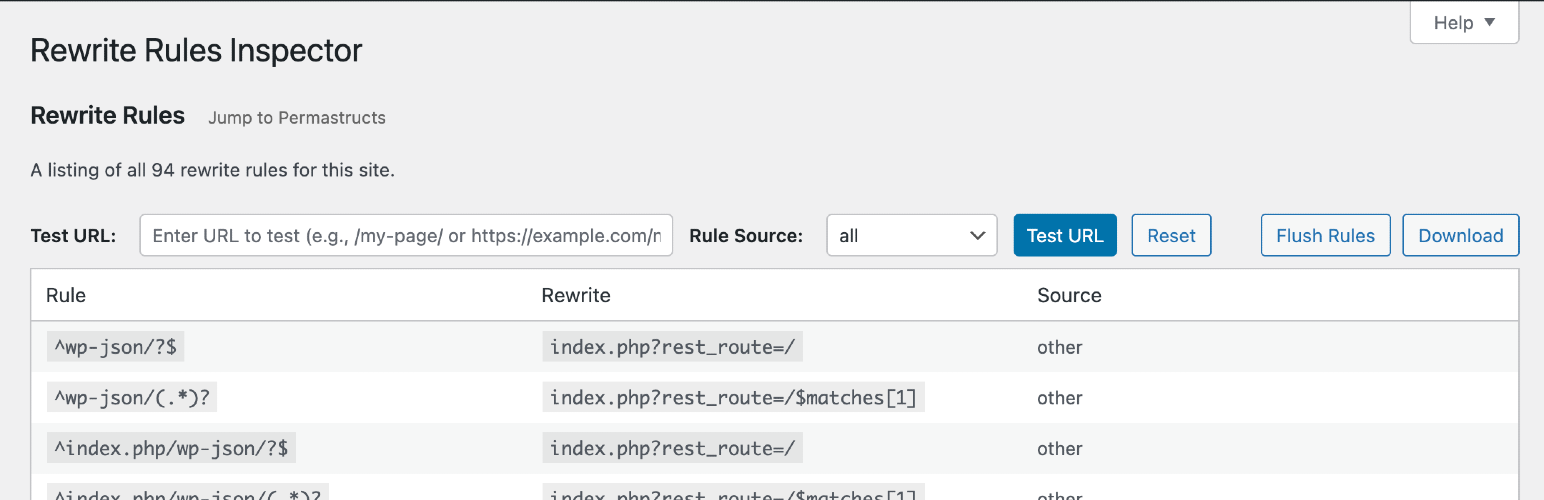
這是一個簡單的 WordPress 後台工具,用於檢查 rewrite 規則。您可以查看所有 rewrite 規則的清單,檢視哪些 rewrite 規則符合特定的 URL(以及它們符合的優先順序),或使用不同的 rewrite 規則來源進行篩選。您可以輕鬆對 rewrite 規則進行軟刷新以重新產生規則。
最初是為托管在WordPress VIP 的客戶開發的,但我們認為這對開發環境等也很有用。歡迎在GitHub 上分支插件,我們隨時歡迎 pull requests。如果您有任何反饋、問題、錯誤報告或功能要求,請在 GitHub 的問題區向我們發送。
外掛標籤
開發者團隊
原文外掛簡介
A simple WordPress admin tool for inspecting rewrite rules. View a listing of all your rewrite rules, see which rewrite rules match a given URL (and the priorities they match in), or filter by different sources of rewrite rules. Perform a soft flush of your rewrite rules to regenerate them.
Developed on GitHub — pull requests are always welcome. Please leave feedback, questions, bug reports, and feature requests in the GitHub issues.
Where to find it
Go to Tools → Rewrite Rules in the WordPress admin.
URL Tester
Quickly test any URL (or path) against your site’s rewrite rules:
See whether the URL would be a 404 or which rule would match first (the one WordPress uses).
View the list of all matching rules, in match priority order.
Inspect the query variables extracted from the match and the resulting final query WordPress would run.
Works with full URLs or paths and automatically handles sites installed in a subdirectory.
Permastructs
Browse a table of all permastructs that WordPress is aware of, including:
Name — the permastruct key (e.g. for posts, taxonomies, authors).
Structure — the permalink structure pattern used to generate rules.
Description — a human-friendly summary of what the permastruct controls.
Flush Rules
The “Flush Rules” button allows you to regenerate your site’s rewrite rules. Here’s exactly what happens when you click it:
What the Flush Rules Button Does
When you click the “Flush Rules” button, the following sequence occurs:
Security Check: The system verifies you have the proper permissions (manage_options capability) and validates the security nonce to prevent unauthorized access.
Cache Clearing: WordPress deletes the cached rewrite rules from the options cache using wp_cache_delete('rewrite_rules', 'options').
Rule Regeneration: WordPress calls flush_rewrite_rules(false) to regenerate all rewrite rules based on:
Current permalink structure settings
Custom post types and taxonomies
Any custom rewrite rules added by themes or plugins
Hook Execution: The rri_flush_rules action hook is fired, allowing other plugins to perform additional cleanup or actions after the flush.
Success Feedback: You’re redirected back to the Rewrite Rules Inspector page with a success message confirming the rules have been flushed.
When to Use Flush Rules
Use the “Flush Rules” button when:
Missing Rules: You see rules marked as “missing” (red background) in the inspector
Custom URLs Not Working: Your custom permalinks or post type URLs aren’t working properly
After Plugin Changes: You’ve activated/deactivated plugins that register custom rewrite rules
Permalink Structure Changes: You’ve modified your site’s permalink structure
Custom Post Type Issues: New custom post types or taxonomies aren’t generating proper URLs
Important Notes
Soft Flush: This performs a “soft” flush (using flush_rewrite_rules(false)), which is safer than a hard flush as it doesn’t force regeneration of all rules unnecessarily.
Permissions Required: Only users with manage_options capability can flush rules.
No Data Loss: Flushing rules doesn’t delete any content or settings, it only regenerates the URL routing rules.
Immediate Effect: Changes take effect immediately after flushing.