[WordPress] 外掛分享: Restrict Payment Methods For WooCommerce

WordPress 外掛 Restrict Payment Methods For WooCommerce 的封面圖片。

前言介紹

  • 這款 WordPress 外掛「Restrict Payment Methods For WooCommerce」是 2021-09-25 上架。
  • 目前有 100 個安裝啟用數。
  • 上一次更新是 2025-12-29,距離現在已有 59 天。
  • 外掛最低要求 WordPress 5.0 以上版本才可以安裝。
  • 外掛要求網站主機運作至少需要 PHP 版本 7.4 以上。
  • 尚未有人給過這款外掛評分。
  • 還沒有人在論壇上發問,可能目前使用數不多,還沒有什麼大問題。

外掛協作開發者

gravitymaster97 |

外掛標籤

payment | checkout | conditional | woocommerce | restrictions |

內容簡介

WooCommerce Restrict Payment Methods 是一款針對 WooCommerce 結帳流程的限制付款方式外掛。

功能

✅ 一鍵安裝
✅ 設定多個限制規則
✅ 針對訂單總額、商品、運送方式進行限制
✅ 啟用/停用付款方式
✅ 使用簡單

原文外掛簡介

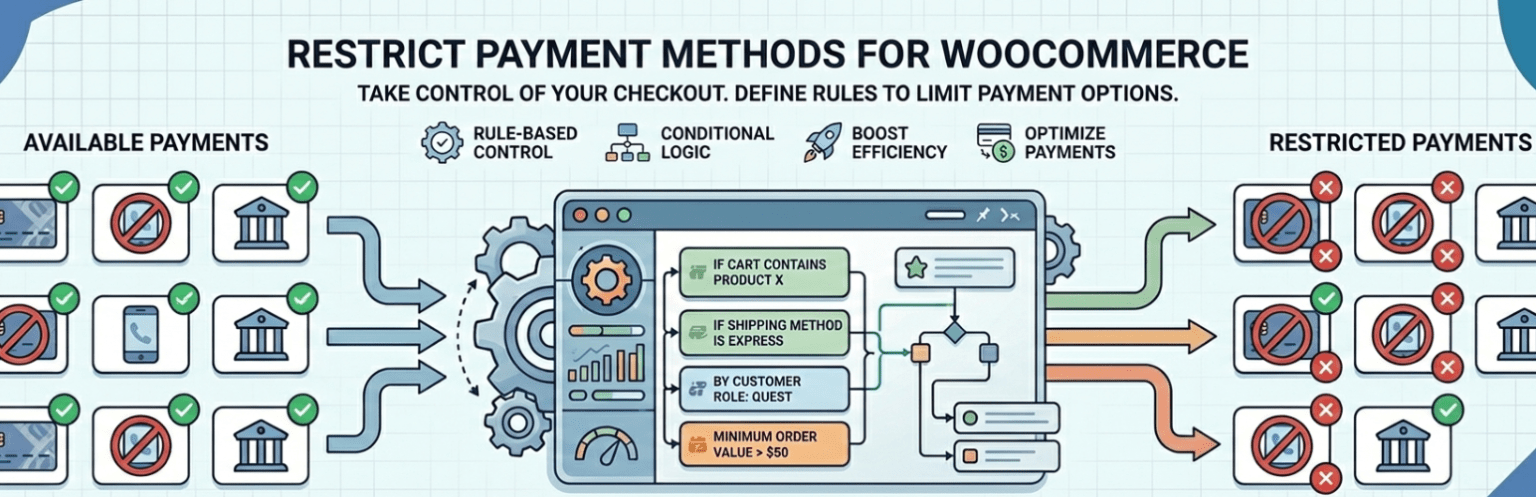
Restrict Payment Methods For WooCommerce lets you control which payment gateways appear at checkout using powerful, flexible conditions.
With this plugin, you can dynamically show or hide WooCommerce payment methods based on cart contents, user roles, shipping methods, dates, and more — ensuring customers only see suitable and secure payment options.
💡 Key Features

One-click installation and intuitive setup
Configure multiple restriction rules for payment gateways
Simple admin interface with grouped conditions

Enable/disable payment gateways based on:

Order total (subtotal, quantity)
Products, product categories, tags, brands, types, stock status
Shipping method and shipping class
Billing and shipping fields (name, address, etc.)
User status (logged in/out), user role, or specific users
Date and day-of-week conditions

Supports multi-line and multi-select conditions

Advanced matching logic for robust scenarios
Compatible with the latest WooCommerce versions

Examples
Here are several examples of how you can use Restrict Payment Methods For WooCommerce to control which gateways appear during checkout:

Restrict PayPal for orders below $50

Show PayPal only if the cart subtotal is greater than or equal to $50.
Condition used: Cart total (subtotal).

Hide Cash on Delivery for orders over 10 items

Disable COD if the total cart quantity exceeds 10.
Condition used: Cart quantity.

Restrict Cash on Delivery for specific products

Hide Cash on Delivery if “Gift Card” or “Custom Order” product is in the cart.
Condition used: Specific products.

Hide Stripe for certain product categories

Do not show Stripe for items in “Digital Products” category.
Condition used: Product category.

Show PayPal only for products tagged “express”

Display PayPal only when the cart contains products tagged as “express”.
Condition used: Product tags.

Enable Bank Transfer for “Brand A” products only

Only allow Bank Transfer if all items belong to Brand A.
Condition used: Product brand.

Restrict certain payment methods for “Variable” product types

Hide “Cash on Delivery” if the cart has variable products.
Condition used: Product type.

Disable PayPal for out-of-stock products

Prevent checkout with PayPal if any product in the cart is out of stock.
Condition used: Product stock status.

Enable payment methods based on shipping method

Show “Cash on Delivery” only if “Local Pickup” or “Flat Rate” shipping is selected.
Condition used: Shipping method.

Restrict PayPal for certain shipping classes

Hide PayPal if any cart item belongs to “Heavy Item” shipping class.
Condition used: Shipping class.

Restrict gateways based on billing country

Allow PayPal only for customers with a billing country of “United States”.
Condition used: Billing field (country).

Hide certain gateways for specific shipping zones or cities

Disable Bank Transfer for shipping city “New York”.
Condition used: Shipping field (city).

Enable Bank Transfer only for logged-in users

Hide Bank Transfer for guests; show only to logged-in customers.
Condition used: User login status.

Allow Stripe for “shop_manager” and “administrator” roles only

Restrict Stripe to specific user roles.
Condition used: User role.

Restrict payment methods for specific users

Disable “Cash on Delivery” for a particular customer account.
Condition used: Specific user.

Show Stripe only on Mondays and Fridays

Display Stripe gateway only on those two days.
Condition used: Day-of-week condition.

Restrict PayPal for specific date ranges

Hide PayPal between Dec 25–Jan 1 (e.g., during holidays).
Condition used: Date range condition.

Allow multiple conditions in a single rule

Example: Show PayPal only if subtotal ≥ $50 AND user is logged in AND it’s Friday.
Condition used: Multi-condition and advanced matching logic.

Enable multiple payment rules at once

Example: Create separate rules for different countries, product categories, and user roles simultaneously.
Condition used: Multiple rules support.

Restrict based on shipping class and subtotal together

Hide PayPal for “Heavy Item” class unless subtotal is above $200.
Condition used: Combined conditions.

Each example demonstrates how you can tailor checkout payment options to your exact business logic and improve the customer experience.
Our More Plugins

Short Description and Attributes Show Loop For WooCommerce
Add to Quote For WooCommerce
Product Shortcode – Widget – Block for WooCommerce
Show Variations On Shop & Category WooCommerce
Variation Dropdown to Radio For WooCommerce
Product Enquiry for WooCommerce
PDF Catalog WooCommerce
Display Product Variations Dropdown On Shop Page For WooCommerce

各版本下載點

  • 方法一:點下方版本號的連結下載 ZIP 檔案後,登入網站後台左側選單「外掛」的「安裝外掛」,然後選擇上方的「上傳外掛」,把下載回去的 ZIP 外掛打包檔案上傳上去安裝與啟用。
  • 方法二:透過「安裝外掛」的畫面右方搜尋功能,搜尋外掛名稱「Restrict Payment Methods For WooCommerce」來進行安裝。

(建議使用方法二,確保安裝的版本符合當前運作的 WordPress 環境。


最新版本

延伸相關外掛(你可能也想知道)

  • Brazilian Market on WooCommerce 》此外掛增加了用於自然人或法人的新項目:出生日期、性別、號碼、鄰居和手機號碼等欄位。該掛件在某些字段上使用格式掩碼,並通知用戶錯誤的電子郵件位址。, ...。
  • reCAPTCHA for WooCommerce 》輕鬆將 Google reCAPTCHA 加入到 WooCommerce 結帳和表單中,以幫助防止垃圾郵件。, 支援的表單, 您目前可以在以下表單啟用 reCAPTCHA:, WooCommerce, , 結...。
  • Amazon Pay for WooCommerce 》什麼是Amazon Pay?這是一個端到端的支付解決方案,為數以百萬計活躍的Amazon客戶[1]提供一個熟悉、快速和安全的方式來完成他們通過您的在線商店的購買。購物...。
  • Fluid Checkout for WooCommerce – Lite 》Fluid Checkout 是一款外掛程式,可以使 WooCommerce 網站的結帳體驗更加簡單、提高新客戶和老客戶的滿意度,並支援 Shopify 一樣的線性結帳流程,消除結帳頁...。
  • PayTR Sanal POS WooCommerce – iFrame API 》PayTR Sanal POS and Payment Solutions is a service that allows website owners to receive secure online payments from their websites in the fastest ...。
  • Kustom Checkout for WooCommerce 》Checkout 是一個嵌入式的結帳解決方案,內含多種熱門支付方式(現在支付、稍後支付、分期、分期付款)。有了 Checkout,Klarna 就是你的唯一付款服務提供商。...。
  • Force Authentification Before Checkout for WooCommerce 》強制顧客在結帳前登入或註冊以提高您的轉換率。, 貢獻, , 如有錯誤、建議或貢獻,請在我們的Github存儲庫中開啟一個問題或在WordPress外掛論壇中創建一個主題...。
  • MkRapel Regiones y Ciudades de Chile para WC 》這個 WordPress 外掛已經更新到 2020 年最新的智利地區與城市數據,讓你可以使用城市來設置配送區域,並允許你自定義 WooCommerce 中用於運送和帳單的付款表...。
  • Checkout Files Upload for WooCommerce 》Checkout Files Upload for WooCommerce 外掛允許您的顧客在 WooCommerce 結帳頁面上 (或結帳完成後) 上傳檔案。, 功能, 設定欄位在 WooCommerce 結帳頁面上...。
  • Payoneer Checkout 》Payoneer Checkout 是下一代支付處理平台,為世界各地的商家提供他們在今天競爭激烈的全球市場中所需的解決方案和方向。, 我们提供开箱即用的付款页面、支持...。
  • Order Delivery Date for WP e-Commerce 》點擊「購買」後客戶體驗(通常稱為購後體驗)與產品獲取過程同樣重要。因此,我們開發了 Order Delivery Date Plugin,以協助您通過在指定日期交付訂單,提高...。
  • Change Quantity on Checkout for WooCommerce 》這個外掛可以讓顧客在 WooCommerce 結帳頁面使用標準數量欄位更改數量,並刪除商品。, Change Quantity on Checkout Pro for WooCommerce, Change Quantity o...。
  • Payment Button for PayPal 》Payment Button for PayPal外掛(也叫做 WP PayPal)讓你可以輕鬆建立PayPal的立即購買、加入購物車、捐款、或訂閱等按鈕。它會透過短碼產生動態按鈕,在你的...。
  • Timologia for WooCommerce 》在結帳頁面上添加發票功能,並根據希臘標準在用戶配置文件和訂單頁面上添加可編輯字段。, 特點, , 在結帳頁面中添加需要的發票字段(增值稅、稅務機關和職業...。
  • myPOS Checkout 》這款外掛由myPOS推出,提供全方位的支付服務和即時結算,讓你享有一鍵式結帳的便利。, 無需設置費用和月費,完整的安全性和放心的保障。不僅可以接收所有主要...。

文章
Filter
Apply Filters
Mastodon