內容簡介
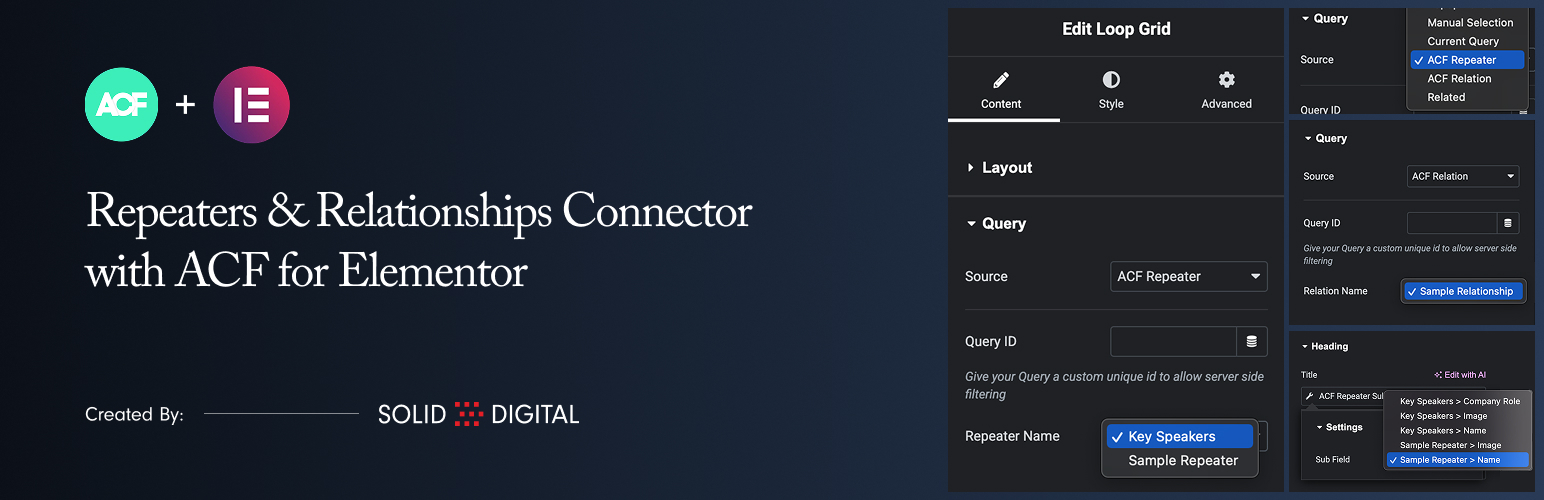
此外掛讓你在 Elementor 的 Loop Grid 小工具中,直接使用 ACF Repeater(重複器)與 ACF Relationship(關聯)欄位作為資料來源,輕鬆建立動態內容迴圈網格,無需額外撰寫程式碼。
【主要功能】
• 將 ACF Repeater 作為 Loop Grid 資料來源
• 將 ACF Relationship 作為 Loop Grid 資料來源
• 提供 Repeater 子欄位動態標籤,可顯示文字與圖片
• 提供 Relationship 子欄位動態標籤,可顯示文章資訊
• 支援分類法彙整頁面範本使用
• 支援作者彙整頁面範本使用
外掛標籤
開發者團隊
② 後台搜尋「Repeaters & Relationships Connector with ACF for Elementor」→ 直接安裝(推薦)
原文外掛簡介
This plugin allows you to use ACF Repeater and ACF Relationship fields as data sources for Elementor’s Loop Grid widget.
Key Features:
New Data Sources: Adds “ACF Repeater” and “ACF Relationship” to the Source dropdown in the Loop Grid’s Query tab.
Use Repeater Data: Select any ACF Repeater field from the current post/page to power your Loop Grid.
Use Relationship Data: Select any ACF Relationship field to create a grid of related posts in your Loop Grid.
Repeater Sub-Field Tag: A dedicated dynamic tag to easily pull and display data (text, images, etc.) from any sub-field within your repeater.
Relationship Sub-Field Tag: A dynamic tag to display data from the related posts, such as the post title, content, featured image, and permalink.
Taxonomy Archive Support: Use ACF Repeater and Relationship fields on category, tag, and custom taxonomy archive templates.
Author Archive Support: Use ACF Repeater and Relationship fields on author archive templates.
Requirements
Elementor
Elementor Pro
Advanced Custom Fields Pro (The Repeater and Relationship fields are ACF Pro features)
Usage
1. Configure the Loop Grid
Add an Elementor Loop Grid widget to your page.
In the widget settings, go to the Query tab.
From the Source dropdown, select “ACF Repeater” or “ACF Relationship”.
A new dropdown will appear below the Source. Select the specific ACF field you wish to use as the data source for the grid.
Create or select a template for your loop item.
2. Displaying Data in Your Loop Template (ACF Repeater)
Edit the Elementor template you are using for your loop item.
Add any standard widget, such as a Heading, Text Editor, or Image widget.
Click the Dynamic Tags icon next to a field.
Scroll to the “ACF Connector” group and select the ACF Repeater Sub Field tag.
Click on the tag name again to open its settings.
In the Sub Field dropdown, select the specific sub-field you want to display. The fields are grouped by repeater name for clarity.
Note that the preview within the template will not display the sub-field data. This is expected behavior because no applicable preview data can be set in Elementor.
3. Displaying Data in Your Loop Template (ACF Relationship)
Edit the Elementor template you are using for your loop item.
Your template will be supplied with a standard WordPress Post object, so just create your template as you normally would.