內容簡介
QueueForge 是一款專為改善網站互動性能而設計的外掛,透過延遲執行不必要的 JavaScript,提升用戶在移動設備上的互動體驗,確保頁面快速回應。
【主要功能】
• 延遲所有符合條件的第三方/佈景主題 JavaScript 直至首次互動
• 在延遲腳本之間讓主線程暫時空閒
• 可配置的延遲超時設定
• 可選的 jQuery 延遲功能
• 關鍵字排除清單及每標籤的數據不優化選項
• 實時 INP 和阻塞時間調試覆蓋層(僅限管理員)
外掛標籤
開發者團隊
② 後台搜尋「QueueForge – Interaction to Next Paint Fixer」→ 直接安裝(推薦)
原文外掛簡介
Google’s Core Web Vitals now use Interaction to Next Paint (INP) instead of First Input Delay. Caching plugins make pages load fast, but they do nothing about the bloated JavaScript from other plugins, themes, ads, and analytics that blocks the browser’s main thread and makes mobile interactions feel choppy.
QueueForge INP Fixer attacks INP directly:
Delays eligible JavaScript until the visitor’s first scroll, tap, key press, or mouse move. The main thread stays free during the critical early window, so the page responds immediately.
Yields the main thread between scripts when the deferred code finally runs, using the native scheduler.yield() (with a setTimeout fallback) so the queued scripts do not re-block the thread in one long task.
Fallback timeout loads delayed scripts automatically after N seconds even with no interaction, protecting analytics and ad impressions.
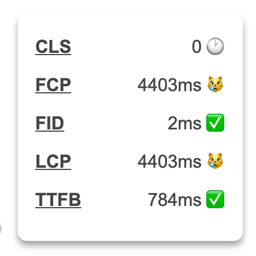
Live INP overlay for admins shows measured INP and long-task blocking time right on the front end, using PerformanceObserver (event + longtask).
Key Features
Delay all eligible third-party / theme JavaScript until first interaction
Main-thread yielding between deferred scripts (scheduler.yield() + fallback)
Configurable fallback timeout (0 = interaction only)
Optional jQuery delay (off by default for safety)
Keyword exclusion list, plus per-tag data-no-optimize opt-out
Skips logged-in editors so page builders keep working
Live INP + blocking-time debug overlay (admins only)
?queueforge_off URL switch to bypass the delay for one page load
No database writes on the front end; nothing is cached or stored per visitor
Why INP?
INP measures how quickly the page visually responds to every interaction across the whole visit, not just the first one. The single biggest cause of poor INP is JavaScript executing long tasks on the main thread while the user is trying to interact. Delaying that JavaScript until it is actually needed — and breaking its execution into yield-separated chunks — is the most direct fix.
Developer-Friendly
qfinp_exclusions filter to programmatically add never-delay keywords.
Uses an output buffer on template_redirect; no edits to your theme or other plugins.