
外掛標籤
開發者團隊
原文外掛簡介
qTrad is an independent continuation of qTranslate and qTranslate-X. Existing translations keep working as they are, and you gain modern editing, accessible language controls and multilingual SEO.
Why qTrad
I liked the way qTranslate worked. Every translation of a post lives in that same post, so there are no duplicate posts to keep in sync, and switching languages in the editor is one click. When qTranslate and later qTranslate-X were closed, I wanted that approach to stay available, so qTrad carries it on and reads the same data.
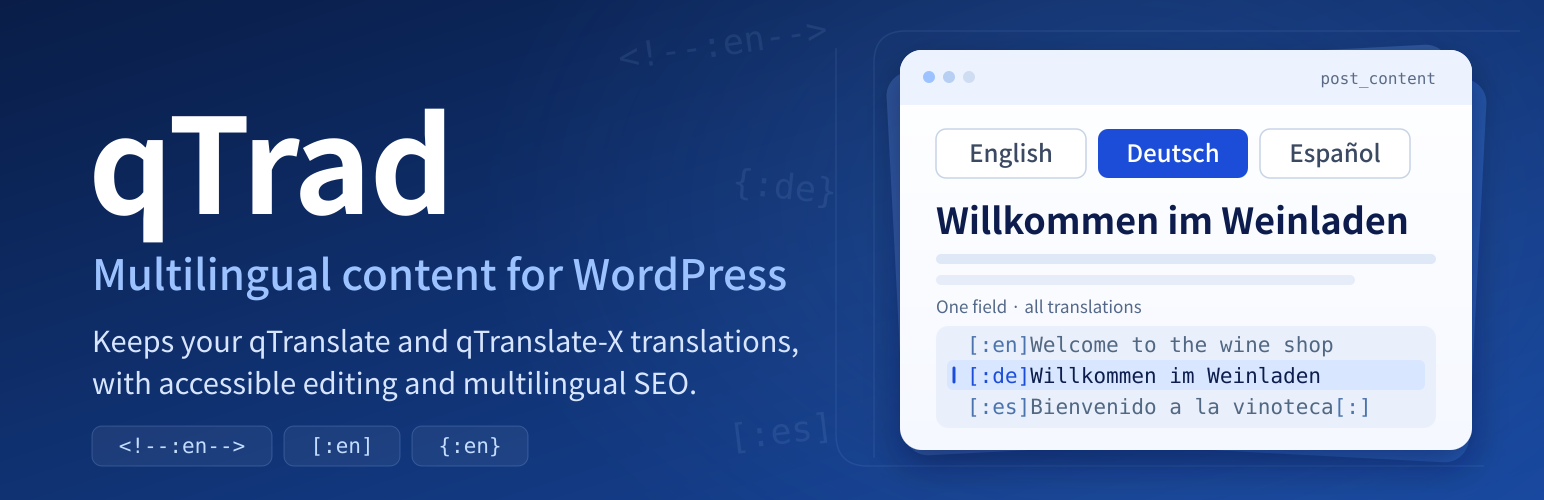
qTrad keeps all translations of a post title, content and excerpt together in the same field. It reads the qTranslate comment markers, the qTranslate-X bracket markers and the swirly markers.
HelloHallo
[:en]Hello[:de]Hallo[:]
{:en}Hello{:de}Hallo{:}
The classic and block editors show one language at a time. Saving preserves the other translations, including those of disabled languages. Public custom post types with a REST endpoint are supported. Raw mode shows the complete multilingual field for direct editing.
Language controls use full names, keyboard-operable buttons, announced selection changes, visible focus, generous targets and right-to-left editing. Public switchers offer links, flags with accessible names, short codes, or a labelled dropdown with an explicit Go button. Dropdowns fall back to ordinary links without JavaScript.
The qtranslate_* language, locale, flag, URL, term and fallback settings are reused as they are. Existing qTranslate and qTranslate-X widgets keep their place in the sidebar. Imported custom languages remain available in Settings → Languages, where you can edit their names and locales and add new two- or three-letter language codes.
qTrad offers content compatibility and a documented subset of the qtrans_* and qtranxf_* public functions. It does not include every feature of its predecessors or their third-party integration modules.
Read and write compatibility
The “Keep” format preserves whichever marker style each field already uses, and new translated post fields use comment markers. Choose comments if a site may need to return to the original qTranslate, which cannot read qTranslate-X closing brackets or swirly markers. The site title and tagline always use brackets because WordPress strips comments from those settings, so returning those two to the original qTranslate needs a deliberate conversion. Activation never rewrites posts.
Date and time formats
Each language can have its own date and time format under “Language names and locales” in Settings → Languages, in the syntax of Settings → General. Where a theme or plugin shows a date in the site’s format, the public site and emails use the format of the visitor’s language, with month and day names from that language’s WordPress translation. Formats stored by qTranslate-X or qTranslate-XT are used as they are, including their strftime style. wp-admin keeps the site formats.
What still needs translating
The post lists have a “Missing in …” filter that shows the items without text in a language, and the dashboard has a Translations box with the number of missing items per content type and language, each linked to the filtered list.
Custom fields, user profiles and options
List custom fields under “Custom fields” on the Advanced tab of Settings → Languages to show them in the visitor’s language and to merge edits into the language you are editing. A checkbox below that list also shows every other custom field and user profile field that holds language markers in the visitor’s language. Under “Options” you can do the same for options, such as theme and widget settings, either all of them or a list of names. “Text filters” takes filter hooks of your theme or other plugins whose text should be shown in the current language. These three work on the public site only: wp-admin, the REST API and WP-CLI keep reading what is stored. If code on the public site writes a value back after reading it translated, qTrad keeps the stored translations of everything that did not change.
Advanced Custom Fields
With ACF or ACF PRO active, the field types “Text (per language)”, “Text area (per language)”, “URL (per language)”, “WYSIWYG editor (per language)”, “Image (per language)”, “File (per language)” and “Post object (per language)” show one input per language. They are the qtranslate_* field types of qTranslate-XT’s ACF module, stored in the same way, so existing field groups keep working. A standard text, text area, URL or WYSIWYG field can do the same with its “Translate” setting, and a standard field whose value already carries language markers is edited per language as well. get_field() returns the visitor’s language; a missing translation falls back to the default language without a prefix. A required field needs the default language, and ACF’s own checks, such as a valid URL or a character limit, apply to each language.
WooCommerce
Product names, short descriptions, purchase notes, attribute names and values, payment gateway titles and descriptions, shipping rate labels and email texts with language markers are shown in the visitor’s language: on shop and product pages, in the cart and checkout (also the cart and checkout blocks), in mini-cart fragments and in structured data. Attribute values keep their stored form, so variations match in every language. Each order records the customer’s language in _user_language, the field qTranslate-XT used; its items are stored in that language, the thank-you page opens in it and customer emails are sent in it, including WooCommerce’s own texts when its translation is installed. Emails to the shop use the site’s default language. Product fields are edited with language buttons like any post. Email subjects, headings and texts, payment method titles and descriptions on WooCommerce settings screens that use the classic forms, purchase notes and attribute labels get one input per language. The integration filter qtrad_admin_field_rules adds other screens.
Translations of disabled languages are kept until you replace a complete field in raw mode or through a full programmatic update. Ordinary wp_update_post() calls replace the fields they supply. Pass qtrad_language to request an update of one language only. REST saves in language-button mode merge plain values into the language given by qtrad_language or lang, otherwise into the request language. Complete marker strings replace complete fields.
URLs
The URL modes are the same as in qTranslate-X:
Query parameter
Language path
Subdomain
One domain per language
Sites with plain permalinks or /index.php/ permalinks use query URLs, since those work without server rewriting. Subdomains and separate domains need the matching DNS, certificates and server configuration.
An explicit language URL always wins. Cookies and browser negotiation apply only to the bare homepage, and other bare URLs serve the default language when its prefix is hidden. REST endpoints, assets, admin URLs, feeds and XML sitemaps never receive language prefixes.
Each language can have its own slug for a post, page, custom post type entry, category, tag or other term. Edit them in the “Translated slugs” box of the editor and on the term screens; an empty field uses the WordPress slug. Post types and taxonomies can also have a translated base, such as “kategorie” instead of “category”, on the URLs tab of Settings → Languages. Links, the language switcher, canonical and hreflang tags and sitemaps use the translated address, and the WordPress address under another language redirects to it. The WordPress admin and the REST API keep working with the WordPress slug.
Slugs and bases are stored the way qTranslate-XT stores them, so a site that used its Slugs module keeps its addresses, and slugs left by the older qTranslate Slug plugin are read as well.
SEO
Alternate language links and multilingual sitemap entries use canonical URLs and only list languages a post is actually translated into. Category, tag, author and post type archives list a language only when at least one of their posts is translated into it. Adapters for WordPress core, Yoast SEO and Rank Math cover metadata, social sharing and schema output. Pages missing a translation keep the configured visitor fallback and receive noindex. The SEO translations panel takes optional per-language titles and descriptions.
Full-page caches should bypass the personalized bare homepage or vary it by the language cookie and Accept-Language. Browser negotiation can be turned off for a stable homepage.
Switchers
Use the Language switcher block (in block themes, for example in the header), the shortcode [qtrad_switcher style=”both”] or the qTrad Language Chooser widget. Styles are text, image, both, short and dropdown. Prefer text or both so visitors can identify languages without interpreting flags. The qtrans_* and qtranxf_* chooser functions used in older themes keep working.
Language menu items created with qTranslate-X or qTranslate-XT (custom links to #qtransLangSw) keep working in classic navigation menus, with their type, title, flags, names, colon and current options. To add one, create a custom link with the URL #qtransLangSw for a “Language” item with all languages below it, or #qtransLangSw?type=AL for a direct link to the other language. Custom links that point into the site follow the visitor’s language; add setlang=no to a link’s query string to keep it as written.
Privacy
qTrad sends no data anywhere and loads nothing from other sites. It stores the language a visitor chose in the cookie qtrans_front_language, and the language an administrator edits in, in the cookie qtrans_admin_language, under the names qTranslate used, so a site that switches plugins keeps them.
Credits
qTrad continues the work of qTranslate by Qian Qin and qTranslate-X by the qTranslate Team, both licensed GPLv2 or later. It is an independent project and is not endorsed by the original authors.
The bundled flag images are unchanged SVGs from flag-icons 7.3.2 by Panayiotis Lipiridis, licensed MIT. The full notice is in flags/license-flag-icons.txt and the source of each file is recorded in flags/manifest.json.














