內容簡介
總結:WooCommerce Wishlist 是一個輕量級的外掛程式,可以提高您 WooCommerce 商店的銷售量。啟用此外掛程式將允許客戶將產品加入到他們的願望清單並稍後購買。
問題與答案:
1. 如何預覽 Wishlist for WooCommerce 外掛程式的功能?
使用 WordPress Playground 中的 Live Preview 按鈕可以預覽完整的外掛程式功能。
2. 如何透過 Wishlist 外掛程式提高 WooCommerce 商店的銷售和轉換率?
藉由啟用此外掛程式,顧客可以將產品加入到他們的願望清單中並稍後購買,有助於轉化潛在客戶成為實際購買者。
3. Wishlist for WooCommerce 外掛程式如何幫助顧客快速加入產品到願望清單?
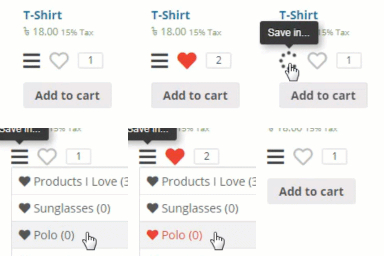
此外掛程式使用可愛的紅色心形圖示,顧客可以點擊它將產品加入到他們的願望清單中,並且該圖示直接連結到我的帳戶頁面上的願望清單。
4. Wishlist 外掛程式在客戶的 My Account 頁面上創建了什麼?
外掛程式在客戶的 My Account 頁面上創建了一個獨立的標籤頁,即使他們使用不同系統瀏覽您的網店,也始終可以訪問到添加到願望清單中的產品。此外,他們可以直接從願望清單購買產品或者如果不再有購買意願,也可以從清單中將其刪除。
外掛標籤
開發者團隊
原文外掛簡介
WooCommerce Wishlist is a lightweight plugin that can boost the sales on your WooCommerce store. Enabling this plugin will allow customers to add products to their wishlist and buy them later.
🧪 Demo of Wishlist for WooCommerce plugin
You can preview the complete plugin functionality in the WordPress Playground using the Live Preview button.
💰 Increase Sales and Conversions
Increase sales in your WooCommerce store with this Wishlist plugin for WooCommerce. A prospective customer often visits your store to browse the products but leaves without buying.
This Wishlist for WooCommerce plugin can help with such scenarios.
If you activate this WooCommerce Wishlist plugin, a cute wishlist icon becomes visible on your product pages. Your customer can click on it to add the product to their wishlists and buy them later.
🧡 Add to wishlist Icon
The Wishlist for WooCommerce plugin does not use separate buttons or annoying popups.
Instead, it activates a cute red heart icon your customer can click. It also directly links to the wishlist available on the My Accounts page.
🎯 Wishlist
The plugin creates a separate tab on the customer’s My Account page. The products added to the wishlist are always available even if they use a different system to browse your online shop.
Moreover, they can buy a product directly from their wishlist or remove it if they no longer wish to buy.
You can optionally configure the wishlist such that products get automatically deleted from the wishlist as soon as your customer adds it to the cart from the wishlist.
🌐 Language Support
This Wishlist for WooCommerce plugin lets you change all the text it uses right from the settings panel. You can add or change the text in any language. Moreover, you can add HTML tags to the texts.
👋 Customization
The plugin is completely customizable, You can change the colors, fonts, and styles by simple CSS edit.
👉 Features of the WooCommerce Wishlist plugin
✅ The plugin works out-of-the-box for registered users.
✅ It supports adding specific variants to the Wishlist.
✅ Customize the texts generated by the plugin. You can use any Language.
✅ No annoying popup for your customers.
✅ Works with default configurations out of the box.
✅ Lightweight WooCommerce plugin that is not bloated.
✅ Compatible with the popular WooCommerce themes.
✅ Uses standard WooCommerce filters and hooks to avoid conflicts.
&Other Plugins Developed by Us
🔥 Catalog Mode for WooCommerce – The most efficient free plugin to transform your WooCommerce shop into an online catalog by hiding price and the add to cart button.
Roadmap
⏳ Enable functionality for guest users.
⏳ Shortcode support.
⏳ Support for multisite.