內容簡介
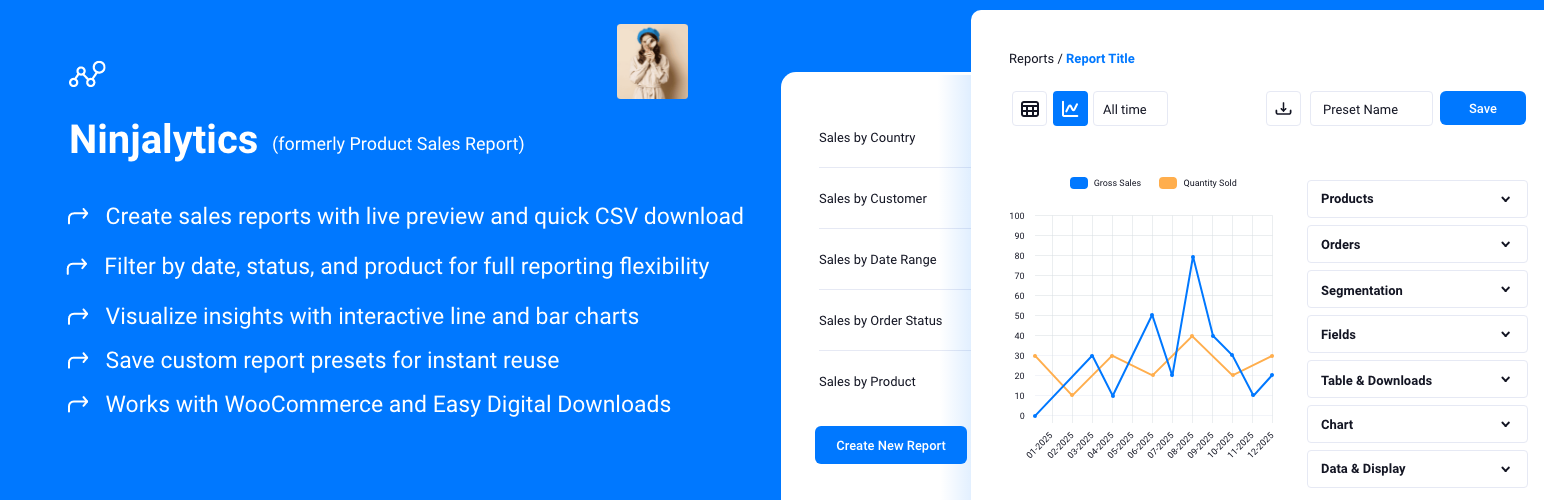
Ninjalytics 是一款專為 WooCommerce 和 Easy Digital Downloads 設計的外掛,能夠生成強大的銷售報告和訂單匯出。使用者可以輕鬆自訂報告模板,並即時預覽數據,幫助做出明智的商業決策。
【主要功能】
• 15+ 預建報告模板
• 即時預覽與一鍵下載
• 訂單匯出模式,包含完整訂單詳情
• 靈活的日期範圍選擇
• 訂單狀態過濾功能
• 互動式圖表視覺化數據
外掛標籤
開發者團隊
② 後台搜尋「Ninjalytics: Sales Reports & Order Export for WooCommerce and EDD」→ 直接安裝(推薦)
📦 歷史版本下載
原文外掛簡介
Ninjalytics creates powerful sales reports and order exports for your WooCommerce store. Generate detailed product sales reports with charts, or export individual order line items for fulfillment and accounting. Choose from 15+ pre-built templates, customize which fields to include, filter by date ranges and order status, and preview everything live before downloading.
Perfect for smart decision making, monitoring sales performance, order fulfillment, inventory management, and accounting. Works with both WooCommerce and Easy Digital Downloads (beta).
Previously using “Product Sales Report for WooCommerce” and “Export Order Items for WooCommerce” as separate plugins? Ninjalytics replaces both – everything you need is now in one plugin, plus more.
Reporting Features & Benefits
Live preview and one-click download – see your data instantly before exporting
Pre-built report templates – quickly create reports from 15+ ready-made templates including Top Selling Products, Stock Reports, Sales by Region, Live Carts analysis*, and more
Order Export Mode – export individual order line items with full order details (billing/shipping info, order status, dates) – replaces Export Order Items plugin functionality
Flexible date ranges – use quick shortcuts like “Last 7 days,” “This Year,” or set precise relative and absolute date ranges
Order status filtering – include or exclude sales based on transaction status
Product-specific reporting – store-wide reports, by product(s), product categories, and/or custom segmentation
Interactive charts – create line and bar charts to help visualize your data
Report presets – save custom report settings to regenerate reports later
Variation support – report on variations separately or together
Custom sorting – set display order for your data
Flexible field selection – choose what fields to include in your report from dozens of available fields
Cost of Goods (COGS) tracking – calculate profit and margins (requires compatible COGS plugin)
Exclude free products – leave free products out of your report
Row limits – set report to only include top X results
CSV export – export in versatile CSV format for universal spreadsheet compatibility
High Performance Order Storage (HPOS) – full support for WooCommerce’s modern order storage system
Customizable live preview – link order and product IDs directly to their pages, color-code order status, and highlight negative numbers in the preview table
Import & Export Report Settings —- save a report’s configuration to a file and load it back in seconds. Great for backups, moving between stores, or sharing setups.
Works with WooCommerce, Live Carts for WooCommerce and Easy Digital Downloads (beta)
View, Download, and Share
Use the report builder to quickly create a custom report, view in your dashboard, or click “Download Report” and your custom report will be generated and downloaded as a CSV. Import to your favorite spreadsheet software or share it with members of your team.
Pre-Built Report Templates
Ninjalytics includes 15+ ready-to-use report templates to get you started quickly:
Product Sales Templates:
Blank Product Report: A minimal starting point for a product report – pick your own fields and settings from scratch.
All Sales: Sales trend chart with quantity sold and revenue after discounts, shown per product.
Top Selling Products: Identify top selling products with quantities and revenue in a single view.
Top Rated Products: See products with the highest customer ratings to highlight quality performers. (Pro only)
Sales by Product: Review sales totals grouped by product to spot trends quickly.
Refunds By Product: Top products by refunded amount in the period. Compare with sales columns; add a calculated field for refund rate if you need it. (Pro only)
Inventory Management Templates:
Stock Report: Monitor stock levels and surface products that need replenishment.
Low & Out Of Stock: Lowest on-hand quantities first so shortages stand out; sold units follow the report dates and statuses.
Geographic & Segmentation Templates:
Sales by Country: Analyse performance by billing country for geo insights.
Sales by Currency: Track sales totals by currency when selling internationally.
Sales by Payment Method: Compare revenue by payment method to understand buyer preferences.
Sales Trend (Monthly): Revenue and units sold summed by calendar month across the dates you choose.
Sales Trend (Weekly): Revenue and units sold summed by week across the dates you choose.
Top Revenue By Billing Email: Ranking of billing emails by revenue in your date range, with units, orders and average order total (top 100 rows).
Sales by US State: Break down sales totals by US state for regional insights. (Pro only)
Refund Trend (Monthly): Refunded amounts and units by calendar month across the dates you choose. (Pro only)
Order Export Templates:
Blank Order Export: A minimal starting point for an order export – choose your own fields, one row per order or per line item.
Accounting: One row per completed order with totals, tax, and billing country for bookkeeping.
Fulfillment & Shipping: One row per order with shipping contact, address, method and quantities for picking, packing and labels.
Refunds & Returns: One row per refunded order with status, and amounts.
Line Items (One Row Per Item): One row per line item for supplier files, picking lists and SKU-level analysis.
Order Margin Summary: One row per completed order with revenue and tax amounts. COGS columns appear when cost tracking is enabled.
Live Carts Templates:
Live Carts Report: Aggregate cart statistics and trends
Live Carts Export: Individual cart details export
Carts by Status: Segment carts by status (active, abandoned, converted)
Average Cart Value: Monitor cart value trends over time
Requires free Live Carts for WooCommerce plugin)
Simple Filtering
Ninjalytics gives you a ton of control for zeroing in on what’s important. See what products are performing best based on quantity or sales so you can refine your online sales strategy. Filter by date range, order status, item, and/or category.
Live Carts Integration
When you have the free Live Carts for WooCommerce plugin installed (Pro version also available), Ninjalytics automatically adds specialized reporting templates for analyzing abandoned and active shopping carts. Track cart abandonment rates, monitor cart values, and understand customer behavior before checkout to optimize your conversion funnel.
Key Reporting Fields Available:
Product Sales Reports:
Product Image, ID, SKU, Name
Variation ID, SKU, Attributes
Product Categories
Current Stock Quantity
Quantity Sold
Gross Sales
Gross Sales (After Discounts)
Total Sales Including Tax
Cost of Goods Sold (COGS, Profit, Gross Margin)
Order Count, Average Order Total
Line Item Count
And more…
Order Export Reports:
Order ID, Status, Total, Date/Time
Order Item Type, Line Item Name
Billing Name, Phone, Email, Address, State
Shipping Name, Phone, Email, Address
Line Item Quantity, Gross, Total
Line Item Tax, Taxes
Order Shipping Methods
Product details for each line item
And more…
You can rename any field in your reports and reposition it.
Note: The Pro version adds additional advanced fields including product prices, detailed taxes, refund data, customer notes, order notes, custom meta fields, and more. See “Get Pro Features” section for details.
Get Pro Features
If you are a power user needing advanced options for fine-tuning reports, upgrade to pro:
Email reports – send reports to any email address with a single click, or use scheduled reports addon for automation
Multiple export formats – save reports in XLSX (Excel), HTML, or Enhanced HTML formats in addition to CSV
Pie charts – create pie charts for visual data representation (free version includes line and bar charts)
Alternative date ranges – filter orders by paid date, completed date, or custom date fields (e.g., delivery date from other plugins) instead of order date
Custom calculated fields – create your own formulas using arithmetic operators and built-in functions (Concatenate, Get Post Title, Get Permalink, Timestamp to Date/Time, and more) to calculate custom metrics
Advanced field customization – include custom product/order meta fields
Expanded product filtering – filter by product tags, custom fields, and product variation-specific attributes
Multiple custom segments – use several custom segmentation fields at the same time for complex data grouping
User role filtering – generate reports filtered by customer user roles (both default and custom roles)
Order meta filtering – limit reports to orders matching specific custom meta field values (e.g., delivery date, custom order tags)
Advanced order fields – access to Order Source, Order Notes, Customer Notes, Shipping State, and refund-related fields
Ninjalytics App – access your reports on the go with the Ninjalytics app for Android or iOS (beta)!
Want more? – check out our add-ons for expansion plugins
Reviews
⭐️⭐️⭐️⭐️⭐️
“I needed reports to help make informed decisions for ordering new stock from suppliers and the Ninjalytics was perfect. It can create very granular reports for specific product categories or one grand report for all our products. Well done!” - @krooisant
⭐️⭐️⭐️⭐️⭐️
“I was looking for good frontend reports for my marketplace and I came across the winning trio, Ninjalytics, Export Items Pro in combination with Frontend Reports. This trio was the best for the job.” - Yinon Tubi
If you like this plugin, please consider leaving a comment or review.
Documentation
Explore the full Ninjalytics documentation:
Introduction
Compatibility
Presets & Templates
Report Dates
Report Configuration
Products
Orders
Segmentation
Fields
Table & Downloads
Charts
Data & Display
Extending Ninjalytics
Addons & Integrations
Looking to automate your reports, share them on the frontend of your site, or export details about an individual sale for order fulfillment? Upgrade or become a member for access to these add-ons:
Scheduled Email Reports – email your reports as an attachment on a recurring schedule
Frontend Reports – embed a report or a download link in a post or a page
Export Order Items Pro – export order details for use in order fulfillment and data analysis
You may also like these plugins
BerryPress has built a range of powerful plugins for WooCommerce and WordPress. Check out some of our favorites below – and don’t forget to leave a ⭐⭐⭐⭐⭐ review to help others in the community discover them!
Inline Image Upload for BBPress – Add a TinyMCE WYSIWYG editor to BBPress forums and enable inline image uploads, so users can easily attach and display images within their posts.
PhotoBerry Studio – Create beautiful, customizable product photo galleries directly in your WordPress dashboard.
Automatic Product Categories – Available as a free version and Pro. Automatically assign products to categories based on custom rules, saving you time and keeping your store organized.
Live Carts for WooCommerce – Free plugin to view and analyze live shopping carts in real time to understand user behavior and optimize conversions (Pro version also available). Integrates with Ninjalytics to add 4 specialized cart reporting templates.
Customer Address Change Notification for WooCommerce – Get instant notifications when customers update their shipping or billing address, helping you stay on top of changes and prevent delivery issues.
LoginBerry – Automatic email verification for WordPress accounts. Stops fake signups by requiring a 6-digit activation code before users can log in – zero configuration needed.
To view BerryPress’s premium WordPress plugins and themes, visit our WordPress products catalog page.
Enjoy!