內容簡介
Pricing Table Free 是一款響應式的 WordPress 價格表外掛,讓您能在幾分鐘內為網站創建專業的價格表。使用簡單的短碼,您可以在網站的任何地方顯示無限的價格表,並自訂各種計劃的標題、價格、功能等。
【主要功能】
• 完全響應式的價格表設計
• 無限數量的價格表和計劃
• 簡單易用的短碼顯示
• 拖放排序功能
• 自訂計劃標題和價格
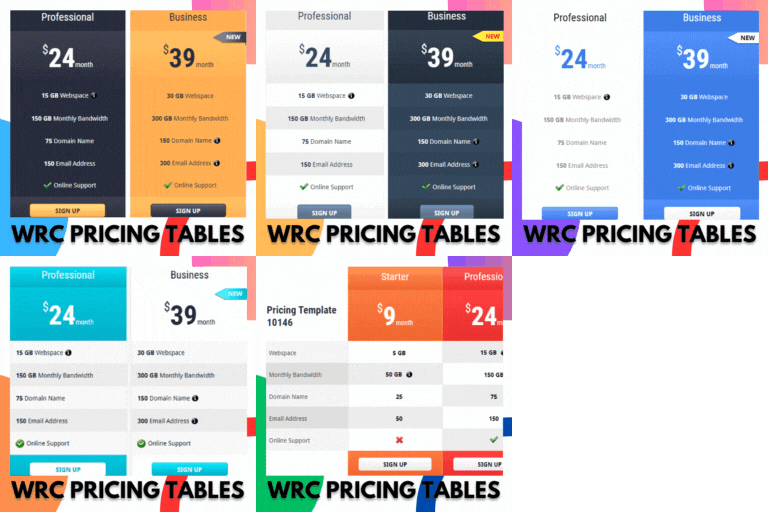
• 四種專業設計的價格表主題
外掛標籤
開發者團隊
📦 歷史版本下載
原文外掛簡介
Pricing Table Free is a responsive WordPress pricing table plugin that allows you to create professional pricing tables for your website in minutes.
Create unlimited pricing tables and display them anywhere on your website using a simple shortcode. Each pricing table can contain multiple pricing plans with custom titles, subtitles, prices, currencies, billing periods, features, buttons, and colors.
The plugin includes multiple professionally designed pricing table themes and a simple drag-and-drop interface for managing pricing columns and features.
Live Preview! »
Plugin Features
Fully responsive pricing tables.
Unlimited pricing tables.
Unlimited pricing plans/columns.
Display pricing tables using a unique post ID.
Easy-to-use shortcode.
Drag & drop pricing column sorting.
Drag & drop feature sorting.
Add and remove pricing columns from the WordPress dashboard.
Add and remove pricing features from each pricing plan.
Featured Plan / Most Popular option.
Select only one Featured Plan per pricing table.
Custom pricing plan title.
Custom pricing plan subtitle.
Custom pricing plan price.
Multiple currency options.
Custom billing period.
Custom purchase/buy link.
Custom button text.
Header background color option.
Header title text color option.
Individual pricing plan customization.
4 different pricing table themes.
Responsive layouts for desktop, tablet, and mobile devices.
Clean and modern pricing table designs.
Automatic compatibility with existing pricing table data.
Backward compatibility with existing pricing table settings.
Secure WordPress data sanitization and output escaping.
Modern PHP compatibility.
Improved WordPress coding standards and architecture.
Lightweight and easy to use.
Highly customizable.
No coding required.
And many more.
Available Pricing Table Themes
Theme 1 – Classic Vertical Card
Theme 2 – Floating / Layered Card
Theme 3 – Split Card
Theme 4 – Premium / Featured Card
How to Create a Pricing Table
Go to Pricing Tables → Add New from your WordPress dashboard.
Enter a title for your pricing table.
Add your pricing plans using the Add Pricing Column button.
Configure the title, subtitle, price, currency, billing period, features, button, and colors.
Use drag & drop to arrange your pricing columns and features.
Select one plan as the Featured Plan if required.
Publish the pricing table.
Copy the generated shortcode and add it anywhere on your website.
How to Use the Shortcode
After creating and publishing a pricing table, copy its shortcode and paste it into any post, page, widget, or supported shortcode area where you want the pricing table to appear.
Example:
[ptwcode id=”123″]
Replace 123 with the ID of your pricing table.
Available Video Instruction