內容簡介
Pressundo Image Optimizer 是一款專為 WordPress 媒體庫圖像進行本地優化的外掛,能夠壓縮 JPEG/PNG 檔案,生成 WebP 和 AVIF 格式,並改善響應式圖像傳遞,提升網站性能。
【主要功能】
• 本地圖像優化,無需遠端 CDN
• 支援 WebP 和 AVIF 格式生成
• 自適應 AVIF 壓縮,保護視覺相似性
• 響應式 srcset 和尺寸增強
• 原始圖像備份及逐圖恢復
• WP-CLI 命令進行優化和診斷
外掛標籤
開發者團隊
原文外掛簡介
Pressundo Image Optimizer optimizes WordPress Media Library images locally on your server. It can compress JPEG/PNG files, generate WebP and AVIF variants, improve responsive image delivery, add missing intrinsic dimensions, and manage image loading behavior without requiring a remote image CDN.
Its focus is local, performance-aware image delivery rather than cloud-only compression: eligible large decorative images can use adaptive AVIF quality with a visual-similarity guard, while the optional PageSpeed workflow can identify LCP images and use stored analysis to improve priority/preload decisions.
Main features:
Local image optimization with WordPress image editors.
Optional Sharp + libvips support when Sharp is provisioned by the server administrator.
WebP and AVIF generation.
Adaptive AVIF compression for eligible large decorative images, with a visual similarity guard.
Responsive srcset and sizes enhancement for local Media Library images.
Optional
Optional optimization of inline CSS background images through image-set().
Automatic width and height attributes for supported local raster images when dimensions are missing.
Native lazy loading management with protection for priority images.
Original-image backups and per-image restore.
Bulk optimization and targeted re-optimization.
WP-CLI commands for optimization and diagnostics.
Optional PageSpeed Insights integration for LCP image detection and preload selection.
The plugin does not download or install executable dependencies. If Sharp is not available on the server, it automatically falls back to the WordPress image editor stack (Imagick/GD when supported).
External services
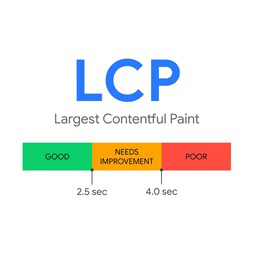
This plugin can optionally use the Google PageSpeed Insights API to analyze Largest Contentful Paint (LCP). This integration is disabled by default and requires explicit activation in the plugin settings.
When enabled and an analysis is started, the plugin sends the analyzed page URL, the selected strategy (mobile or desktop), the performance category, the locale, and an optional API key to Google PageSpeed Insights. No PageSpeed request is made from the public frontend. Stored analysis results are kept in the local WordPress database and reused for frontend preload decisions.
Service: Google PageSpeed Insights API
https://developers.google.com/speed/docs/insights/v5/get-started
Google APIs Terms of Service:
https://developers.google.com/terms
Google Privacy Policy:
https://policies.google.com/privacy