
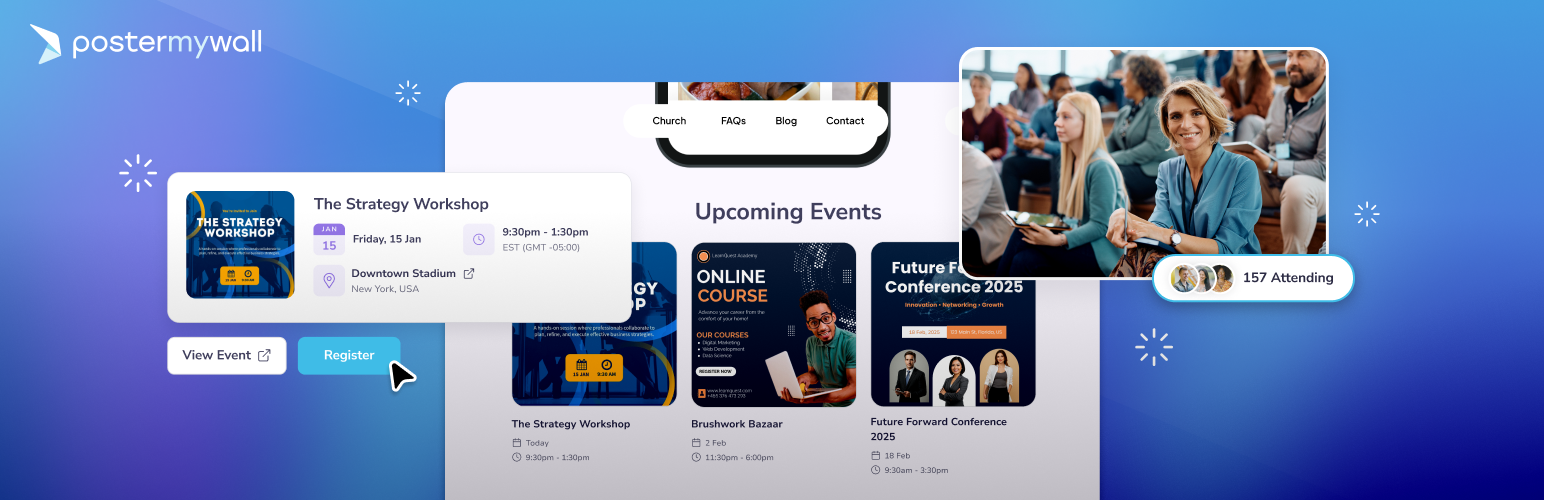
內容簡介
總結:PosterMyWall Events Calendar 外掛是一個簡單且應用了人工智慧的方式,在您的 WordPress 網站上直接顯示即將舉辦的活動。不再需要手動輸入或混亂的格式,只需一個美觀、互動且隨時更新的日曆,讓觀眾時刻掌握資訊。
1. 什麼是 PosterMyWall Events Calendar 外掛的主要功能?
- 輕鬆嵌入:只需粘貼 PosterMyWall Events Calendar 連結,使用小工具即可立即顯示日程表。
- 實時更新:對 PosterMyWall Events Calendar 進行的任何更改都將自動反映在您的 WordPress 網站上。
- 適用於所有螢幕尺寸:您的日曆將在桌面、平板電腦和智慧手機上呈現迷人的效果。
- 可自訂的日曆:使用 PosterMyWall 的美麗活動圖像,而不僅是單調的文字列表。可以選擇列表、網格和日曆視圖。
- 重複事件:輕鬆管理重複和獨立事件。無論是每週的開放麥克風之夜,每月的社交交流活動,還是一次性的盛大開幕,都可以使用適合各種時間表的模板。
- 連結至活動頁面:您的日曆將連結至每個活動的自訂人工智慧活動頁面,收集 RSVP,支持易於在社交媒體和郵件中宣傳等功能。
- 簡易註冊:在活動頁面上收集 RSVP 或直接連結至您的售票網站,輕鬆管理清潔有序的列表。
2. PosterMyWall Events Calendar 外掛如何操作?
- 創建:在 PosterMyWall 上將活動添加到您的日曆中。
- 連接:從您的 PosterMyWall 帳戶中複製唯一的嵌入代碼或連結。
- 顯示:在 WordPress 網站的「小工具」部分找到我們的外掛,然後粘貼您的代碼或連結。
3. 誰適合使用 PosterMyWall Events Calendar 外掛?
- 娛樂與餐飲業:酒吧、咖啡店和餐廳希望促銷現場表演、開放麥克風之夜、知識問答晚會和主題活動。
- 教堂及非營利組織:管理活動行程的組織。
外掛標籤
開發者團隊
原文外掛簡介
The PosterMyWall Events Calendar plugin is a simple AI-powered way to display your upcoming events directly on your WordPress website. No more manual entries or messy formatting—just a beautiful, interactive, and always up-to-date calendar that keeps your audience informed.
Key Features
🍰 Effortless embedding: Simply paste your PosterMyWall Events Calendar link and use our widget to display your schedule instantly.
🔄 Real-time updates: Any changes you make to your PosterMyWall Events Calendar will reflect automatically on your WordPress site.
📱 Built for all screen sizes: Your calendar will look stunning on desktops, tablets, and smartphones.
🗓️ Customizable calendars: Use beautiful event graphics from PosterMyWall rather than boring, text-only lists. Choose between list, grid, and calendar views.
🔁 Recurring events: Manage both recurring and standalone events easily. Whether it’s weekly open mic nights, monthly networking mixers, or just a one-time grand opening, you’re all set with templates that fit every schedule.
🎟️ Link to event pages: Your calendar will link to custom AI-powered event pages for each event that collect RSVPs, allow easy promotion to social media and emails, and more.
📋 Easy registration: Collect RSVPs on event pages or link directly to your ticketing site without a hitch. Manage with clean, organized lists.
How It Works
Create: Add events to your calendar and set it up on PosterMyWall.
Connect: Copy the unique embed code or calendar link from your PosterMyWall account.
Display: Find our plugin under the ‘Widgets’ section on the WordPress site and paste your code or link.
Who It Is For
The PosterMyWall Events Calendar is the perfect solution for anyone who needs to display a professional schedule without the technical headache of traditional website updates. It is ideal for:
🍸 Entertainment & Hospitality: Bars, cafes, and restaurants looking to promote live shows, open mics, trivia nights, and themed sets.
⛪ Churches & Non-Profits: Organizations managing celebrations, fundraisers, community outreach, and regular meetings.
🎙️ Artists & Performance Groups: Bands and musicians who need to spotlight live gigs, manage registrations, and send automated reminders.
🛍️ Retail & Small Businesses: Shop owners hosting seasonal sales, product launches, in-store parties, and open houses.
📚 Educational Institutions: Schools and universities keeping students and parents informed about sports fixtures, term dates, and extracurricular events.
👥 Social Events: Individuals organizing parties, weddings, or reunions who want a centralized, visual schedule for guests.
All Your Event Marketing in One Place
Beyond the calendar, PosterMyWall takes the headache out of event promotion by streamlining your entire marketing workflow with advanced AI-powered tools. When you create an event on PosterMyWall for your WordPress calendar, you also unlock:
Shareable Event Pages: Generate beautiful, branded event pages that can be shared anywhere via link or publishing across all your digital channels.
AI-Powered Content: Use the AI Writer to craft perfect event descriptions and AI Designs to generate unique visuals in seconds.
AI Image Tools: Need the perfect visual? Use AI Images to create unique graphics from scratch or the AI Background Remover to make your event photos more professional in one click.
One-Click Promotion: Publish your event details and graphics directly to social media and email in a single click. Your posts and emails will be ready-to-go when you create your event!
Automated Email Reminders: Send invites to your mailing lists and set up automated email reminders to boost attendance.
RSVP & Registration Tracking: Manage your guest lists, collect registrations, and track event metrics like page views and reach from a single dashboard.
Smart Mailing Lists: Use auto-generated mailing lists of frequent attendees to ensure the right message always reaches the right people.
1M+ Event Templates: Choose from over one million professionally designed templates for everything from live music and church services to business conferences and fundraisers.
Learn more about event marketing with PosterMyWall
Embed Event Promotion walkthrough:
Supercharge Your Marketing With Premium
Upgrade to unlock the full potential of your events. With a Premium plan, you can create unlimited events, remove watermarks, access advanced AI creation tools, and use the Content Planner to automate your entire marketing schedule.
Support & Feedback
Need a hand getting started or experiencing a technical hiccup? We’re here to help!
Documentation: For step-by-step guides and FAQs, visit the PosterMyWall Help Center.
Direct Support: If you have specific questions or need to report an issue, feel free to reach out to our support team.
Feedback: We’re constantly improving! If you have a feature request or an idea to make this plugin better, we’d love to hear from you. Create a request here.
🚀 Try PosterMyWall today and start filling venues!