
內容簡介
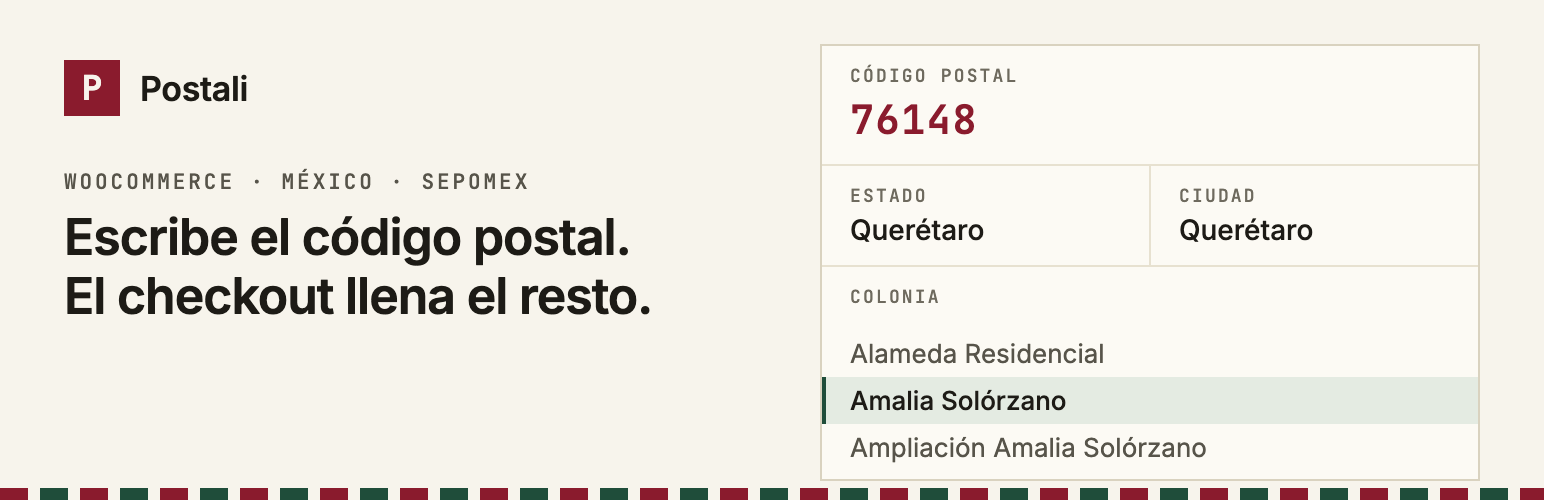
Postali 外掛專為墨西哥的 WooCommerce 商店設計,讓顧客在結帳時輸入郵遞區號,自動填寫州、市及鄰里,減少地址錯誤,提升訂單準確性。
【主要功能】
• 自動填寫州、市及鄰里選單
• 支援手動輸入不在資料庫的鄰里
• 提供伺服器端驗證以確保郵遞區號有效
• 瀏覽器快取避免重複請求相同郵遞區號
• 可選擇調整郵遞區號欄位位置
外掛標籤
開發者團隊
② 後台搜尋「Postali — Códigos postales de México」→ 直接安裝(推薦)
原文外掛簡介
Your customers type their postal code (código postal) and the WooCommerce checkout fills in the state, the city or municipality, and shows a dropdown with every colonia (neighborhood) for that postal code. Fewer typos, fewer parcels returned for incomplete addresses.
The data comes from the official SEPOMEX catalog (Correos de México), served by the free public Postali API: no signup, no API key, no quotas.
The plugin interface is in Spanish, since it is built for stores that sell in Mexico.
Features
When the country is Mexico and the customer types a 5-digit postal code, it fills the state (using WooCommerce’s state codes), the city (municipality or alcaldía) and turns the colonia field into a dropdown.
If the postal code has a single colonia, it is selected automatically.
An “Otra (escribirla a mano)” option lets customers type a colonia that is not in SEPOMEX yet. Every field can still be edited by hand.
Works for billing and shipping, and on My Account > Addresses.
If the API is unreachable or the postal code does not exist, the customer sees a short message and fills the address manually. A network failure never blocks checkout.
Per-session browser cache, so the same postal code is not requested twice.
Optional server-side validation: when the order is placed, reject postal codes that do not exist or that do not match the selected state. Results are cached for a week. If the API does not answer, the order goes through.
Optionally moves the postal code field before the street fields for Mexico, so customers type it first.
Compatible with HPOS (High-Performance Order Storage).
Where the colonia is stored
By default, in Address line 2 (address_2), relabeled “Colonia” for Mexico. This is the most common convention in Mexican stores: line 1 holds street and number, line 2 holds the colonia. The colonia then shows up with no extra setup in emails, invoices, shipping labels, exports and any integration that reads the standard WooCommerce address.
If you prefer a separate field, choose “Campo propio Colonia” in the settings. It is stored as an additional order field (_wc_billing/postali/colonia and _wc_shipping/postali/colonia, the same format the block checkout uses), and it is added to the formatted Mexican address in the order screen, emails and the thank-you page. Keep in mind that many shipping integrations only read address_2.
Classic checkout and block checkout
Classic checkout ([woocommerce_checkout] shortcode): fully supported.
Block checkout: supported. State, city and colonia are written to the checkout data store (wc/store/cart), so the React form and the server see the same values. The colonia dropdown appears right below the postal code field, using the same markup as WooCommerce’s own selects. Because the block checkout does not allow replacing its fields, the dropdown is the plugin’s own element and writes into Address line 2 (or into the separate “Colonia” field, registered through WooCommerce’s additional checkout fields API and shown only for Mexico on WooCommerce 9.9+). If a theme or plugin heavily customizes the block form, state and city autocompletion keep working even if the dropdown cannot be inserted.
Settings
Under WooCommerce > Settings > Postali:
Turn autocompletion on or off.
Which fields to fill: state, city, colonia.
What goes into “City”: municipality/alcaldía (recommended for carriers) or the SEPOMEX city.
Where to store the colonia: Address line 2 or a separate field.
Show the postal code before the street (Mexico).
Server-side validation.
“Datos: Postali” credit link (off by default).
Optional credit link
The plugin can show a small “Datos: Postali” link below the colonia field. It is off by default and only appears if you turn it on in the settings. The plugin works exactly the same without it.
External services
This plugin connects to the Postali API (https://postali.app), an external service, to look up the state, municipality and colonias of a Mexican postal code. Without this lookup the plugin cannot autocomplete the address.
What is sent, and when
From the customer’s browser, on the checkout page and on My Account > Addresses: when the country is Mexico and the customer types a 5-digit postal code, the browser requests https://postali.app/api/v1/mx/cp/{postal code}. Only the postal code is sent, as part of the URL. As with any web request, the service also receives the customer’s IP address and browser user agent. No name, street, email, phone or order data is sent. The request is made without cookies.
From the store’s server, only if “Validación en el servidor” is enabled: when an order with a Mexican address is placed, WordPress requests the same URL with that address’s postal code. Only the postal code is sent; the response is cached for one week.
The service is provided by Postali. Terms of use: https://postali.app/terminos — Privacy policy: https://postali.app/privacidad — Documentation: https://postali.app/api/docs
Postal code data comes from SEPOMEX (Servicio Postal Mexicano).














