內容簡介
Post2Podcast 是一款強大的 WordPress 外掛,能將您的文字部落格內容轉換為引人入勝的播客集。藉由先進的 AI 技術,該外掛可生成自然對話,讓您的內容更具可聽性,幫助您擴大受眾。
【主要功能】
• 兩位講者對話:自動將部落格文章轉換為自然對話
• 多種 AI 語音選擇:提供高品質語音以適應不同內容
• 實時音頻生成:即時生成播客並提供進度更新
• 自動音頻嵌入:生成的播客自動嵌入到文章中
• 批量生成:可同時為多篇文章生成播客
• 多語言支持:自動檢測語言並選擇語音
外掛標籤
開發者團隊
📦 歷史版本下載
原文外掛簡介
Post2Podcast is a powerful WordPress plugin that converts your written blog content into engaging podcast episodes using advanced AI technology. The plugin creates natural-sounding conversations between two AI speakers, making your content more accessible and engaging for audio consumption.
Whether you’re a blogger, content creator, or business owner, Post2Podcast helps you reach a wider audience by repurposing your written content into professional-quality podcast episodes.
Key Features
Two-Speaker Conversations: Automatically converts blog posts into natural dialogues between two distinct AI speakers
Multiple AI Voice Options: Choose from high-quality AI voices optimized for different content types
Customizable Speaker Instructions: Define unique personality and tone for each speaker
Real-time Audio Generation: Watch your podcast generate in real-time with live progress updates
Automatic Audio Embedding: Generated podcasts are automatically embedded into your posts
Bulk Generation: Generate podcasts for multiple posts simultaneously
Auto-Generation: Automatically create podcasts for new posts as they’re published
Cloud-Hosted Service: Reliable hosted service with managed infrastructure
Professional Audio Player: Built-in audio player with download functionality
Multi-language Support: Automatic language detection and voice selection for 19+ languages
Credit System: Transparent usage tracking and subscription management
Perfect For
Bloggers – Reach audio-first audiences and increase engagement
Content Creators – Repurpose written content into podcast format
Businesses – Create accessible content for all audiences
Educators – Transform articles into audio learning materials
News Sites – Offer audio versions of articles
Personal Brands – Expand content reach across multiple formats
Two Simple Plans
FREE Plan
* 10 free podcast generations
* Up to 2 minutes per audio
* Multi-language support
* Standard support
* Perfect for testing and small blogs
PRO Plan ($9.99/month)
* 300 credits per month
* Unlimited audio length
* Priority support
* Bulk generation tools
* Auto-generation for new posts
* Professional audio quality
Voice Options
Choose from multiple high-quality AI voices optimized for different content types and languages. The plugin automatically selects the most appropriate voices based on your content’s detected language, or you can manually choose from available options for your preferred language.
Supported Languages
Post2Podcast automatically detects your content language and selects appropriate voices for natural-sounding podcasts:
English (en) – Default language with all voice options
Portuguese (pt) – Brazilian and European Portuguese
Spanish (es) – Latin American and European Spanish
French (fr) – European French
German (de) – Standard German
Italian (it) – Standard Italian
Dutch (nl) – Netherlands Dutch
Russian (ru) – Standard Russian
Japanese (ja) – Standard Japanese
Chinese (zh-cn) – Simplified Chinese
Arabic (ar) – Modern Standard Arabic
Hindi (hi) – Standard Hindi
Korean (ko) – Standard Korean
Turkish (tr) – Standard Turkish
Polish (pl) – Standard Polish
Swedish (sv) – Standard Swedish
Danish (da) – Standard Danish
Norwegian (no) – Standard Norwegian
Finnish (fi) – Standard Finnish
The plugin automatically:
1. Detects your post’s language from the content
2. Selects the most appropriate voices for that language
3. Generates the podcast script in the detected language
4. Produces natural-sounding audio in your content’s language
Requirements
WordPress 5.0 or higher
PHP 7.4 or higher
cURL enabled (for API communications)
File permissions: Write access to uploads directory
Memory: 128MB minimum (256MB recommended for bulk operations)
How to Use
Creating Your First Podcast
Write or Edit a Post
Create a new blog post or edit an existing one
Ensure your content is well-structured with clear paragraphs
Configure Podcast Settings
In the post editor sidebar, find “Podcast Settings”
Speaker 1 Voice: Choose the first speaker’s voice
Speaker 1 Instructions: Define their personality (e.g., “Speak in an enthusiastic and friendly tone”)
Speaker 2 Voice: Choose the second speaker’s voice
Speaker 2 Instructions: Define their style (e.g., “Speak in a professional, analytical tone”)
Generate Audio
Click “Generate Audio”
Watch real-time progress updates
Preview the generated podcast
Download or regenerate if needed
Publish and Share
The audio player is automatically embedded in your post
Visitors can listen directly on your site
Share your audio-enhanced content
Advanced Features
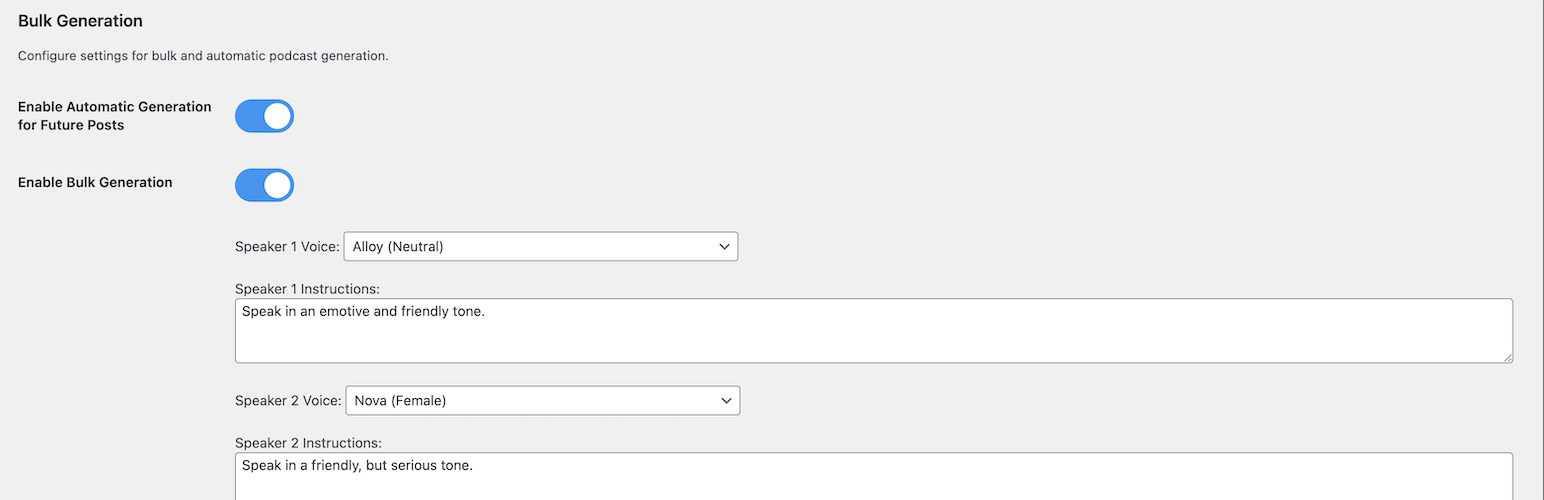
Bulk Generation
1. Go to Post-to-Podcast → Bulk Generation
2. Select posts to convert
3. Configure default voice settings
4. Start bulk generation process
5. Monitor progress in real-time
Auto-Generation
1. Enable “Automatic Generation for Future Posts”
2. New posts will automatically generate podcasts
3. Uses your default voice settings
4. Runs in background after publishing
Custom Voice Instructions
Create unique speaker personalities:
* Professional: “Speak in a clear, authoritative tone with technical expertise”
* Conversational: “Use a friendly, casual tone like talking to a friend”
* Educational: “Explain concepts clearly with enthusiasm for learning”
* Dramatic: “Use expressive, engaging delivery with emotional emphasis”
Pricing & Credits
Understanding Credits
1 Credit = 1 Podcast Generation (regardless of length on PRO plan)
Free Plan: 10 generations total, max 2 minutes each
PRO Plan: 300 generations per month, unlimited length
Subscription Management
Upgrade or downgrade anytime
Cancel without penalties
Credits refresh monthly on PRO plan
Free credits never expire until used
Cost Comparison
Free: $0 (perfect for testing)
PRO: $9.99/month
Privacy & Security
Data Handling
Content Processing: Blog content is temporarily sent to AI servers for processing
No Content Storage: Original content is not permanently stored on external servers
Audio Storage: Generated audio files are stored on your WordPress server
Account Data: Subscription and usage data securely managed
Security Features
Application Password Authentication: Secure WordPress-native authentication
HTTPS Required: All API communications use encrypted connections
Regular Updates: Security patches and improvements
Data Protection: Your content is processed securely and not stored permanently
Support & Community
Getting Help
Documentation: Visit our WordPress plugin page
Issues: Report bugs and request features on our WordPress plugin page
PRO Support: Priority email support included with PRO subscriptions
Credits & Acknowledgments
Developed by: Samuel Bezerra
Powered by:
* Advanced AI text-to-speech technology
* WordPress REST API
* Modern web technologies
* Cloud infrastructure
Special Thanks:
* WordPress community for feedback and testing
* AI technology providers for enabling high-quality voice synthesis
* Early adopters and beta testers
Ready to transform your blog into a podcast? Install Post2Podcast today and start reaching audio-first audiences with professional-quality podcast episodes generated from your existing content.
For more information, visit our official website: https://post2podcast.xyz/