
內容簡介
此外掛是為了與網頁編輯器一同使用而開發的。
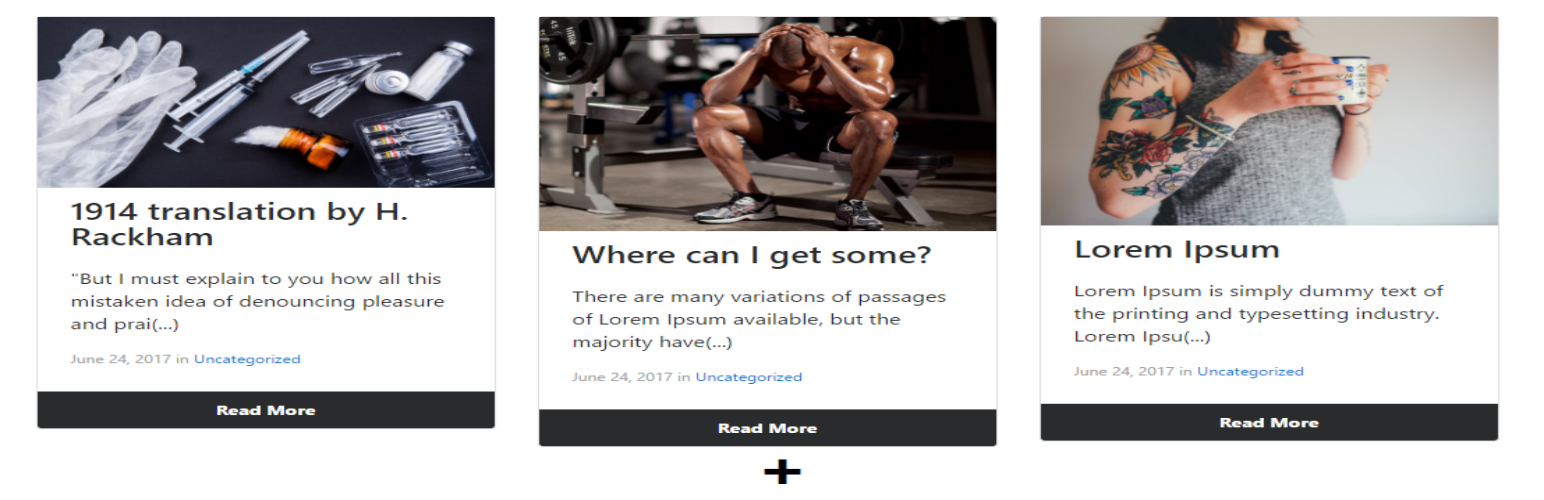
Post Preview Card 會安裝 3 個小工具,以協助非開發人員在靜態網頁建構器頁面中預覽部落格文章。
小工具列表:
* 多個文章:此小工具可預覽多個文章,您可以選擇首先顯示多少個小工具,然後使用者將按一下「加號按鈕」載入其餘文章,而這些文章將不需要重新載入頁面即可重新載入,這是因為此小工具使用 AJAX 載入其他文章,進而提供更好的使用者體驗。
* 根據 ID 的單獨文章:此小工具可預覽具有插入 ID 的文章。
* 根據類別的隨機文章:此小工具會使用您插入的類別,預覽一篇隨機的文章。
美觀的版面配置
目前此外掛提供 1 種具有兩個變化的版面,兩種版面都支援回應式。我們正努力在不久的將來提供更多版面。
* 版面將顯示縮圖、標題、發布日期和類別、文章摘要或呼叫文字及「閱讀更多」按鈕。
* 版面將顯示黑色背景的標題、文章摘要或呼叫文字及「閱讀更多」按鈕。
版面可自訂。
正在開發更多版面選項及完整自訂化,這樣您就可以從可選版面、選擇顏色、將文章的首要圖片預設為沒有特色圖片或完全移除特色圖片等選項進行選擇。
容易操作
Peaw Single Post by id Preview
使用網頁編輯器,只需將小工具拖放到所需位置。這是小工具的名稱
將跳出小工具選單。
您需要在此處輸入文章 ID (請參閱常見問題解答以查找其位置),然後最後一件事情是插入一個美觀的文本以引起人們對您的文章的興趣。如果呼叫文字為空,將顯示文章摘要或文章內容的前 85 個字元
所有其他項目均是選擇性的。
就是這樣!這裡有 3 個 Peaw 小工具的示例here
Peaw Random Post By Category
使用網頁編輯器,只需將小工具拖放到所需位置。這是小工具的名稱
您只需要選擇要使用的類別。這裡的呼叫文字始終是文章摘要。
如果您插入了無效的類別,那麼這將是result
所有其他項目均是選擇性的。
就是這樣!
如果您收到「Something is wrong」消息,可能是很多原因,但最常見的是 WordPress 沒有正確地保存您的小工具,您需要改變小工具表單保存中的某些內容,然後再恢復原樣並重新保存。這是 WP 的錯誤,而不是外掛的錯誤。
Peaw Multiple Posts
使用網頁編輯器,只需將小工具拖放到所需位置。
將跳出小工具表單,您可以選擇要顯示多少篇文章(999 篇文章將顯示全部的部落格文章),您然後可以選擇首先顯示多少篇文章以及每行顯示多少篇文章。
所有其他項目均是選擇性的
就是這樣!
外掛標籤
開發者團隊
原文外掛簡介
This plugin was build to be used along with page builders.
Post Preview Card installs 3 widgets to help non-developers that want to use page builders to preview blog posts within static page builder’s pages.
list of widgets:
* Multiple Posts: This widget previews multiple posts and you can select how many widgets to be firstly displayed and then the user will load the rest of the posts by clicking in the “plus button” and the posts are going to be reloaded without the need of reloading the page, this is possible because this widget use AJAX to load the others posts, granting a better User Experience.
* Single Post by ID: This widget preview the post with the ID you inserted.
* Random Post by Category: This widget preview a random post using the category you inserted.
Beatiful Layout
This plugin has 1 layout with two variations so far, both are responsive. We are working to deliver more layouts in the near future.
* Post with thumbnail will be displayed in this order: Thumbnail, Title, Publish date and Category, Post excerpt or call text, read more button
* Post without thumbnail will be displayed in this order: Title with black background, Post excerpt or call text, read more button
Layout is customizable.
More layout options and full customization is being developed, so you’ll be able to choose from optionals layouts, colors, default images for posts without featured images or complete remove the feature image.
Easy to Use
Peaw Single Post by id Preview
Using a page builder, simply drag and drop the widget wherever you want. This is the widget name
The widget menu will be prompted.
all you need to do here is insert the Post id (Check FAQ to know where to find it), and the last thing is to insert a beatifull text to make people interested about your post. If call text is blank, it will be the Post Excerpt or first 85 char of post content
All the others fields are optional.
That’s it! Here an example of 3 Peaw widget together here
Peaw Random Post By Category
Using a page builder, simply drag and drop the widget wherever you want. This is the widget name
All you need to do is choose the Category you want. The call text here is the Post excerpt always.
If you insert an invalid Category this will be the result
All the others fields are optional.
That’s it!
If you’re receiving the “Something is wrong” message it can be a lot of things but the most commom is that WordPress is not properly saving your widget and all you need to do is to change something in the widget form save, and then return the way it was and save again. This is a WP error, not a plugin error.
Peaw Multiple Posts
Using a page builder, simply drag and drop the widget wherever you want.
The widget form will be prompted and you can choose how many posts to be displayed (999 posts will display ALL the blog posts), you can choose then, how many posts to be firstly displayed and how many posts per row.
All the others fields are optional
That’s it!






![WP-CopyProtect [Protect your blog posts]](https://s.w.org/plugins/geopattern-icon/wp-copyprotect_cccccc.svg)
