內容簡介
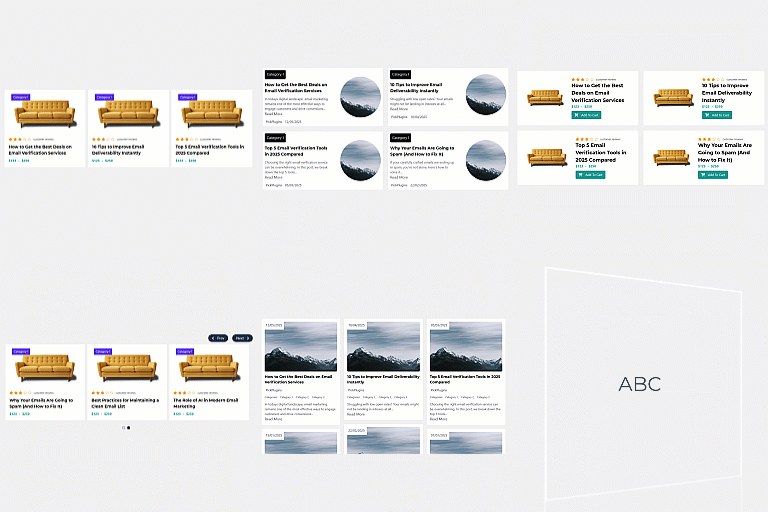
Squad Post Grid 是一款專為 Divi 5 和 Divi 4 設計的文章網格模組,能夠靈活地在 Divi Builder 中創建設計豐富的文章網格,無需短碼或遷移,簡化了使用者的操作流程。
【主要功能】
• 原生支援 Divi 5 和 Divi 4
• 自適應網格,1-6 欄位選擇
• 顯示最新文章或按類別過濾
• 自訂排序和限制文章數量
• 多種分頁樣式選擇
• 每個卡片可自訂元素
外掛標籤
開發者團隊
② 後台搜尋「Squad Post Grid – Divi 5 & Divi 4 Post Grid Module for Divi Builder」→ 直接安裝(推薦)
原文外掛簡介
A Post Grid module for Divi — native in both Divi 5 and Divi 4.
The Squad Post Grid Module adds a flexible, design-rich post grid to the Divi Builder. As of 2.0.0 it runs natively in the Divi 5 Visual Builder (Block API) and the classic Divi 4 builder from a single plugin — the correct version loads automatically based on which builder is active, so existing pages keep working and new Divi 5 pages get the native module. No shortcodes, no migration.
Build it visually, style every detail, and ship a responsive blog layout that matches your theme.
What you can build
Native in Divi 5 and Divi 4 — the Post Grid and Post Element modules are first-class in the Divi 5 Visual Builder (Block API) and the classic Divi 4 builder. The plugin detects the active builder and loads the matching version automatically.
Responsive grid, 1–6 columns — independent column counts for desktop, tablet, and mobile, with control over the gap between cards.
Choose what to show — display the latest posts or filter by one or more categories or tags. On archive and single templates, the grid can inherit the current query (its categories, tags, or author) automatically.
Order and limit — order by date, modified date, title, name, author, comment count, or random (ascending or descending); set posts-per-page and an offset; optionally ignore sticky posts.
Pagination your way — numbered pagination, prev/next (icon + text, or icon-only), or none. Divi 5 also adds an AJAX “Load More” button with a loading spinner.
Build each card from elements
The child Post Element module lets you add exactly the pieces you want, in any order:
Title — any tag (H1–H6, span, div), optional link to the post, optional icon
Featured image — full-width option, optional link
Content or excerpt — full content or excerpt, with an optional word limit
Author — display name, nickname, full, first, or last name; optional link to the author archive
Author gravatar — sized avatar, optional link
Date — published or modified, with a custom date format
Read More — custom button text, linked to the post
Comment count — with optional before/after text
Categories & Tags — custom separator, optional links to the archives
Custom text and a Divider for layout
Custom field (Divi 5) — output any post meta value by key
Most elements also accept an icon — a Font Awesome glyph, an uploaded image, or a text badge — with placement, size, color, and hover options.
Style every level
Three styling tiers — style the post card, the elements container, and each element independently: background or gradient, border, radius, box-shadow, margin, padding, and alignment.
Full pagination styling — separate controls for the active and inactive page numbers, the wrapper (alignment, gap), and the prev/next icons.
Responsive and hover — spacing, sizing, and color controls carry desktop / tablet / mobile and hover states throughout.
Lightweight — server-rendered markup and no jQuery for the grid; the Load More script loads only where it’s used.
Part of the Squad family
Want more than a post grid? Squad Modules Lite adds 60+ free modules and extensions for Divi 5 and Divi 4 — see the full library.
If this plugin helps your workflow, a 5-star review is hugely appreciated. Built and maintained by The WP Squad.
Support
Support for this plugin is primarily provided within the volunteer-based WordPress support forum. The official website also provides custom development and professional support services. See Support for more information.