內容簡介
該外掛在更新插件時最多保留三個版本。它还适用于高级和自定义插件。
如果插件的新版本不能按預期工作,只需點擊以前的版本即可回滾。
它的運作方式與文章修訂版本相同,但適用於插件。
已經有一個名為WP Rollback 的外掛,可以讓您回滾外掛版本。
WP Rollback 也是一個很棒的外掛,如果您只有使用儲存在庫中的插件,我非常推薦它。
PlugVersions 也可與自定义和高级插件配合使用。這是目前與其他版本回滾外掛的最大區別。
在路線圖上,還有更多功能,例如插件版本預覽。
如何回滾插件的舊版本
安装並激活 PlugVersions
前往插件頁面
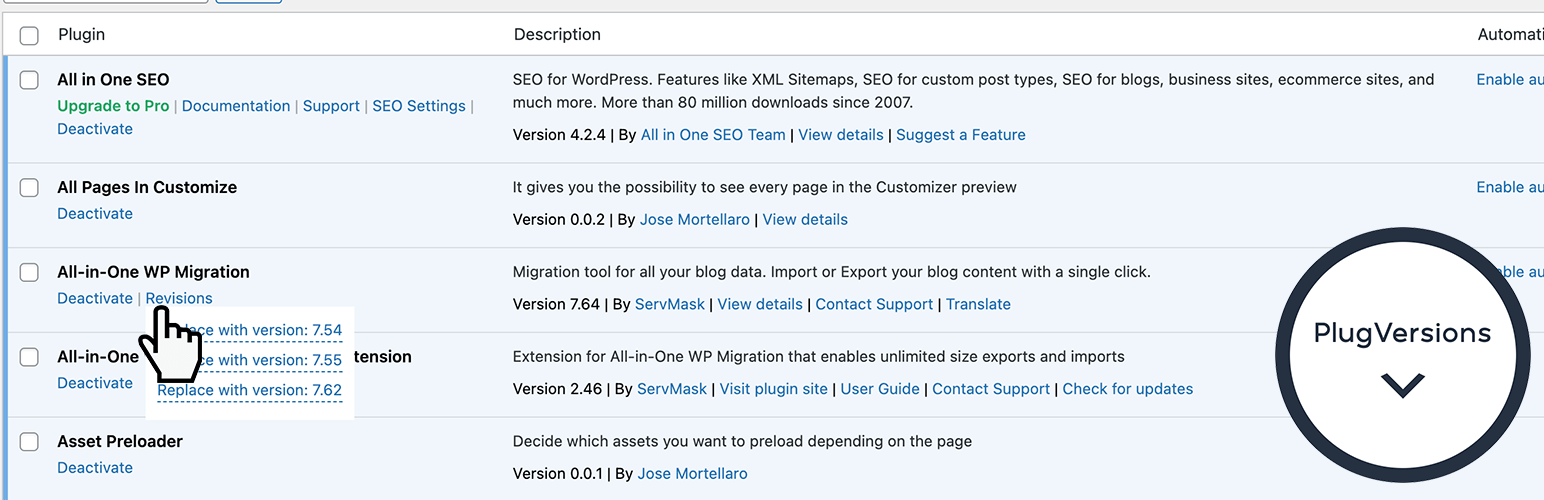
所有更新的插件都會顯示操作鏈接“版本”。通過鼠標懸停在版本上,您將看到以前版本的列表
單擊要恢復的版本
完成!
此插件無需設置。此免費版本可讓您保留最多三個先前的插件版本。
在插件頁面上,您可以在操作鏈接“版本”下找到先前的版本。
幫助
如有任何問題或運作不如預期,請不要猶豫,在支援論壇中開啟主題。
外掛標籤
開發者團隊
② 後台搜尋「PlugVersions – Easily roll back to previous versions of your plugins.」→ 直接安裝(推薦)
原文外掛簡介
PlugVersions lets you retain up to three versions each time you update a plugin, including premium and custom plugins.
If a new version doesn’t work as expected, you can easily roll back by selecting a previous version with a single click. It works similarly to post revisions, but for plugins.
While WP Rollback is a great solution for plugins hosted on the WordPress repository, PlugVersions supports all plugins, including those not available on the repo.
This broader compatibility is currently the key difference between PlugVersions and other rollback plugins.
Additional features, such as version previews, are on the roadmap.
How to roll back to a previous version of a plugin
Install and activate PlugVersions.
Go to the Plugins page in your WordPress dashboard.
For any plugin that has been updated, you’ll see a “Revisions” action link. Hover over it to view the list of previously stored versions.
Click on the version you want to restore.
That’s it. Your plugin is rolled back!
There are no settings to configure.
This free version allows you to retain up to three previous plugin versions.
You’ll find them listed under the “Revisions” link on the Plugins page.
How to Safely Update a WordPress Plugin
To learn how to safely update a WordPress plugin, please read the detailed guide here:
How to Safely Update a WordPress Plugin
Help in case of issues after a plugin update
Want peace of mind when updating your plugins? Check out our Plugin Update Rescue – Annual Protection Plan
If something breaks after an update, we’ll step in and fix it.