內容簡介
Player Leaderboard 是一款免費的 WordPress 外掛,專為管理體育排名而設計。管理員可以創建比賽、添加選手或隊伍、輸入結果,並在任何頁面或文章上發布計算出的排名表。
【主要功能】
• 創建單打、雙打及團隊比賽
• 管理選手或隊伍及其聯絡資訊
• 同時記錄一至十個比賽結果
• 配置勝負、平局的積分及排名行為
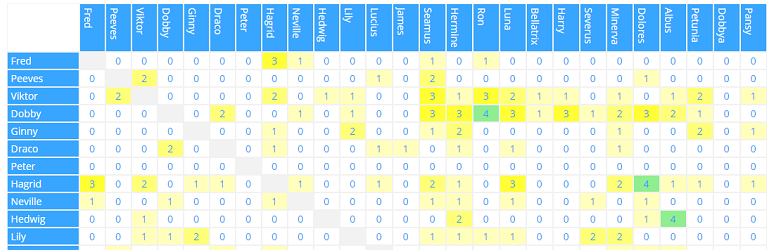
• 在前端顯示排名、排名表及對戰矩陣
• 支援 CSV 格式的進口與出口
外掛標籤
開發者團隊
原文外掛簡介
Player Leaderboard provides a complete, free workflow for managing sports rankings in WordPress. Administrators create competitions, add players or teams, enter results and publish the calculated tables on any page or post.
The plugin supports singles, doubles and team competitions. Standings use configurable points for victories, defeats and draws. Individual and doubles rankings can take opponent strength, bonuses and rating history into account.
There is one free edition of Player Leaderboard. No premium edition or paid feature gate is required.
Features
Create singles, doubles and team competitions.
Manage players or teams and their contact information.
Record one result or up to ten results at once.
Configure points, sets, ratings, bonuses and ranking behaviour.
Display standings, rankings and duel matrices on the front end.
Optionally show result-detail dialogs.
Import and export competitions, players and results as CSV.
Configure table and matrix colours per competition.
Use responsive, horizontally scrollable tables without clipped columns.
Read expanded context-sensitive help and workflow guides while editing a competition.
View complete shortcode documentation in the competition overview and directly below the editor help.
Basic workflow
Open Player Leaderboard in the WordPress administration area.
Create a competition and select its type and scoring rules.
Add the participating players or teams.
Enter the match results.
Copy the shortcode shown in the competition list to a page or post.
Shortcode
The competition ID is required:
[player_leaderboard id="1"]
Available attributes:
id – Numeric competition ID. Required.
mode – Output type: standing (default), ranking or matrix.
showheader – Set to true to show the competition title and view heading. Default: false.
details – Set to true to make standing or matrix values open result-detail dialogs. Default: false.
view – Ranking calculation shown for doubles: points (default), quotient, rating, ratings or average.
type – Matrix value: games (default), sets, points or rating.
matrix_font_size – Matrix font size in pixels from 8 to 32. If omitted, the responsive default size is used.
fontweight – Legacy responsive matrix font-size factor from 1 to 500. Default: 100.
width – Minimum matrix width with a supported CSS unit, for example 100%, 720px or 50rem. If less space is available, the matrix becomes horizontally scrollable. Default: 100%.
Examples:
[player_leaderboard id="1" mode="standing" showheader="true" details="true"]
[player_leaderboard id="1" mode="ranking" view="average"]
[player_leaderboard id="1" mode="matrix" type="sets" details="true" matrix_font_size="12" width="100%"]
CSV import and export
Use the CSV export generated by Player Leaderboard as the template for imports. A complete competition export can contain competition, player and result rows. During import you can choose whether existing rating values are reset and whether result rows are imported.
For security, CSV uploads are limited to .csv files up to 5 MB and are available only to administrators.