內容簡介
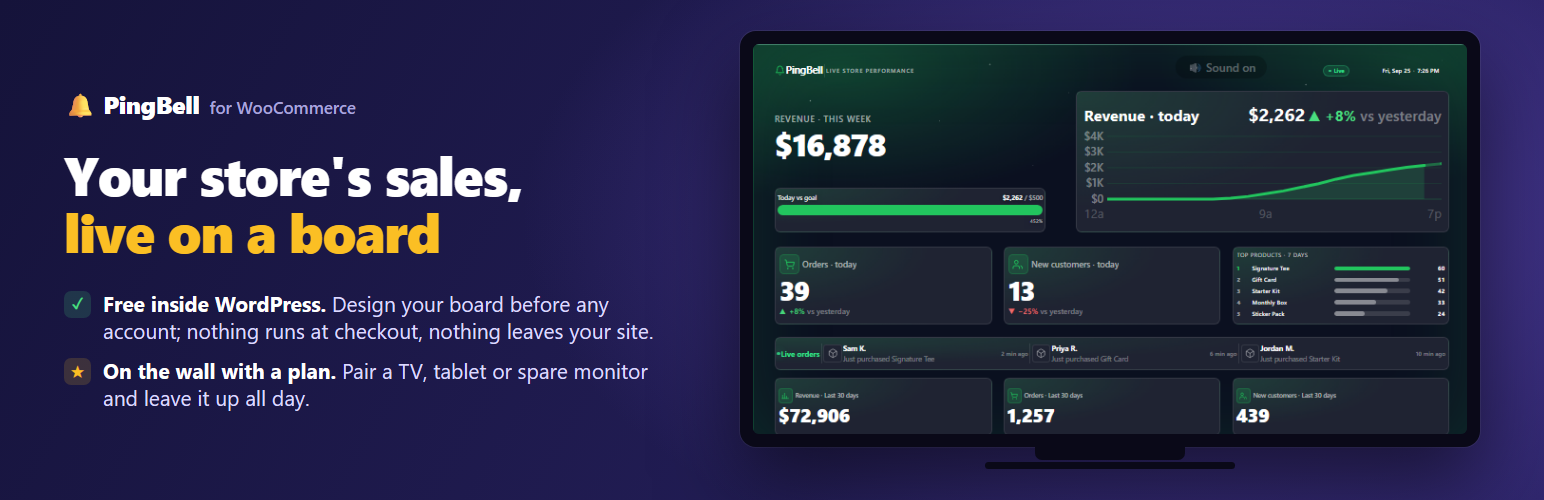
PingBell for WooCommerce 是一款專為 WooCommerce 設計的外掛,能將銷售數據轉換為即時顯示的銷售看板,讓商店、辦公室或倉庫的每個人都能隨時掌握當日的業績與訂單情況。
【主要功能】
• 實時顯示當日收入與訂單數據
• 設定目標條,追蹤達成進度
• 顯示過去 7 天的熱銷產品
• 支援多種顯示裝置,如電視與平板
• 自定義慶祝效果與聲音
外掛標籤
開發者團隊
② 後台搜尋「PingBell for WooCommerce — Live Sales Board, Order Bell & Shop TV」→ 直接安裝(推薦)
原文外掛簡介
Every order, on the wall.
PingBell turns your WooCommerce sales into a live board: today’s revenue and how the day is shaping up hour by hour, orders and new customers against yesterday, a goal bar, your top products, and the latest orders as they land. Put it on a TV in the shop, the office or the warehouse, and everyone sees the day happen. Every order rings a bell — confetti, fireworks, hearts or your own emoji, a sound you pick, and a message in your own words.
Two minutes to set up.
Install it, open WooCommerce → PingBell, and your board is there. Pick the colours, set today’s goal, choose the sound and the celebration, and watch the preview change as you click. When it looks right, sign in with PingBell and your real numbers take over. Your last 30 days come along, so the board never starts at zero.
Any screen you like.
A TV, a tablet, a spare monitor: open the pairing page on it, type the six letters it shows, and your board is up. The PingBell apps run it on Apple TV, Fire TV, Roku and Android TV, and the phone app rings in your pocket on every order.
What’s on the board
Revenue today, with the day’s shape hour by hour and how it compares to yesterday.
Orders today and new customers today, each against yesterday.
Today vs goal — set the number, watch the bar fill.
Top products over the last 7 days.
Live orders — the last few, as they come in.
The totals strip — revenue, orders and new customers for the last 30 days, or for all time. Your choice.
Free and paid
Designing the board in WordPress is free, with no account and no time limit. A free PingBell account brings your real numbers in and rings the phone app on every order. Putting the board on a TV or any other screen, or sharing it by link, takes a plan, and the first time you subscribe there is a 14-day free trial. Higher plans add more boards, and let one screen rotate through several.
Your store stays yours
The plugin adds nothing to your checkout and slows nothing down. Before you sign in, nothing leaves your site: the board shows sample numbers so you can design it. Once you sign in, WooCommerce sends each new order to PingBell the way it sends any webhook, and you can disconnect from the same page at any time. The details are below, under External service.
Supported WooCommerce events
Signing in sets up three counters and the webhooks that feed them:
New orders (order.created) — the order count and the revenue.
New customers (action.wc_pingbell_new_customer_order) — an order from someone who had not bought before. WooCommerce has no event for this, so nothing in your store fires it: PingBell tells a first order from a repeat one on its own side, from the orders it receives, and the counter fills from there. It would carry the order’s id and nothing else.
Completed orders (action.woocommerce_order_status_completed).
The manual API-key connection can point a counter at any WooCommerce webhook topic, including action.woocommerce_add_to_cart.
External service
This plugin talks to the PingBell service (https://pingbell.io — terms, privacy). What goes where:
Nothing, until you connect. Before you sign in or enter an API key, your server makes no request to PingBell and reads none of your orders. The board in your admin shows sample numbers.
Signing in: your browser goes to https://my.pingbell.io to sign in and approve the store. Your server then exchanges a one-time code for a credential it keeps; that credential never reaches your browser.
Connecting: your server sends your store name, currency and timezone, the design you made, and — once — a summary of your history up to that moment: the last 30 days as daily totals, the last 72 hours as hourly totals, your lifetime totals, and up to 50 top products by name with their order count and revenue. These are counts and sums only. No customer’s name, email or address is in them.
Afterwards: WooCommerce sends each new order to https://hooks.pingbell.io over HTTPS, signed (X-WC-Webhook-Signature), through its own webhook mechanism. This is WooCommerce’s standard order webhook, and WooCommerce puts the whole order in it — including the customer’s name, email and billing and shipping addresses. The plugin does not choose or trim that content. The new-customer and completed-order webhooks carry only the order’s id. Older manual API-key connections send to https://app.pingbell.io. While the PingBell page is open in your admin, your server asks https://my.pingbell.io for the board and its numbers, and pairs or unpairs a screen when you ask it to.
Celebration sounds: when the board rings, or you press Play on the Design tab, your browser streams an audio file from https://my.pingbell.io/sounds/. Nothing about your store goes with it.
Deleting the plugin removes every WooCommerce webhook in your store that delivers to PingBell and tells PingBell the store is gone.