內容簡介
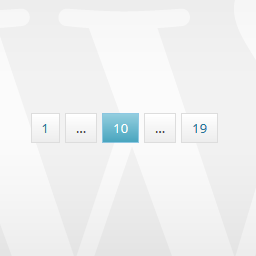
透過簡單的函數調用,顯示帶分頁的列表。
在同一頁面添加多個分頁。
特點
在同一頁面上顯示多個分頁
選擇每頁顯示的項目數量,默認值為10
選擇相鄰的項目,默認值為6
自定義頁面查詢變量,默認值為“page”
選擇是否自動獲取頁面值,默認值為true
選擇如何顯示第一個和最後一個頁面按鈕,作為數字或文本,默認值為數字
默認情況下,所有按鈕都可見
如果前一個按鈕可見
如果下一個按鈕可見
當到達第一頁時,是否顯示前一個按鈕
當到達最後一頁時,是否顯示下一個按鈕
相鄰的省略號是否可見
第一個按鈕是否可見
最後一個按鈕是否可見
本地化支持 - 下載模板並提交您的語言
所有 HTML/CSS 元素都可自定義
變更日誌
1.0:插件發布
外掛標籤
開發者團隊
原文外掛簡介
Display your list with pagination by a simple function call.
Add multiple paginations to the same page.
Features
Multiple paginations at the same page
Chose how many items to display per page, default: 10
Chose adjacent items, default: 6
Customize on page query variable, default: “page”
Choose if the on page value should be fetched automatically, default: true
How to display first and last page buttons, as numbers or as text, default: numbers
All the buttons are visible by default
If the previous button is visible
If the next button is visible
If the previous button is visible when the first page is reached
If the next button is visible when the last page is reached
If the adjacent dots are visible
If the first button is visible
If the last button is visible
Localization support – download the template and submit your language
All HTML/CSS elements are customizable
Changelog
1.0: Plug in release