內容簡介
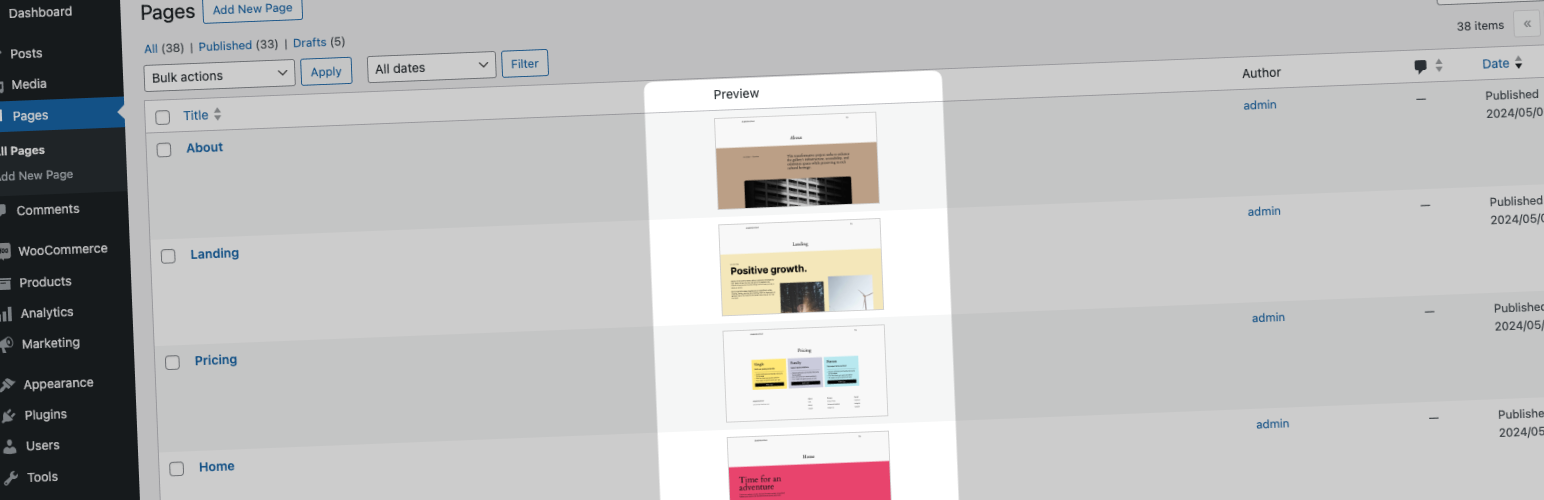
Page Preview 外掛為您的 WordPress 控制台提供視覺增強,能自動在文章列表中添加已發佈頁面的截圖,讓您無需逐一打開頁面即可快速檢視,節省時間並簡化工作流程。
【主要功能】
• 自動截圖:發佈或更新頁面時自動捕捉並更新截圖
• 控制台整合:在文章列表中輕鬆管理截圖
• 響應式預覽:顯示適應螢幕大小的截圖
• 效率內容管理:快速識別頁面外觀,適合大量頁面
• 支援自訂文章類型:顯示任何公共內容的截圖
• 批次處理:支援從文章列表批次生成或更新截圖
外掛標籤
開發者團隊
原文外掛簡介
Page Preview, provides a visual enhancement to your WordPress dashboard by automatically adding screenshot of your published pages directly in the post listings. This feature allows you to see a visual representation of each page without the need to individually open and review them, saving you time and simplifying your workflow.
Features 🖼️
Automatic Screenshots: Automatically captures and updates screenshots of your pages whenever they are published or updated.
Dashboard Integration: Integrates smoothly into your WordPress dashboard, adding screenshots to your post listings for easy visual management.
Responsive Previews: Displays responsive screenshots that adapt to the size of your screen, ensuring a consistent viewing experience.
Efficient Content Management: Helps you quickly identify the pages by their appearance, which is particularly useful for sites with a large number of pages or frequent updates.
Post Type Support: Supports custom post types, enabling you to display screenshots for any public type of content on your site.
Batch Processing: Supports batch processing from the post listing to generate or update screenshots in bulk, enhancing your productivity.
CLI Support: Offers a CLI command feature for advanced users to manage screenshots generation via command line.
Easy Customization: Provides a range of customization options to adjust the behavior of the screenshots according to your preferences.
Multisite Compatibility: Fully compatible with WordPress Multisite, allowing you to manage screenshots across multiple sites from a single network.
“Page Preview” is the perfect tool for content creators, website administrators, and anyone who manages a WordPress site and values efficiency, automation, and responsive design. Install it today to streamline your site management and enhance your productivity.
Privacy Policy
This plugin makes HTTP requests to https://screenshot.handyplugins.co to generate screenshots of your pages.
Our screenshot capturing service requires the URL of the public page to generate screenshots. While we do not collect personal information directly from users, we do record IP addresses and domain names from the servers initiating the requests. This data is used exclusively for rate limiting and to prevent abuse of our service, ensuring fair usage and stability.
Contributing & Bug Report
Bug reports and pull requests are welcome on GitHub.
More from HandyPlugins
If Page Preview is helpful on your site, you may also want to explore our other WordPress plugins:
Magic Login Pro – Easy, secure, and passwordless authentication for WordPress.
SessionQuota Pro – Limit concurrent sessions in WordPress.
Stream Integration Pro – Upload, sync, restore, and manage WordPress videos with Cloudflare Stream.
Easy Text-to-Speech – Convert written content into high-quality synthesized speech for WordPress.
Handywriter – AI-powered writing assistant for WordPress.
PaddlePress PRO – Paddle plugin for WordPress.
WP Accessibility Toolkit – Tools to help make your WordPress site more accessible.
Powered Cache – Caching and optimization for WordPress to help improve PageSpeed and Core Web Vitals.