內容簡介
WordPress 外掛程式往往會被其開發者捨棄,並因此產生安全漏洞。如果你的網站安裝了這些外掛程式,它將會在沒有任何警告或提示的情況下,使您的網站處於風險中。"過期的外掛程式通知" 是一個輕量級且不妨礙使用的外掛,它能夠幫助您隨時關注這些情況。"過期的外掛程式通知" 監控您的外掛程式,並告訴您每個外掛程式最後一次由其開發者更新的確切日期。如果一個外掛程式已從 WordPress 外掛程式庫中被移除,"過期的外掛程式通知" 也會顯示這些信息。
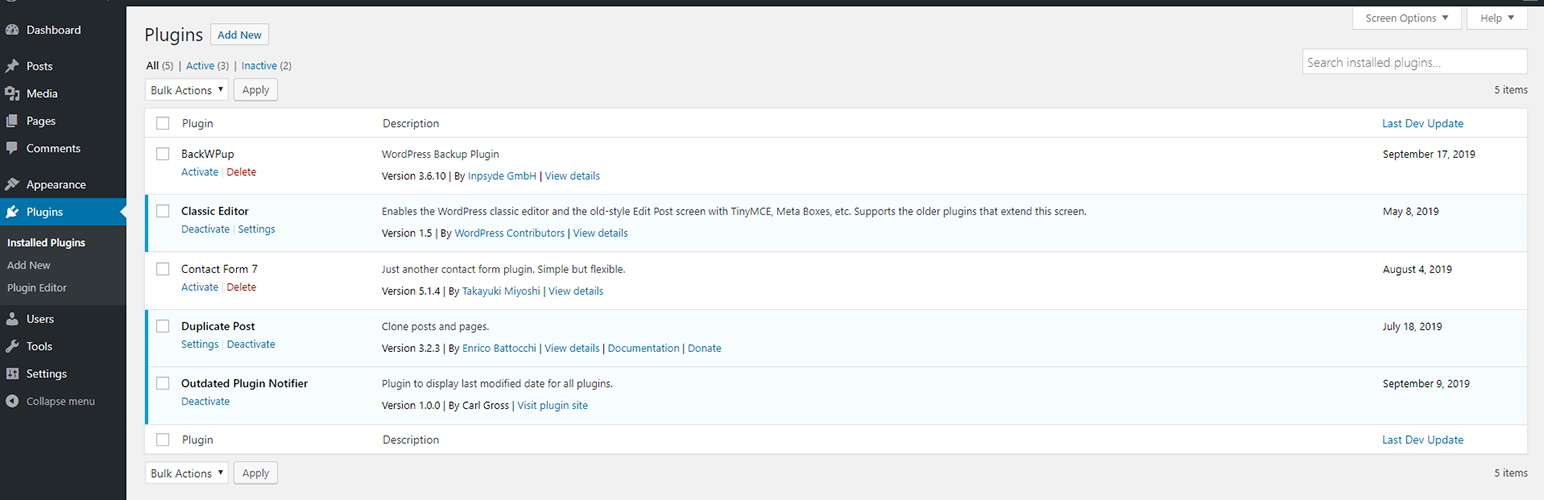
使用這個外掛程式非常簡單,只需安裝並啟用它即可,無需進行任何其他配置。然後,從 WordPress 控制台中打開此外掛程式的管理頁面,您將看到一個新列顯示在表格中:最後的開發者更新。此列將顯示外掛程式由其開發者上次更新的日期。如果開發者已經幾個月或幾年沒有更新外掛程式,您可能需要聯繫開發者確認該外掛程式是否仍有維護。如果外掛程式不再在 WordPress 外掛程式庫中,"過期的外掛程式通知" 將在外掛程式管理頁面中指示您刪除和/或替換該外掛程式。
外掛標籤
開發者團隊
原文外掛簡介
WordPress plugins frequently become abandoned by their developers, and in-turn, develop security vulnerabilities. If one of these plugins is installed on your site, it will put your site at risk, without any warning or indication. Outdated Plugin Notifier is a lightweight and unobtrusive plugin that helps you stay aware of these situations. Outdated Plugin Notifier monitors your plugins and tells you exactly when each plugin was last updated by its developer. If a plugin has been expelled from the WordPress plugin repository, Outdated Plugin Notifier will display that information as well.
To use, simply install and activate the plugin. There is no additional configuration required. After, open the plugin admin page from your WordPress dashboard and you will see a new column displayed in the table: Last Dev Update. This column will indicate the last date the plugin was updated by its developer. If it has been several months–or years–since the developer last updated the plugin, you may want to contact the developer to confirm the plugin is still maintained. If the plugin is no longer in the WordPress plugin repository, Outdated Plugin Notifier will indicate so on the plugins admin page, and suggest you remove and/or replace the plugin.