
內容簡介
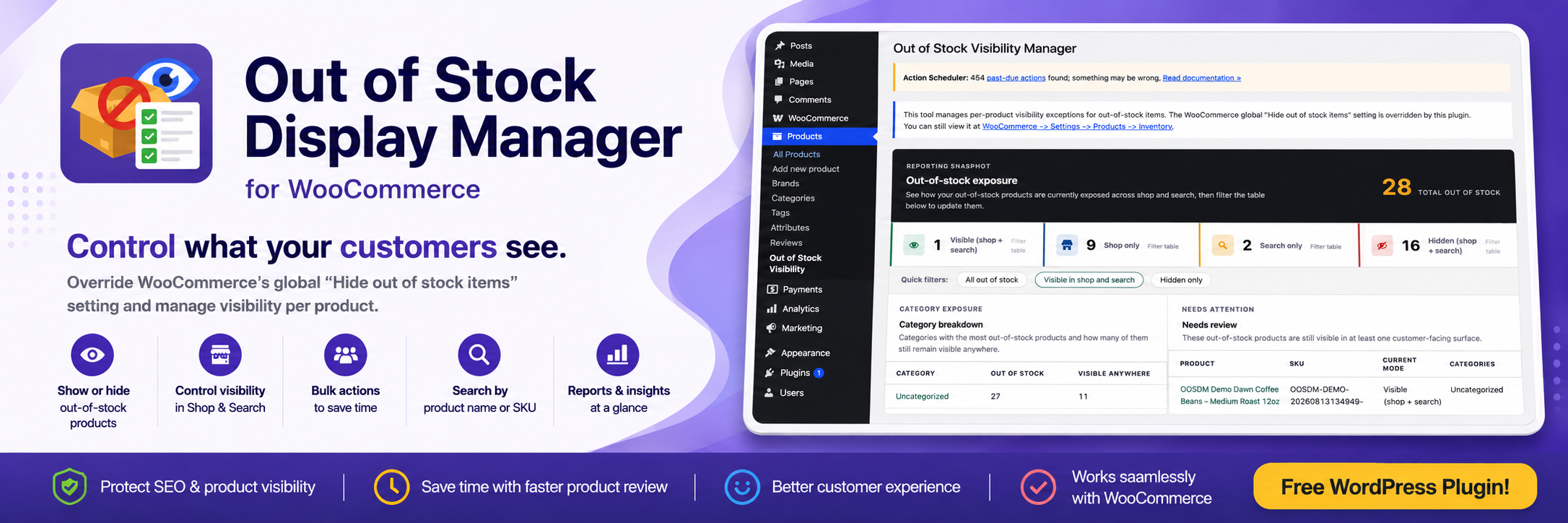
Hide or Show Out-of-Stock Products for WooCommerce 外掛讓商店擁有者能夠更精細地控制缺貨產品的可見性,避免所有缺貨產品都被隱藏,從而提升SEO、顧客參考及未來補貨的需求。
【主要功能】
• 個別控制缺貨產品的可見性
• 選擇產品在商店或搜尋結果中的顯示方式
• 支援批次操作以快速更新多個產品
• 按名稱或SKU搜尋缺貨產品
• 檢視可見性總數與摘要卡片
• 快速識別需要檢查的缺貨產品
外掛標籤
開發者團隊
② 後台搜尋「Hide or Show Out-of-Stock Products for WooCommerce」→ 直接安裝(推薦)
原文外掛簡介
WooCommerce gives store owners a global option to hide all out-of-stock products from the catalog. That works for simple stores, but it can be limiting when some sold-out products should stay visible for SEO, customer reference, seasonal demand, or future restocks.
Hide or Show Out-of-Stock Products for WooCommerce gives you more control over how out-of-stock products appear in your store.
Instead of hiding every sold-out product, you can choose whether each out-of-stock product appears in shop results, search results, both, or neither.
Version 2.3.0 keeps the reporting snapshot introduced in 2.1.0, supports WordPress 7.0.1, and refreshes the admin dashboard with a cleaner, more premium flat design.
Key features
Control out-of-stock product visibility individually
Choose whether products appear in shop results, search results, both, or neither
Update multiple products at once with bulk actions
Search out-of-stock products by name or SKU
Review visibility totals with summary cards
See which categories have the most out-of-stock products
Quickly identify sold-out products that may need review
Manage everything from a simple WooCommerce admin screen
Why use this plugin?
Not every out-of-stock product should be treated the same.
Some products may be temporarily unavailable but still important to your store. Others may have SEO value, incoming restocks, seasonal demand, or product pages that customers still need to access.
This plugin gives you a more selective alternative to WooCommerce’s all-or-nothing out-of-stock visibility setting.
How it works
The plugin gives you a dedicated admin screen under:
Products -> Out-of-Stock Visibility
From there, you can review your current out-of-stock products and decide how each one should behave.
For each out-of-stock product, you can choose whether it should be:
visible in shop results
visible in search results
visible in both shop and search
hidden from both shop and search
You can also use bulk actions to update multiple products faster.
Out-of-stock reporting
Version 2.1.0 added a reporting snapshot above the visibility manager table.
The report helps you quickly understand how out-of-stock products are currently exposed in your store.
The reporting section includes:
visibility summary cards
out-of-stock product counts by visibility mode
category breakdowns
products that may need review
quick filters that jump to matching products in the table
This makes it easier to spot sold-out products that are still visible to customers and review them before they affect the shopping experience.
Use cases
This plugin is useful when:
You want to keep selected out-of-stock products visible for SEO
You want customers to find temporarily unavailable products
You want product pages to remain accessible for future restocks
You want popular or seasonal products to stay visible even when sold out
You want low-priority sold-out products hidden from shop or search
You want to review which out-of-stock products are still visible to customers
You want to see which categories have the most sold-out products
You want more control than WooCommerce’s default global setting
Who this plugin is for
This plugin is built for WooCommerce store owners, managers, and developers who want better control over out-of-stock product visibility.
It may be especially useful for stores that sell:
seasonal products
frequently restocked items
popular products with high demand
products with strong SEO value
products customers may still need to browse, even when unavailable
What this plugin does not do
This plugin does not replace WooCommerce inventory management.
It does not change your actual stock quantities or stock status. It only helps manage how out-of-stock products appear in your store’s catalog, shop results, and search results.














