內容簡介
由 PowerfulWP 開發 | 付費版本 | 文件
訂單分拣是從倉庫或儲存空間挑選和收集物品以履行訂單的過程。
這是訂單履行流程中關鍵的一步,需要驗證正在挑選的正確物品,
將它們打包在適當的包裝中,並為運輸或送貨做好準備。
有效的訂單分拣對於確保準確和高效地填充訂單,
並使客戶及時收到正確的物品至關重要。
這也是維護良好的庫存管理和跟踪庫存水平的關鍵因素。
Order Picking For WooCommerce 外掛允許您選擇分拣訂單並將其標記為已履行或未履行。
訂單履行管理:
此外掛允許商店所有人管理在其商店中下的訂單的履行流程。
有四種履行狀態可用:“部分履行”,“已履行”,“等待履行”和“未履行”。
可以在管理面板上的訂單列表中篩選這些狀態。
此外掛還包括管理面板上訂單列表中的批量操作功能,
可讓商店所有者快速方便地更新多個訂單的履行狀態。
他們可以將訂單標記為“等待履行”或取消這些訂單的履行流程。
商店所有者還可以從管理面板上的訂單列表或訂單頁面
將單個訂單標記為“履行”、“未履行”或“部分履行”。
* 付費版本功能
查看 Order Picking For Woocommerce 付費外掛。
高級版外掛包括以下其他功能:
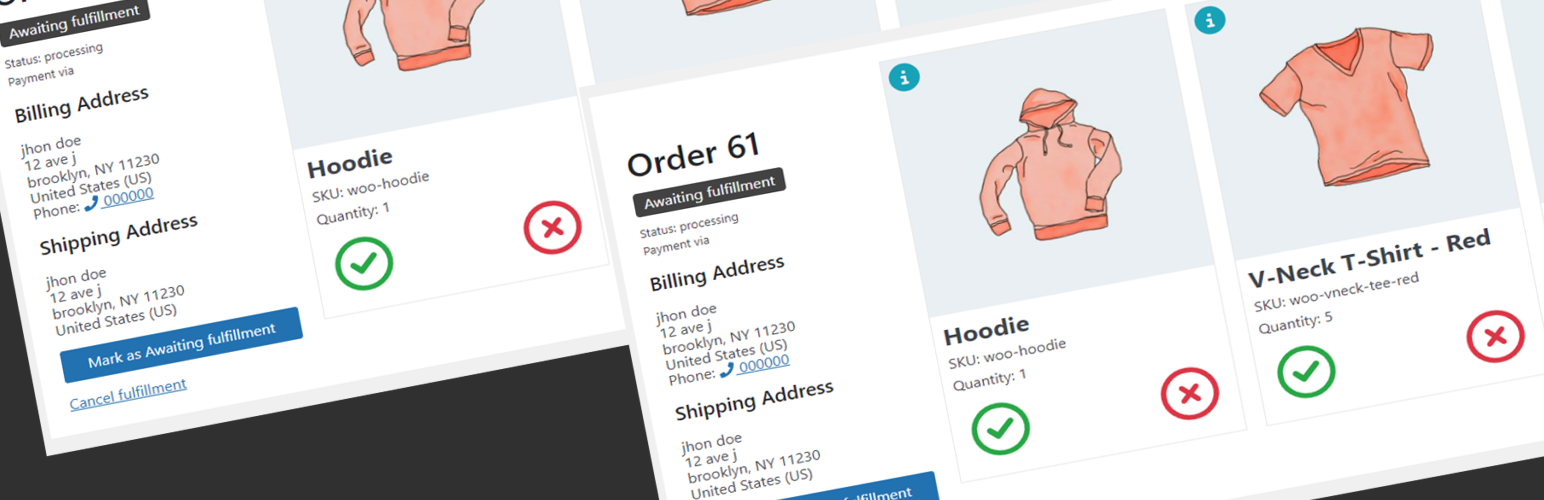
員工訂單履行屏幕。
工作人員可以從其工作站訪問履行屏幕,並實時跟踪和履行訂單。
屏幕將保持打開並自動加載新順序,因為它們被標記為“等待履行”,
讓員工保持組織並高效處理訂單。
自動化訂單分拣流程
您可以設置一種訂單狀態,在訂單狀態變化時自動將訂單標記為“等待履行”。
您可以設置某些訂單狀態在採取某些履行操作時自動選擇。
外掛標籤
開發者團隊
② 後台搜尋「Order Picking For WooCommerce」→ 直接安裝(推薦)
原文外掛簡介
Developed by PowerfulWP | Premium | Documents
Order picking is the process of selecting and gathering items from a warehouse or storage location to fulfill an order.
It is a critical step in the order fulfillment process and involves verifying that the correct items are being picked,
packing them in the appropriate packaging, and preparing them for shipping or delivery.
Effective order picking is important for ensuring that orders are filled accurately and efficiently,
and that customers receive the correct items in a timely manner.
It is also a key factor in maintaining good inventory management and keeping track of stock levels.
The Order Picking For WooCommerce plugin allow you to choose orders for picking and mark them as fulfilled or unfulfilled.
Order fulfillment management:
The plugin allows store owners to manage the process of fulfilling orders placed on their store. There are four fulfillment statuses available: “Partially Fulfilled,” “Fulfilled,” “Awaiting fulfillment,” and “Unfulfilled.” These statuses can be filtered on the order list in the admin panel.
The plugin also includes a bulk action feature in the order list on the admin panel, which allows the store owner to quickly and easily update the fulfillment status of multiple orders at once. They can mark orders as “Awaiting fulfillment” or cancel the fulfillment process for those orders.
The Store owners can also mark individual orders as “fulfilled,” “not fulfilled,” or “Partially Fulfilled” from the order list on the admin panel or from the order page.
* PREMIUM FEATURES
Check out the Order Picking For Woocommerce premium plugin.
The premium plugin includes the following additional features:
Staff frontend order fulfillment panel.
Staff members can access the fulfillment panel from their work stations and use it to track and fulfill orders in real-time.
The panel will stay open and automatically load new orders as they are marked as “waiting for fulfillment,”
making it easy for staff members to stay organized and efficiently process orders.
New WooCommerce Status for Fulfillment
We’ve introduced a new status in WooCommerce specifically for fulfillment. This status will help keep track of orders that are in the fulfillment phase, thereby providing more transparency and accuracy in the order processing lifecycle. This feature is a significant improvement for businesses that want to optimize their fulfillment operations, providing a clear, real-time view of order status.
Automating the Order Picking Processes
You can set an order status that will automatically mark an order as “awaiting fulfillment”
when the order status changes.
You can set certain order statuses to be automatically selected when certain fulfillment actions are taken.
Reports
This premium feature provides a comprehensive reports display.
Included are:
* Order Fulfillment Report.
* Product Fulfillment Report.
* Order and Product Fulfillment Report.
* Missing Order and Product Report
* Missing Order Items Report
* Missing Items Report
With these, you can easily track and analyze how well your orders and products are being fulfilled.
It gives a clear snapshot of your business’s fulfillment processes, and you can print these reports for further use.
Picklist
This premium feature provides a comprehensive printable picklist Display.
Included are:
* Picklist by Order
* Picklist by Product
* Picklist by Category
This makes managing your picklists easier and more efficient.