
內容簡介
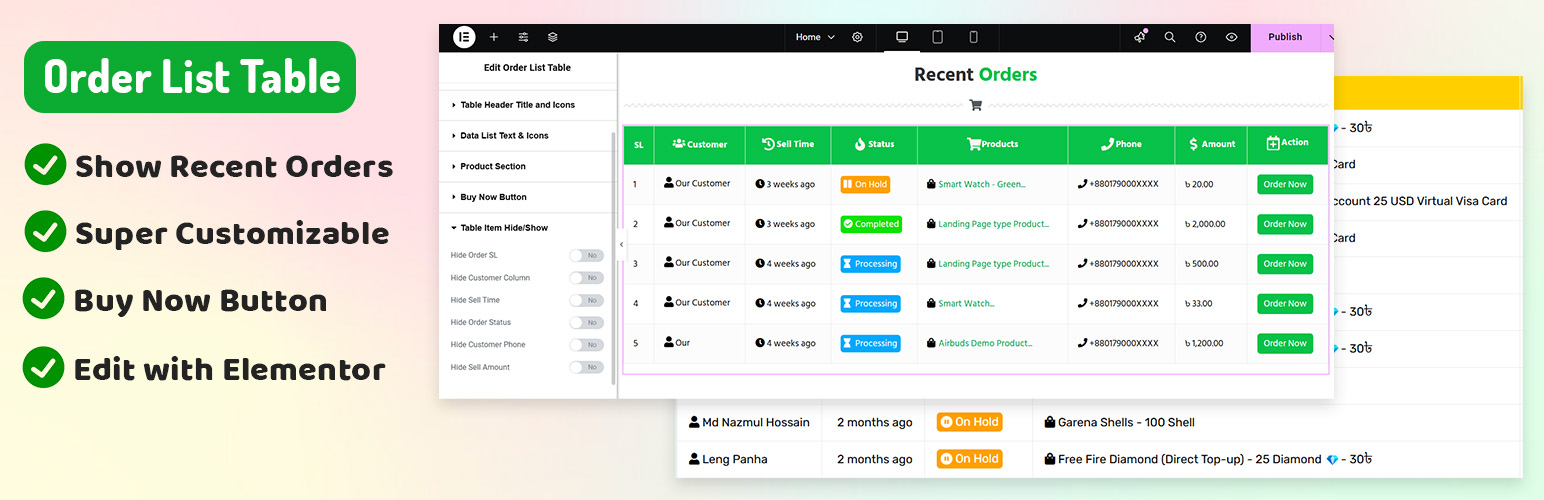
「WooCommerce Order List Table」是一款最佳的Elementor外掛,可使用Elementor頁面建構器在前端展示您的WooCommerce客戶訂單。您可以輕鬆地自定義訂單表格並顯示客戶資訊,例如訂單時間、客戶姓名、訂單狀態等等,只需要使用Elementor頁面建構器即可使用此小工具並自定義此表格。
如果您遭遇「時間差異」的問題,只需前往 wp-admin儀表板 設置>一般>時區,然後從時區中選擇城市名稱即可。
功能
✅ 顯示特定訂單狀態的訂單
✅ 自定義表格圖示
✅ 更改表格背景、邊框、標題顏色
✅ 隱藏/顯示任何列
✅ 显示客户姓名、銷售時間、產品名稱、售賣金額等等。
✅ 非常自定義的表格,易於更改風格。
由 wpmethods 愛心製作
注意:本外掛為Elementor頁面建構器的附加元件,僅在安裝了Elementor頁面建構器和WooCommerce外掛時才能使用。
外掛標籤
開發者團隊
② 後台搜尋「Order List Table Elementor Widget for Woocommerce」→ 直接安裝(推薦)
原文外掛簡介
Order List Table is the best Elementor Addon to show your woocommerce customer orders on frontend using Elementor page builder. You can easily customize the order table And show your customer’s information. Like order time, customer name, order status, etc. Just use elementor page builder and use This widget and customize this table.
If you face ‘time ago’ issue just go to wp-admin dashboard settings>general>timezone and select city name from timezone.
Features
✅ Show Orders from specific order status
✅ Customizable Table Icons
✅ Change Table Background, Borders, Heading Color
✅ Hide / Show Any Columns
✅ Show customer name, sell time, product name, sell amount, etc.
✅ Super Customizable Table & easy to change styles.
✅ Enable/Disable Responsive Table for Mobile Devices.
✅ Buy Now button on the order list table.
Made with love by WP Methods
🎁If you like this plugin, consider supporting development: Donate
Note: This plugin is an addon of Elementor Page Builder and will only work with Elementor Page Builder and WooCommerce Plugin installed.