內容簡介
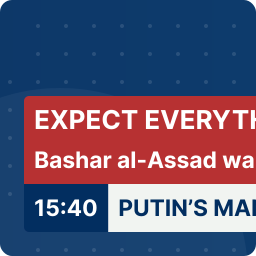
新聞快訊外掛程式可讓你在 Elementor 頁面建構器中新增新聞快訊。你可以使用部落格文章作為新聞快訊,或者也可以新增自訂文字作為快訊。使用此外掛程式,沒有限制,因此可以新增無限量的新聞快訊。此外掛程式可用於顯示最新文章、具有連結的自訂通知等多種用途。
它會在 Elementor 小工具面板上新增一個元素。你可以在網頁的任何位置上顯示最新文章和自訂文字。
升級到專業版!
查看演示
專業 WordPress 主題自訂服務
功能
使用部落格文章標題作為新聞快訊。
限制顯示文章數量
選擇部落格文章連結是否在新分頁中開啟
新增無限量自訂文字作為新聞快訊
為自訂新聞快訊項目新增連結
選擇自訂新聞快訊連結是否在新分頁中開啟
上一步和下一步導覽按鈕
暫停按鈕
可自訂標題樣式
標題設計自訂化選項
控制按鈕設計自訂化選項
新聞區段設計自訂化選項
無限量新聞快訊
更多功能即將推出
升級到專業版!
查看演示
此外掛程式也有專業版。專業版提供更多功能和優勢。
專業版功能
升級到專業版!
查看演示
兩種效果:滾動和打字
啟用 RTL 選項
滾動效果滾動速度選項
可新增任何種類的文章,包括 WordPress 預設文章類型和自訂文章類型
從自訂文章類型中選擇文章
文章限制選項,限制想顯示的文章數
文章排序選項,按升序或降序排序文章
依照日期、ID、標題、名稱、修改時間、文章主父節點 ID、隨機、選單順序、評論計數等選項排序文章
從類別/分類法篩選文章
排除特定文章類型的文章選項
鼠標懸停時暫停選項
關閉自動撥放選項
顯示或隱藏上一步、下一步導覽按鈕選項
顯示或隱藏播放/暫停按鈕選項
可自訂標題樣式
列表分隔符號帶有風格選項
使用 FontAwesome 圖示作為標題
使用自訂圖片作為標題
顯示或隱藏標題選項
完全自訂樣式選項
完全自訂標題,以更改標題字型大小、背景、顏色、字型等
自訂樣式選項以自訂快訊背景、邊框、字型等
外掛標籤
開發者團隊
原文外掛簡介
News icker for Elementor lets you add news ticker with the Elementor Page builder.You can use any of your blog post as news ticker. You can also add custom texts as as news ticker. There is no limitation, so you can add unlimited numbers of news ticker with this plugin. This plugin is useful to display your latest posts, custom notification with link as news tickers or so many purposes.
It adds a new Element on the Elementor widget panel. You can show your latest posts and custom texts at anywhere of your webpage with this plugin.
Upgrade to Pro!
View Demo
Features
Use Blog Post title for news ticker.
Limit Numbers of Posts to Display
Select whether Blog Post Link Open in a new tab or not
Add Unlimited Numbers of Custom Texts as News Ticker
Add Link for your Custom News Ticker Item
Select whether Custom News Ticker Link Open in a new tab or not
Previous and Next Navigation button
Pause Button
Customizable Heading Title
Heading Design Customization Option
Control Button Design Customization Option
News Section Design Customization Option
Unlimited Numbers of News Ticker
More Features are Coming Soon
Upgrade to Pro!
View Demo
There is also a pro version of this plugin. You will get more features and advantages on the pro version.
Pro Features
Upgrade to Pro!
View Demo
Two Types of Effect : Scrolling and Typing
Option to Enable RTL
Scroll Speed Option for Scrolling Effect
Add Posts from any Kind of Post Types Including WordPress Default Post Types and Custom Post Types
Choose Posts from Custom Post Types
Post Limit option to Limit how many Posts you want to show from Post Types
Order Posts option to Order Posts by Ascending or Descending Order
Order By options to Oder Posts by Date, ID, Title, Name, Modified Time, Post Parent ID, Randomly, Menu Order, Comment Count
Filter Posts From Category/Taxonomy
Exclude Post Option to Exclude posts from Specified Post Type
Pause Option on Mouse Hover
Option to Disable Autoplay
Option to Display or Hide Next, Previous Navigation Button
Option to Display or Hide Play/Pause Button
Customizable Heading Title
List Separator Icon with Styling Options
Use FontAwesome Icon for Heading Title
Use Custom Image for Heading Title
Option to Display or Hide Heading Title
Fully Customizable Style Options
Fully Customizable Heading to Change Heading Font Size, Background, Color, Font Family etc.
Customizable Styling Options to customize Ticker Background, Border, Font, etc.
Customizable Styling Options to customize Control Button Background, Border, Font, etc.
Custom JS
Priority Support
More Features are Coming Soon
Upgrade to Pro!
View Demo
** We welcome your feedback and new feature requests to improve the plugin! Please contact with us at [email protected] for new Feature Requests**