外掛標籤
開發者團隊
原文外掛簡介
NeoSERP is a free WooCommerce product schema plugin. It gives Google the structured data its Merchant listings and Product snippets reports check for: every variant of a variable product, shipping details from your real shipping zones, and the return policy you declare. Everything runs on your own store. No account, no API key, and nothing is sent anywhere.
If Search Console has emailed you “Merchant listings structured data issues detected”, or flagged Missing field "shippingDetails" or Missing field "hasMerchantReturnPolicy", those are the fields NeoSERP fills in, from data WooCommerce already holds.
Compatible with 233 of the most popular WooCommerce themes, 195 out of the box and 38 with one setting, including Storefront, Twenty Twenty-Five, Astra, Kadence, OceanWP, Blocksy, GeneratePress and Hello Elementor, and with shops built in Elementor, Elementor Pro and Divi. Each was checked over HTTP on a real store. See the full theme compatibility list.
Works beside the SEO plugin you already use. When Yoast, Rank Math, All in One SEO, SEOPress, Slim SEO, The SEO Framework, Squirrly or WPSSO is active, NeoSERP switches its overlapping modules off by itself.
What changes on your store
Activate it and these appear by themselves. Nothing to paste in, no block to place, no shortcode to find:
Product pages: a Product node in the page head, or a ProductGroup with every variation for a variable product. It carries offers, shipping, returns, brand, GTIN, ratings and reviews.
Shop and category pages: an ItemList of the products the page actually shows.
Every page: Organization, WebSite, WebPage and breadcrumb nodes, linked into one graph, plus meta description, Open Graph and Twitter tags when no SEO plugin is writing them.
Blog posts: BlogPosting markup with speakable hints, and a FAQPage built from core Details blocks.
/llms.txt: a markdown summary of your site for AI crawlers, kept current as you publish.
In the admin: a Dashboard showing how much of your catalogue carries schema, a schema inspector, and a Search Appearance box on the product editor with a live search-result preview.
Shoppers see no difference. NeoSERP adds no script and no stylesheet to your storefront, and nothing on the visible page changes.
What it does for your search results
1. It keeps the rich result.
One missing property does not shrink a product’s rich result. It removes the whole thing, silently, with no warning in your dashboard. NeoSERP reads what WooCommerce already knows (variations, shipping zones, brands, dimensions, stock) and writes it as the structured data Google, Bing and AI answer engines read.
2. It shows each variant as its own product.
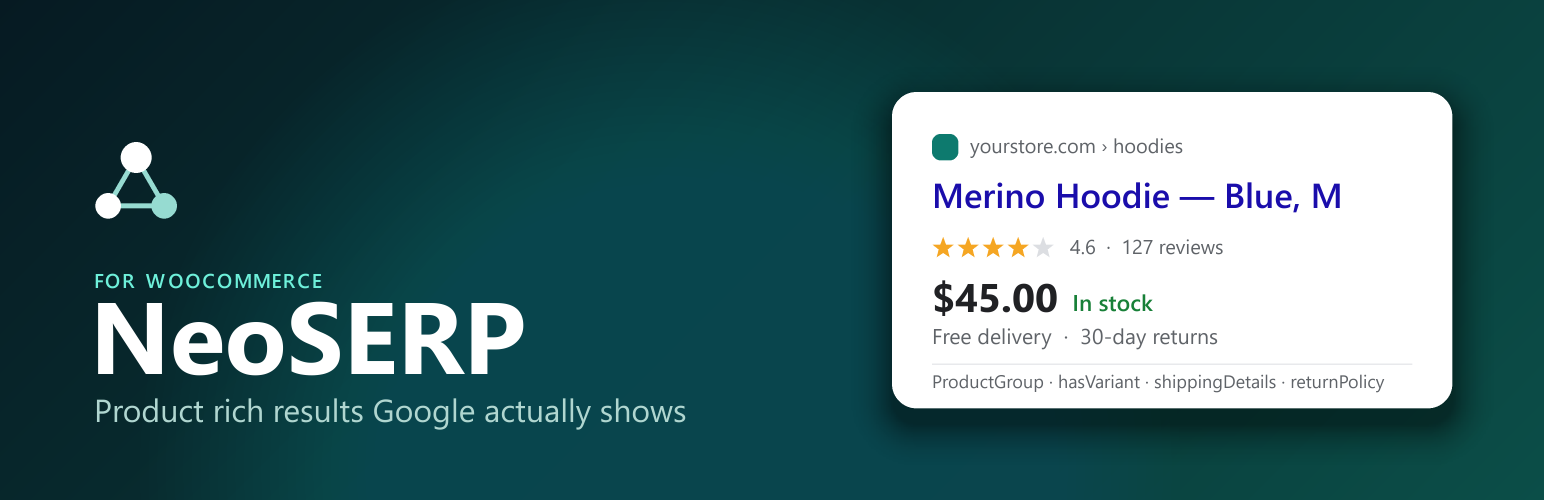
A variable product is not one purchasable thing. It is several, each with its own price, SKU, colour and availability. NeoSERP writes a ProductGroup with hasVariant, variesBy and productGroupID, and nests every variation inside it as a Product node with its own SKU, GTIN, image, price, stock and condition. Colour, size, material and pattern are read from your own attributes, in your own language. An AggregateOffer sits alongside, so the price range still reads correctly.
3. It takes shipping and returns from your settings.
Google increasingly wants both before it shows a product with its price and availability. shippingDetails comes from your live shipping zones: each zone’s destination and its cheapest fixed rate, with unconditional free shipping as a zero rate. hasMerchantReturnPolicy comes from a short Returns form on the settings screen.
4. It never invents a field.
A shipping cost worked out by a formula, free shipping that needs a minimum order, or a return policy you have not filled in is left out rather than guessed at. Markup that disagrees with your checkout is worse than none.
More on what these reports check and how to fix each warning: NeoSERP on neoplugin.com.
Why NeoSERP beside the plugin you already use
It stands aside where another plugin covers the job.
NeoSERP is not a replacement for your SEO plugin. When one of the full SEO plugins above is active, every overlapping module switches itself off.
It tells you when two plugins write the same markup.
NeoSERP also detects structured-data-only plugins, such as Schema & Structured Data for WP & AMP and Schema Pro. It switches its own schema module off beside them, and says so plainly when two plugins are both writing Product markup, the most common reason rich results get ignored.
Variant markup stays on, on purpose.
The free versions of the major SEO plugins do not write variant markup, so NeoSERP’s variant module keeps running beside them. Beside Yoast WooCommerce SEO or WPSSO, which do write it, the module starts switched off. Either way it is a toggle like any other.
It is light by design.
No frontend JavaScript. No CSS. No database tables, now or later. One settings screen. WooCommerce is optional: without it you still get the full content graph.
Features
Everything below is in the free plugin.
Product schema
ProductGroup for variable products, with hasVariant, variesBy and productGroupID, and every variation as its own Product node.
Attribute mapping to colour, size, material, pattern and audience, with multilingual detection and a per-attribute override.
Identifiers and detail: SKU, GTIN from WooCommerce’s own GTIN field, MPN from the meta the common feed plugins write, brand from the WooCommerce brand taxonomy, gallery images, item condition, weight and dimensions.
Ratings and reviews: AggregateRating and real Review nodes from your WooCommerce reviews.
Certification for EU energy labelling, written only when the data exists.
Shipping and returns
shippingDetails from your shipping zones: destination, country and region, and the cheapest fixed rate. Local pickup is never counted as shipping.
hasMerchantReturnPolicy from your declared return terms. Nothing appears until you fill them in.
The site graph
Organization: identity, logo and social profiles.
WebSite: with a SearchAction pointing at your site search.
WebPage: subtyped correctly (CollectionPage on archives, ItemPage on products, CheckoutPage at checkout).
BreadcrumbList: home, shop, category, product.
ItemList: the products a shop or category page actually shows, with positions that continue across pages, including page-builder product widgets.
BlogPosting: headline, author, dates, images and speakable hints.
FAQPage: read automatically from core Details blocks. No shortcode, no proprietary block.
AI search and social
/llms.txt: a cached, always-current markdown summary of your site.
Product Open Graph tags (product:price:amount, product:availability) for Facebook catalogues and Pinterest rich pins.
Meta descriptions, Open Graph and Twitter cards where no SEO plugin writes them.
Compatibility
Automatic back-off beside full SEO plugins and structured-data plugins, with a duplicate-markup warning.
Opt-in theme switches: turn off a theme’s duplicate product microdata, breadcrumb markup, schema, meta description or Open Graph tags, through the theme’s own hooks. Off until you turn them on.
Classic and block themes alike: markup goes in the page head, so it works on block templates where WooCommerce prints no product markup at all.
WooCommerce High-Performance Order Storage and the Cart and Checkout blocks: compatibility declared.
Variation swatches plugins: NeoSERP reads WooCommerce’s own variations, so swatches change nothing.
Running it
Dashboard: how much of your catalogue carries schema, and what each module is doing.
Schema inspector: the real JSON-LD graph for any page you choose.
Search Appearance box on the product editor, with a live search-result preview.
Module toggles: switch any part off.
For developers
Extend or override anything through filters:
neoseo_schema_providers, `neoseo_schema_graph`, `neoseo_product_list`, `neoseo_product_node`, `neoseo_product_group_node`, `neoseo_product_variants_node`, `neoseo_product_mpn`, `neoseo_product_condition`, `neoseo_product_certification`, `neoseo_attribute_property`, `neoseo_offer_shipping`, `neoseo_offer_return_policy`, `neoseo_meta_description`, `neoseo_description_post_types`, `neoseo_webpage_type`, `neoseo_llms_txt`, `neoseo_module_enabled`
Documentation
For the full feature table, the theme compatibility list and how each Search Console warning is fixed, visit:
NeoSERP on neoplugin.com
External services
This plugin does not connect to any external service. Your structured data is built on your own server from your own store’s data, and nothing is sent anywhere.