外掛標籤
開發者團隊
原文外掛簡介
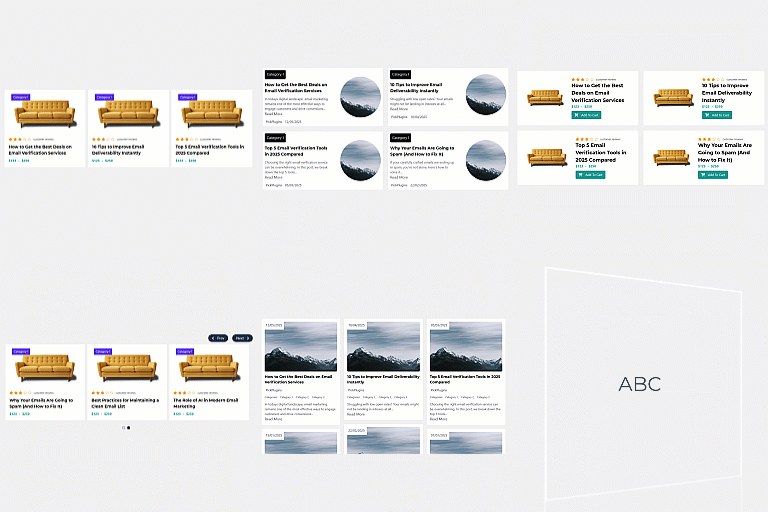
MM Post Grid displays your posts, pages or any custom post type in a responsive card grid. Add one shortcode and you get a grid that already looks finished, with sensible spacing, readable typography and a hover state that does not shout.
It is built to be a good neighbour. The grid inherits your theme typeface instead of forcing its own, every class name is prefixed, no global element is styled, and there is not a single !important in the stylesheet. Nothing is loaded on pages that do not contain a grid.
What makes it different
Genuinely lightweight. One small stylesheet and, only when you use Load More, one small script. No jQuery on the front end, no CSS framework, no icon font, no external requests.
Loads nothing where there is no grid. Assets are registered up front and enqueued only when a grid actually renders.
Theme friendly. Font family is never set, so the grid picks up your theme typeface and only controls size and rhythm. All selectors are scoped to the .mmpg wrapper.
Accessible by default. Real heading levels you choose, no duplicate links per card, unique accessible names on every Read more link, visible focus rings, a live region for Load More, and full support for prefers-reduced-motion.
Customisable without CSS. Over 35 styling settings drive CSS custom properties: card layout, hover and image effects, spacing, typography, line clamping, category badges, button styles and pagination alignment. Only the values you actually change are printed, so a default site sends no extra CSS at all.
Seven styling templates. Default, Minimal, Soft, Outline, Dark, Magazine and List. Apply one as a starting point, then fine-tune anything on the Styling tab.
Three card layouts. Image above the text, image beside the text, or text laid over the image. The side-by-side layout only engages when a card is wide enough, so it never gets squeezed.
Per grid overrides. Any setting can be overridden on a single grid through a shortcode attribute.
Works without JavaScript. The Load More control is a real link to the next page, so it degrades to normal pagination.
Developer friendly. Namespaced classes, a documented filter on every piece of markup, and no third party dependencies.
Usage
[mm_post_grid]
That uses your saved settings. Add attributes to override them for one grid:
[mm_post_grid columns="4" posts_per_page="8" pagination="load_more"]
Shortcode Attributes
Every attribute is optional. Anything you leave out falls back to your saved setting.
Query
post_type – One or more post types, comma separated. Default: your setting.
posts_per_page – Number of posts per page, 1 to 48.
orderby – date, modified, title, menu_order, comment_count, rand or ID.
order – ASC or DESC.
category – Category slugs or IDs, comma separated.
categories – Alias of category.
tag – Tag slugs or IDs, comma separated.
taxonomy – A taxonomy name, used together with terms.
terms – Term slugs or IDs for the taxonomy above.
author – Author IDs, comma separated.
exclude – Post IDs to leave out.
offset – Skip this many posts.
ignore_sticky – yes (default) treats sticky posts like any other post; no pushes them to the front.
Layout
columns – Desktop columns, 1 to 6.
columns_tablet – Columns below 1024px, 1 to 6.
columns_mobile – Columns below 640px, 1 to 6.
gap – Space between cards in pixels, 0 to 80.
image_size – Any registered image size.
image_ratio – 16-9, 16-10, 3-2, 4-3, 1-1, 3-4 or auto.
pagination – none, numbers, prev_next or load_more.
Content
show_image – yes or no.
show_title – yes or no.
show_date – yes or no.
show_author – yes or no.
show_category – yes or no.
show_excerpt – yes or no.
show_read_more – yes or no.
image_fallback – yes or no, show a placeholder when a post has no featured image.
title_tag – h2, h3, h4, h5, h6, p or div. Pick the level that fits the page outline.
excerpt_length – Words, 0 for the untrimmed excerpt.
read_more_text – Link label.
button_style – link, button or outline.
Style
These switch a class on the grid, so one grid can look different from the site-wide styling. Colours and sizes stay site-wide on the Styling tab.
card_layout – stacked (image above the text), horizontal (image beside the text once the card is wider than 460px) or overlay (text over the image).
hover_effect – lift, shadow, border or none.
image_hover – zoom, none or grayscale.
text_align – left or center.
term_style – text or badge.
button_size – small, medium or large.
pagination_align – left, center or right.
title_lines – Clamp titles to this many lines, 0 to 5. 0 shows the full title.
excerpt_lines – Clamp excerpts to this many lines, 0 to 8.
Wrapper
class – Extra class names on the wrapper.
id – A specific HTML id, useful for anchor links.
Examples
[mm_post_grid columns="4" posts_per_page="12" pagination="numbers"]
[mm_post_grid category="news,events" show_excerpt="no" title_tag="h2"]
[mm_post_grid post_type="portfolio" taxonomy="project_type" terms="print" image_ratio="1-1"]
[mm_post_grid posts_per_page="9" pagination="load_more" button_style="button"]
[mm_post_grid card_layout="overlay" columns="2" image_ratio="4-3" title_lines="2"]
[mm_post_grid card_layout="horizontal" columns="1" term_style="badge"]