內容簡介
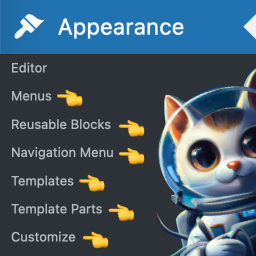
Missing Menu Items 外掛旨在改善 WordPress 控制台的導航體驗,透過新增實用的編輯器相關連結,讓使用者更輕鬆地訪問編輯模板和其他功能,提升網站建置效率。
【主要功能】
• 新增可重用區塊、導航菜單及模板連結
• 顯示網站編輯器、樣式及新增佈景主題選項
• 限制特定使用者角色可見的連結
• 支援在切換到經典佈景主題後訪問編輯器內容
• 自訂連結的顯示方式及分組選項
外掛標籤
開發者團隊
原文外掛簡介
Frustrated navigating around the latest WordPress admin whild building your site? Why does it take so many clicks to get to Editor Templates?
The Missing Menu Items for WordPress plugin adds useful Editor related links to the admin navigation.
Missing Menu Items can add the following links (each one can be turned on or off in Settings → Missing Menu Items):
* Reusable Blocks, Navigation Menus, Templates, and Template Parts (Appearance)
* Site Editor, Styles, and Add New Theme (Appearance)
* Menus, Widgets, and Customizer — shown only when your theme hides them (e.g. block themes)
* Upload Plugin, Add New Plugin, and Plugin Updates (Plugins)
Plus:
* Choose whether links nest in their native menus or group together under Appearance
* Limit which user roles see the links
* Keep Site Editor content (templates, template parts, styles) reachable after switching to a classic theme, so you can copy or export it
Support
You can get support from the community here, or in our growing Facebook Group and find information in our documentation.
Direct support is offered to BlockStyles members.
Stay Connected
Stay up-to-date on Missing Menu Items updates and Gutenberg development, using the links below. The plugin is also being built transparently on GitHub, so give it a star and follow along! 😉
Missing Menu Items is a part of BlockStyles, a collection of tools that transforms the default WordPress Block Editor into a true page builder.
Visit the Block Styles Home Page
Follow on Twitter
Follow on Facebook
Join Our Facebook Community
Subscribe to our Youtube for Tutorials & Demos