
內容簡介
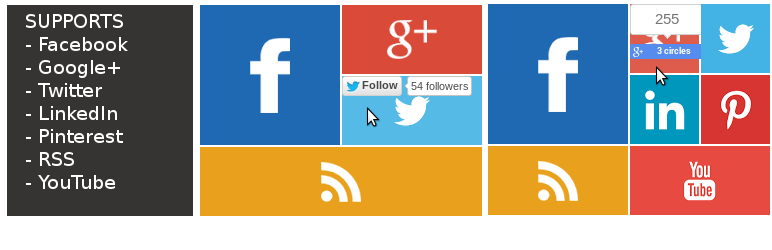
一個輕量級的 WordPress 外掛,顯示地鐵風格的社交網絡圖示在側邊欄,並連接到您的社交網絡檔案。
新增按鈕選項將顯示「讚好/追蹤」按鈕在社交圖示上,讓用戶可以立即在不離開您的網站的情況下「讚好/追蹤」您的頁面或檔案。
由於每個人都使用 Facebook 和 Twitter,我們將它們設為預設選項,其他社交網絡則是可選的。
更新
添加了顏色選擇器,現在可以將 widget 中的任何圖標設定為任何顏色。
根據用戶的要求,Google+ 和 RSS Feed 現在是可選擇的。
如果需要,您可以在 widget 設置中顯示 Google+、Linkedin、Youtube、RSS Feed 和 Pinterest,否則選擇「不顯示」選項。
支持響應式設計,插件會自動適應您側邊欄的寬度,否則您可以為 widget 指定寬度。
下一個版本將包括以下功能
用戶端配置/自定義在 Widget 管理頁面
更多風格
支援/聯繫
更多信息/DEMO
開發者博客:Aidful.com
贊助商
SpecificFeeds
如果您喜歡此插件,請不要忘記給插件評分。
外掛標籤
開發者團隊
📦 歷史版本下載
原文外掛簡介
A light weight wordpress widget that displays Metro Style social network icons in Sidebar and links to your social network profiles.
Add button option will display the Like / Follow button on the Social icons so that your users can immediately Like / Follow your page or profile without leaving your site.
Since every one use Facebook and Twitter, we made them as default and other network as optional.
Update
Color Picker added, Now you can set any color to any icons in the widget.
On Users request Google+ and RSS Feed are now optional.
If needed you can display Google+, Linkedin, Youtube, RSS Feed and Pinterest else choose don’t show option in widget settings.
Responsive design, Plugin will automatically fit within your siderbar width else you can specify width for the widget.
Next Release will Include the Below Feature
User side configuration / customization in Widget admin page
More Styles
Support / Contact
More Info / DEMO
Developer Blog: Aidful.com
Sponsors
SpecificFeeds
If you like this plug-in, please don’t forget to rate this plugin.