內容簡介
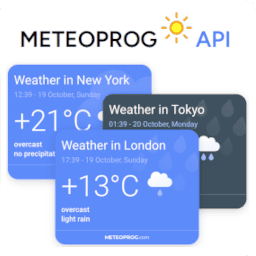
最好的法國天氣預報小工具外掛程式!
MeteoArt.com 提供準確的全球城市天氣預報。
只需設定城市和國家,並嵌入小工具到您的網站/部落格中。
小工具是免費的
可以自訂小工具的樣式
反應靈敏的天氣小工具
不需要開發技能
高效率和輕量級的代碼
符合 SEO 的友善 – 沒有 iframe
選擇您要顯示的語言 – 法文 / 英文
** 如有特殊自訂需求請聯繫此電子郵件 -> [email protected]
此Meteo 外掛程式需要信賴第三方服務,該小工具使用由MeteoArt.com提供的天氣服務。
* 服務提供者連結 – https://www.meteo.com
* 服務提供者使用條款連結 – https://www.meteo.com/terms
* 服務提供者隱私政策連結 – https://www.meteo.com/privacy
外掛標籤
開發者團隊
原文外掛簡介
The best French weather forecast widget plugin!
MeteoArt.com offers an accurate weather forecast for all cities around the world.
Set the city and country and embed the widget in your website/blog.
Widgets are free of charge
Widget style can be customized
Responsive weather widget
No development skills are needed
High performance and lightweight code
SEO friendly – no iframes
Select your display language – French/English
Block editor / Shortcode support / Classic Widgets / Legacy widgets
** For special customization requests, please contact this mail -> [email protected]
The Meteo plugin is relying on a 3rd party as a service, the widget is using weather services provided by MeteoArt.com.
* Service provider link – Meteo Art
* Service provider terms of use link – https://www.meteo.com/terms
* Service privacy policy link – https://www.meteo.com/privacy
Easy Installation
There are several options for installation
Block Editor
Open the Block Editor for the post or page where you want the widget.
Add the “MeteoArt Widget” block.
Customize the widget settings as desired.
Shortcode
Insert [meteo city="Paris" country="France"] into your content, replacing CityName and CountryName with your location.
Classic Widgets
Go to Appearance > Widgets.
Add the “MeteoArt Widget” to your sidebar.
Configure the settings and save.