外掛標籤
開發者團隊
② 後台搜尋「Media Shelf – Media Library Folders」→ 直接安裝(推薦)
原文外掛簡介
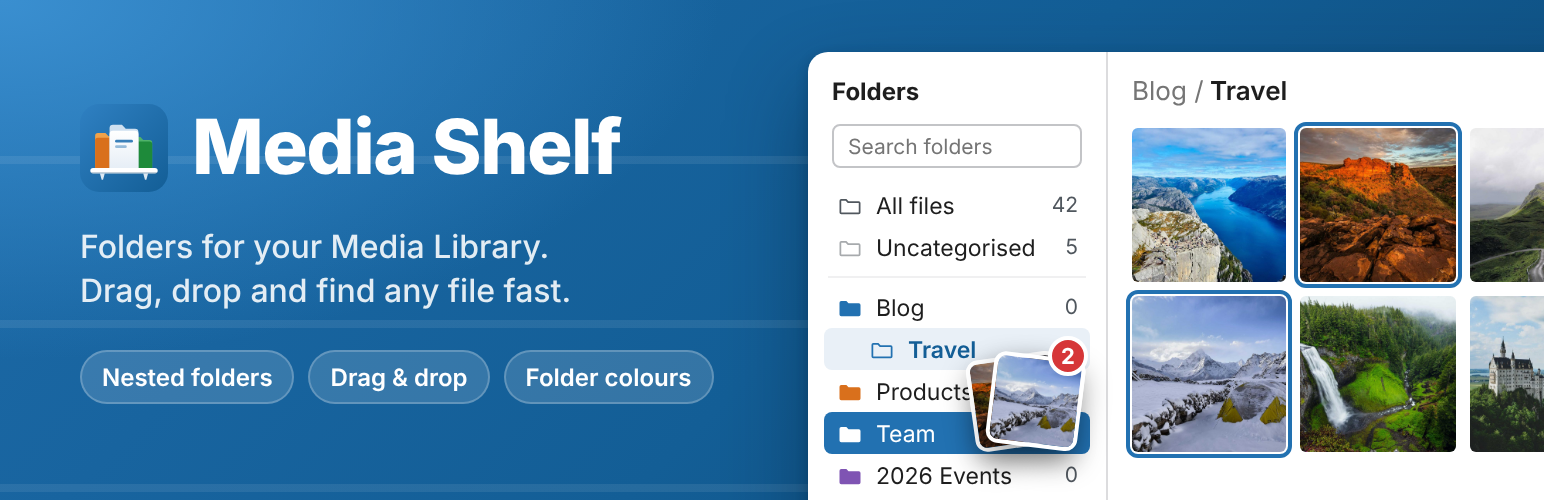
Media Shelf adds a folder panel to the WordPress Media Library, so you can organise images, videos and documents into media folders and find them again in seconds. Files are filed with real WordPress taxonomies, so nothing moves on disk and URLs never change.
Every folder feature is free: unlimited folders and subfolders, folder colours, drag and drop, and the panel in every media dialog.
A folder tree where you work. It appears in the Media Library grid and list views, and in every media dialog, including the block editor’s Media Library and the featured image picker. “All files” and “Uncategorised” are always one click away.
Drag and drop. Drag one file or a whole selection onto a folder. Dropping moves files by default; hold Alt (Option on a Mac) to add them to a folder while keeping their other folders. Every change can be undone from the notice that follows.
Organise folders in place. Create, rename and delete folders inline. Drag a folder onto another to nest it, or between folders to reorder. You can also sort A–Z and pick from nine folder colours. Nesting has no limit.
Right-click menu, keyboard and screen readers. Folders have a context menu. The tree is a proper ARIA tree, controlled with arrow keys, type-ahead, F2 to rename, Delete, and Alt+arrows to move folders. Folder moves are announced.
Upload into a folder. Files you upload land in the folder that is selected.
Search folders. Each result shows where the folder lives.
Collapsible and resizable. The panel’s width and collapsed state are remembered in your browser.
Fast with large trees. Subfolders load when you open them, through the REST API.
Switching from Enhanced Media Library? Media Shelf offers a one-click import of Enhanced Media Library’s settings. Your categories become folders with every assignment intact. It also understands Enhanced Media Library’s taxonomy attributes in gallery and playlist shortcodes, for example .
Works with what WordPress already has. Folders are taxonomy terms. You can add more “folder sets” (for example clients or vendors), or use post categories and tags on media. The attachment details sidebar keeps its checkboxes, and the list view has Move, Add and Remove bulk actions.
Works where you edit. Tested with the block editor, the Classic Editor plugin and the Elementor editor’s media dialogs, on single sites and multisite networks (network-activated or per site).
Right-to-left ready, translatable, private. No tracking, no external requests, no ads in your dashboard.
Media Shelf is not affiliated with or endorsed by the authors of Enhanced Media Library, FileBird, Real Media Library or Folders.
Source code
The JavaScript in build/ is compiled with @wordpress/scripts. The uncompressed source is in the src/ folder of this plugin, with package.json. Run npm install && npm run build to rebuild it.
Privacy
Media Shelf does not collect or send any data.
Media Shelf itself does not set front-end cookies and does not contact any other service.