內容簡介
HTML bulleted list:
```html
<ul>
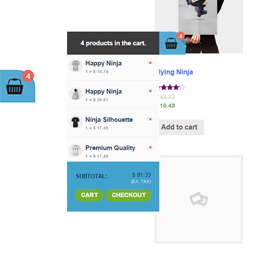
<li>Mini Cart for WooCommerce 是一個輕量、可自定義的迷你購物車外掛程式,透過時尚的浮動購物車圖示和實時的 AJAX 更新功能,增強您的 WooCommerce 商店。</li>
<li>此外掛設計具有彈性和高效能,讓您在不寫任何程式碼的情況下,個性化設定您的迷你購物車的外觀和行為。</li>
</ul>
```
問題與答案:
```html
<h2>問題與答案</h2>
<details>
<summary>這個外掛的主要功能是什麼?</summary>
<p>迷你購物車外掛程式提供了以下主要功能:
<ul>
<li>啟用/停用迷你購物車:輕鬆透過開關打開或關閉浮動購物車。</li>
<li>位置控制:選擇在螢幕底部左側或右側顯示迷你購物車圖示。</li>
<li>自訂購物車圖示:使用預設圖示或上傳您自己的購物車圖片。</li>
<li>固定購物車按鈕:滾動時使購物車按鈕始終可見。</li>
<li>AJAX 驅動:即時添加和移除項目,無需重新載入頁面。</li>
<li>全響應式:為行動、平板和桌面設備進行優化。</li>
<li>輕巧快速:無性能負擔,足跡極小。</li>
</ul>
</p>
</details>
<details>
<summary>這個外掛如何設計客製化?</summary>
<p>您可以透過內建的色彩選擇器,輕鬆將迷你購物車設計與您的商店品牌相匹配,而無需編碼。</p>
<p>可用的色彩選項包括:
<ul>
<li>迷你購物車面板:背景顏色、文字顏色</li>
<li>迷你購物車標題:背景顏色、文字顏色</li>
<li>小計區域:背景顏色、字體顏色</li>
<li>購物車按鈕:字體顏色、背景顏色</li>
<li>結帳按鈕:字體顏色、背景顏色</li>
</ul>
</p>
</details>
<details>
<summary>為什麼要使用迷你購物車外掛?</summary>
<p>無論您管理一個小型網購商店還是一個大型電子商務平台,MCFWC 通過實時保持購物車始終可訪問和最新,提供了用戶友好的購物體驗。</p>
</details>
```
外掛標籤
開發者團隊
② 後台搜尋「Advanced Mini Cart – Floating AJAX Cart & Sidebar」→ 直接安裝(推薦)
原文外掛簡介
Advanced Mini Cart – Floating AJAX Cart & Sidebar is a lightweight plugin that adds a floating, customizable mini cart icon to your store — complete with real-time AJAX updates, sidebar display option, custom icon upload, and responsive design.
No coding needed. Just install, activate, and customize the cart’s appearance and behavior via the user-friendly admin panel.
🎯 Key Features
Enable or disable floating mini cart icon
Position control – bottom-left or bottom-right of the screen
Mini Cart Display Mode – choose between:
Show Cart on Hover
Show Cart as Sidebar (on click)
Custom icon support – upload your own cart image or use defaults
Sticky cart visibility – stays visible as users scroll
AJAX-powered updates – real-time add/remove/modify without reload
Fully responsive – works on all devices
Lightweight and optimized – no extra bloat
🎨 Design Customization
Easily match the mini cart to your site’s branding with built-in color pickers:
Mini cart background and text colors
Header background and text colors
Subtotal area styles
Cart and checkout button colors
🚀 Why Use Mini Cart?
Provide your customers with a fast, seamless cart experience. Keep the cart always accessible, display it as a floating icon or a full sidebar, and allow instant updates without leaving the page.
Support
Have questions or suggestions?
Visit the Support Forum
Credits
Developed by Kirtikumar Solanki.
Donations welcome via PayPal.