內容簡介
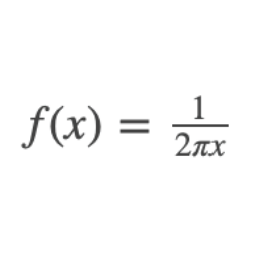
使用 MathQuill(http://mathquill.com/)輕鬆地在 WordPress 頁面中輸入複雜的數學表達式。此外掛會在「小工具」中加入一個名為「直接輸入數學」的新區塊編輯器。
數學表達式以 LaTeX 格式儲存,並由 MathQuill 在頁面檢視期間呈現。
使用方法
安裝後,將可使用名為「直接輸入數學」的新區塊編輯器。每個區塊都包含一個 MathQuill 實例,並可直接在頁面上編輯數學。
當數學編輯器取得焦點時,您可以使用鍵盤或複製/貼上方式輸入數學符號。
請見http://mathquill.com/ 首頁,以瞭解如何輸入數學的視覺示範。
以下是一些常見的鍵盤快捷键:
/ (正斜線) 輸入一個新的分數,其分子和分母的輸入框範圍具有焦點
^ (上標符號) 輸入新的上標,例如添加指數
_ (下標符號) 輸入新的下標
( (左括號) 打開左括號(其大小會根據內容的高度進行縮放)。其他括號類型的行為類似,例如 [ 和 {
\ (反斜線) 開始輸入下列控制序列中的一個。輸入完成後,按下 Enter 或空格以查看生成的符號
控制序列 - 要創建每個符號,請在數學編輯器中輸入完整序列(包括反斜線),然後按空格或 Enter。(非完整清單)
\plusminus
\times
\alpha
\beta
\gamma
\delta
\Alpha
\Beta
\Gamma
\Delta
\summation
\prod
\int
\sqrt
\nthroot
\lt
\gt
\le
\ge
\approx
\doteq
\neq
\nless
\ngtr
\intersection
\union
\subset
\superset
\notsubset
\nosuperset
\subseteq
\isin
\contains
\notcontains
\Complex
\Hamiltonian
\Imaginary
\Naturals
\Primes
\Rationals
\Reals
外掛標籤
開發者團隊
② 後台搜尋「Direct math input with MathQuill」→ 直接安裝(推薦)
原文外掛簡介
Type complex math expressions easily into your wordpress page using MathQuill (http://mathquill.com/). This plugin adds a new block editor called ‘Direct math input’ in the ‘widgets’ category.
Math expressions are saved in LaTeX format and rendered by MathQuill during pageview.
Usage
After installing, a new block editor called ‘Direct math input’ will be available. Each block contains a MathQuill instance
where you can edit math right on your page.
When the math editor is focused, you can enter math symbols using your keyboard or via copy/paste.
See the http://mathquill.com/ homepage for a visual demonstration of how to input math.
Some common keyboard shortcuts are as follows:
/ (forward slash) Enter a new fraction, with focusable input areas for numerator and denominator
^ (caret) Enter a new superscript, e.g. to add an exponent
_ (underscore) Enter a new subscript
( (open parentheses) Open parentheses (which will scale based on the height of the content inside) Other parenthesis types behave similarly, e.g. [ and {
\ (backslash) Start typing one of the control sequences below. When finished, press enter or space to see the resulting symbol
Control sequences – to create each symbol, type the full sequence (including the backslash) into the math editor, followed by
space or enter. (not an exhaustive list)
\plusminus
\times
\alpha
\beta
\gamma
\delta
\Alpha
\Beta
\Gamma
\Delta
\summation
\prod
\int
\sqrt
\nthroot
\lt
\gt
\le
\ge
\approx
\doteq
\neq
\nless
\ngtr
\intersection
\union
\subset
\superset
\notsubset
\nosuperset
\subseteq
\isin
\contains
\notcontains
\Complex
\Hamiltonian
\Imaginary
\Naturals
\Primes
\Rationals
\Reals