
內容簡介
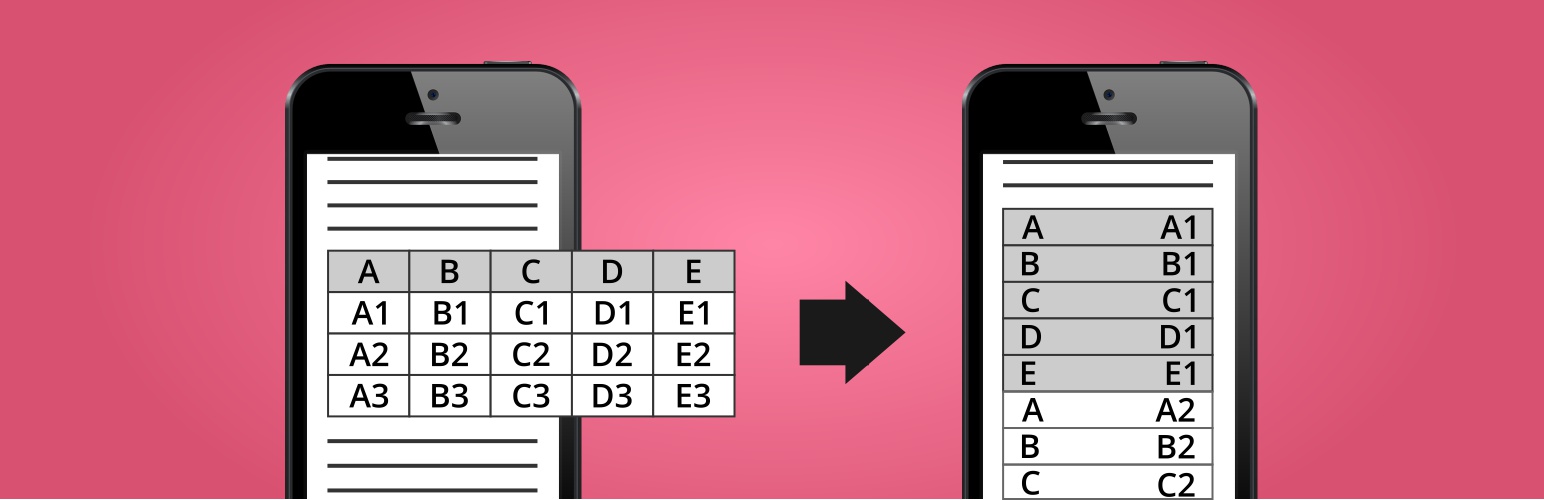
這款 WordPress 外掛能夠自動使您在文章、頁面和小工具中所使用的 HTML 表格適應不同的設備,以手機為主要考量,裝置螢幕較小時,表格會以兩欄的新布局呈現。第一欄將為第一列的資料(欄位名稱),第二欄則是其他列的資料。
WordPress 外掛展示
非 WordPress 網站的 HTML 和 CSS 示範
Make Tables Responsive – HTML and CSS example for Non-WordPress sites
特點
適用於文章、頁面的內容,以及文字/HTML 小工具
選擇要影響的螢幕尺寸
選擇偶數和奇數行的儲存格背景和邊框顏色
可透過 HTML 的類別或 ID 停用某些表格
可透過文章或頁面的 ID 啟用或禁用功能
優點 🙂
完全自動化
不會更改資料庫中實際的文章或頁面內容
藉由停用外掛即可輕鬆回復變更
前端無需使用 jQuery 或 JavaScript
缺點 🙁
第一列必須包含欄位名稱
忽略具有合併儲存格的表格
忽略包含表格的文章或頁面
在多列表格中,只有某些欄位使用 "th" 標籤時,不會適用於所有列
在可回應版本中顯示時,將從具有欄位名稱的儲存格中移除 HTML 代碼(作為左側欄位)
外掛標籤
開發者團隊
📦 歷史版本下載
原文外掛簡介
Automatically makes the HTML tables in your WordPress posts, pages, and widgets responsive (mobile-friendly). Devices with a small screen will see the tables in a new layout with two columns. In the first column will be the data from the first row (the column names), and in the second column will be the data from the other rows.
WordPress Plugin Demo
HTML and CSS Demo for Non-WordPress Sites
Make Tables Responsive – HTML and CSS example for Non-WordPress sites
Features
Affect post/page content, excerpts, category descriptions, and text/HTML widgets
Choose affected screen size
Choose the cell background and border color for even and odd rows
Disable for tables by HTML class or ID
Disable or enable only for posts and pages by ID
Pros 🙂
Fully automatic
Does not change the actual post/page content in the database
Easily reverse changes by deactivating the plugin
No jQuery or JavaScript on the front-end
Cons 🙁
The first row must contain the column names
Skips tables with merged cells
Skips posts/pages with tables inside tables
Skips multi-row tables when only some columns use “th” tags
In multi-row tables, HTML code is stripped from the cells with the column names, when displayed in the responsive version (as the left column)














