內容簡介
總結:LocShip for WooCommerce 是一個強大靈活的 WooCommerce 運輸擴展,允許您使用自定義區域名稱而不依賴標準地址字段來創建基於位置的運輸費率。適合需要對運送區域和價格進行精細控制的企業。
1. LocShip for WooCommerce 可以用來做什麼?
- 定義無限運輸區域,使用自定義名稱(例如:"Spintex","East Legon","Tema")
- 為每個運輸區域設置特定的運費
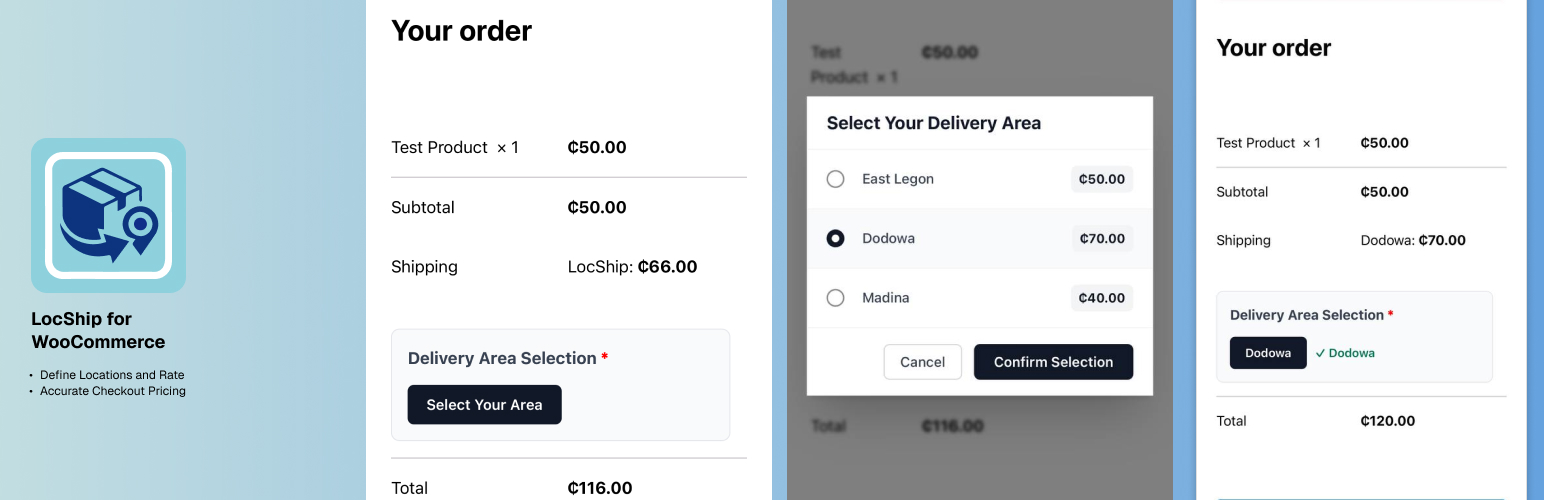
- 在結帳時,提供用戶友好的模態對話框,讓用戶選擇送貨位置
- 用戶選擇送貨區域後,運費將立即更新
- 完全與 WooCommerce 運輸區域無縫配合
2. 如何使用LocShip for WooCommerce?
- 管理員在 WooCommerce 設置中配置送貨區域和相應的運費
- 用戶在結帳時點擊“選擇您的區域”以打開優雅的模態對話框
- 用戶從可用區域列表中選擇送貨位置
- 根據用戶選擇的區域,運費將自動更新
3. LocShip for WooCommerce 適用於哪些商家?
- 本地送貨業務
- 區域性電子商店
- 有非標準送貨區域的企業
- 在郵政編碼不準確反映運費的地區運營的公司
- 任何需要自定義基於位置的送貨邏輯的商店
4. LocShip for WooCommerce 的技術特點:
- 完全集成 WooCommerce 運輸區域
- 以 AJAX 技術為基礎,為用戶提供流暢的使用體驗
- 基於會話的位置存儲
- 自動清除運費緩存
- 響應式設計,適用於所有設備
- 具有文本域支持的多語言支持
非常感謝,敬請留意發佈在我的網站上:[https://www.tiekuasare.com/](https://www.tiekuasare.com/)。
外掛標籤
開發者團隊
原文外掛簡介
LocShip for WooCommerce is a powerful and flexible WooCommerce shipping extension that allows you to create location-based shipping rates using custom area names instead of relying on standard address fields.
Perfect for businesses that need granular control over delivery zones and pricing, this plugin provides:
Custom Delivery Areas – Define unlimited shipping zones with custom names (e.g., “Spintex”, “East Legon”, “Tema”)
Individual Pricing – Set specific shipping costs for each delivery area
User-Friendly Modal – Beautiful modal interface for customers to select their delivery location at checkout
Real-Time Updates – Shipping costs update instantly when customers select their area
Multi-Zone Support – Works seamlessly with WooCommerce shipping zones
HPOS Compatible – Fully compatible with WooCommerce High-Performance Order Storage
Validation – Ensures customers select a delivery area before completing checkout
How It Works
Admin configures delivery areas and their corresponding shipping costs in WooCommerce Settings
During checkout, customers click “Select Your Area” to open an elegant modal
Customers choose their delivery location from the list of available areas
Shipping cost updates automatically based on the selected area
Order proceeds with the correct shipping rate applied
Perfect For
Local delivery businesses
Regional e-commerce stores
Businesses with non-standard delivery zones
Companies operating in areas where postal codes don’t accurately reflect delivery costs
Any store needing custom location-based shipping logic
Technical Features
Fully integrated with WooCommerce shipping zones
AJAX-powered for smooth user experience
Session-based location storage
Automatic shipping cache clearing
Responsive design works on all devices
Translation ready with text domain support
Additional Information
Developer Notes
The plugin stores delivery area selections in WooCommerce sessions and includes AJAX handlers for real-time updates. Custom rules are stored per shipping method instance, allowing for flexible multi-zone configurations.
Support
For support, feature requests, or bug reports:
Email: [email protected]
Website: https://www.tiekuasare.com/
Privacy Policy
This plugin does not collect, store, or transmit any personal data beyond what is already collected by WooCommerce during the normal checkout process.