內容簡介
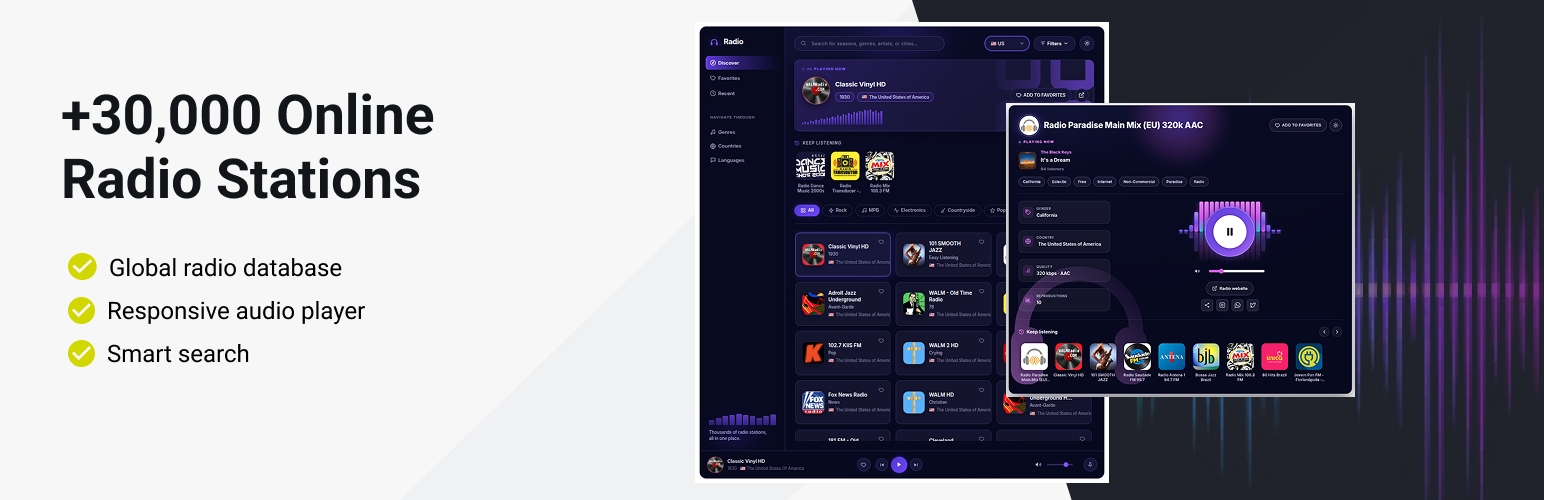
Radio Browser Stations 外掛讓您能夠將超過 30,000 個線上廣播電台整合到您的 WordPress 網站中,提供美觀且響應式的廣播播放器,適合音樂部落格、廣播網站及娛樂門戶等。
【主要功能】
• 全球廣播數據庫:訪問超過 30,000 個廣播電台
• 美觀的音頻播放器:現代化的 HTML5 播放器
• 智能搜尋功能:依名稱、國家或類型搜尋電台
• 多種排序選項:依受歡迎程度、名稱或比特率排序
• 收藏功能:保存喜愛和最近收聽的電台
• 響應式設計:適用於桌面、平板和行動裝置
外掛標籤
開發者團隊
原文外掛簡介
Integrate thousands of online radio stations into your WordPress website with the Radio Browser Stations plugin.
Disclaimer
This plugin is an independent project developed by LinkNacional. It is not affiliated, endorsed, or sponsored by Radio-Browser.info, WordPress, or Select2.
Radio-Browser.info is a free, public API and database of radio stations. This plugin uses their API to fetch station data and stream audio, but there is no official relationship or partnership.
Select2 is an open-source JavaScript library used to enhance dropdowns and search fields. This plugin includes Select2 locally and does not load it from external servers.
WordPress is a registered trademark of the WordPress Foundation. This plugin is designed for WordPress but is not officially associated with the project.
All trademarks, service marks, and project names mentioned are the property of their respective owners. Usage in this plugin is solely for integration purposes and does not imply any affiliation.
External Service Documentation
This plugin uses the public API from Radio-Browser.info to fetch radio station data and stream audio. No user data is collected, stored, or transmitted by this plugin. The API is free to use and does not require registration or API keys.
What is sent/received:
– The plugin sends requests to Radio-Browser.info to retrieve station lists and streaming URLs.
– No personal or sensitive user data is sent to Radio-Browser.info.
– Audio streams are played directly from the radio station servers via the URLs provided by the API.
Terms and Privacy:
– Radio-Browser.info Terms of Service
– Radio-Browser.info Privacy Policy
No user tracking:
This plugin does not track users or collect analytics data. Its sole purpose is to display and play radio stations using public data from Radio-Browser.info.
This powerful plugin connects to the Radio-Browser.info database, providing access to over 30,000 radio stations worldwide with a beautiful, responsive radio player and customizable station lists.
Perfect for music blogs, radio websites, entertainment portals, or any site that wants to offer streaming audio content to visitors.
Features
Global Radio Database: Access to 30,000+ radio stations from Radio-Browser.info
Modern & Legacy Layouts: Choose the redesigned layout (or the previous one) via the layout shortcode attribute
Beautiful Audio Player: Modern, responsive HTML5 audio player with volume controls and an animated audio visualizer
Live Now-Playing Metadata: Album cover, song/artist and current audience (listeners) fetched server-side
Collections: Favorites and Recents views saved in the browser, plus a “Continue listening” block
Genre, Country & Language Filters: Filter stations by country, genre and language, with category pills
Smart Search Functionality: Find stations by name, country, or genre
Multiple Sort Options: Sort by popularity, name, bitrate, or random order, ascending or descending
Light/Dark Theme: Built-in theme toggle for the player and the list
SEO-Friendly URLs: Clean, readable URLs for individual radio stations
Responsive Design: Works perfectly on desktop, tablet, and mobile devices
Easy Integration: Simple shortcodes to embed radio lists and players anywhere
Audio Streaming Proxy: Built-in proxy for smooth audio streaming with CORS support
Station Information: Display station logos, genres, country flags, and bitrate/codec statistics
Click Tracking: Integration with Radio-Browser.info’s click statistics
Minimum Requirements
For this plugin to work correctly, you will need:
WordPress version 5.0 or later
PHP version 8.2 or later
An active internet connection for streaming radio content
Modern web browser with HTML5 audio support
External Libraries
This plugin uses the Select2 JavaScript library to enhance the search and selection experience for radio stations. Select2 provides a modern, responsive dropdown with search, filtering, and accessibility features, making it easier for users to find and select stations from large lists.
Usage
Using the Radio Browser plugin is straightforward with two simple shortcodes:
Radio Station List
Display a list of radio stations with filtering options:
[radio_browser_list layout="modern"]
Available Parameters:
layout – Layout to render: “modern” (new layout) or “legacy”/absent (previous layout)
player_page – The page slug where your radio player is located (default: “player”)
countrycode – Filter stations by country code (default: the country of the WordPress locale, e.g. pt_BR → BR; “all” if none matches). Visitors can change it and the choice is remembered per browser.
limit – Number of stations to display (default: 20)
sort – Sort order: “clickcount”, “name”, “random”, “bitrate” (default: “clickcount”)
reverse – Reverse the order: “1” (descending, default) or “0” (ascending)
search – Pre-filter stations by search term
genre – Pre-select a genre/tag filter (default: “all”)
hide_country – Hide country filter (yes/no)
hide_limit – Hide limit field (yes/no)
hide_sort – Hide sort options (yes/no)
hide_order – Hide the order (reverse) button (yes/no)
hide_genre – Hide genre filter (yes/no)
hide_search – Hide search field (yes/no)
hide_button – Hide the submit button (yes/no, legacy layout only)
hide_all_filters – Hide entire filter form (yes/no)
Example:
[radio_browser_list player_page=”radio-player” layout=”modern” countrycode=”US” limit=”50″]
Radio Player
Display the audio player on a dedicated page:
[radio_browser_player layout="modern"]
This shortcode automatically detects the radio station from the URL and displays the appropriate player with controls and station information.
Setting Up Your Radio Website
Create a Radio List Page: Add a new page and insert the [radio_browser_list layout="modern"] shortcode
Create a Player Page: Add another page with the [radio_browser_player layout="modern"] shortcode
Configure the list shortcode to point to your player page using the player_page parameter
Publish both pages and start enjoying streaming radio!
Enjoying the Plugin?
If you find the Radio Browser Stations plugin useful, please consider leaving a 5-star review on WordPress.org.
Your feedback is invaluable to us. It not only helps other website owners discover the plugin but also motivates us to continue developing and improving it. A positive review is the best way to show your support for our work.
Leave your review here!
Thank you for being a part of our community!
Support
If you need help or have questions, please post them in the support forum for the plugin on WordPress.org. We will be happy to assist you there.