內容簡介
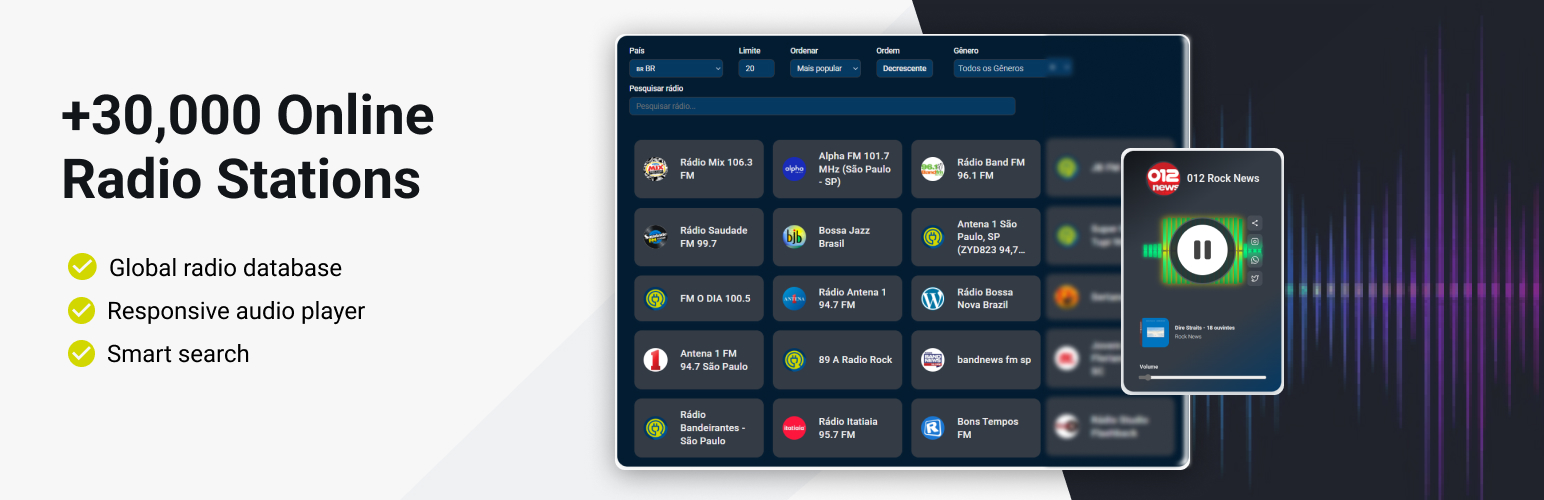
總結:使用 Radio Browser Stations 外掛,可將數千個線上廣播電台整合到您的WordPress網站中。
1. 這個外掛是由LinkNacional開發的獨立專案,並非Radio-Browser.info、WordPress或Select2的關聯、認可或贊助。
2. Radio-Browser.info是一個免費的公共API和廣播電台數據庫,這個外掛使用他們的API來獲取電台數據和流式音頻,但沒有官方關係或合作夥伴關係。
3. 這個外掛使用Radio-Browser.info的公共API來獲取廣播電台數據和流式音頻,不會收集、儲存或傳輸用戶數據。
4. 外掛連接到Radio-Browser.info數據庫,提供全球30,000多個廣播電台的訪問權限,並帶有具有美觀反應性的廣播播放器和可自訂的電台列表。
5. 外掛提供許多功能,如全球廣播電台數據庫、現代反應性HTML5音頻播放器、可自訂的廣播電台列表等。
問題與答案:
1. 這個外掛是由哪家公司開發的?他們與Radio-Browser.info和WordPress有關係嗎?
- 這個外掛是由LinkNacional開發的獨立專案,並非Radio-Browser.info、WordPress或Select2的關聯、認可或贊助。
2. 這個外掛使用Radio-Browser.info的API來做什麼?
- 這個外掛使用Radio-Browser.info的API來獲取廣播電台數據和流式音頻,提供全球30,000多個廣播電台的訪問權限。
3. 使用這個外掛所需的最低要求是什麼?
- 使用這個外掛需要WordPress版本5.0或更高、PHP版本7.4或更高、連接至網路來進行廣播內容流式傳輸、以及支援HTML5音頻的現代網頁瀏覽器。
4. 外掛中提到的Select2是什麼?
- Select2是一個用於增強搜尋和選擇體驗的開源JavaScript庫,這個外掛在本地包含Select2,不從外部伺服器加載。
外掛標籤
開發者團隊
原文外掛簡介
Integrate thousands of online radio stations into your WordPress website with the Radio Browser Stations plugin.
Disclaimer
This plugin is an independent project developed by LinkNacional. It is not affiliated, endorsed, or sponsored by Radio-Browser.info, WordPress, or Select2.
Radio-Browser.info is a free, public API and database of radio stations. This plugin uses their API to fetch station data and stream audio, but there is no official relationship or partnership.
Select2 is an open-source JavaScript library used to enhance dropdowns and search fields. This plugin includes Select2 locally and does not load it from external servers.
WordPress is a registered trademark of the WordPress Foundation. This plugin is designed for WordPress but is not officially associated with the project.
All trademarks, service marks, and project names mentioned are the property of their respective owners. Usage in this plugin is solely for integration purposes and does not imply any affiliation.
External Service Documentation
This plugin uses the public API from Radio-Browser.info to fetch radio station data and stream audio. No user data is collected, stored, or transmitted by this plugin. The API is free to use and does not require registration or API keys.
What is sent/received:
– The plugin sends requests to Radio-Browser.info to retrieve station lists and streaming URLs.
– No personal or sensitive user data is sent to Radio-Browser.info.
– Audio streams are played directly from the radio station servers via the URLs provided by the API.
Terms and Privacy:
– Radio-Browser.info Terms of Service
– Radio-Browser.info Privacy Policy
No user tracking:
This plugin does not track users or collect analytics data. Its sole purpose is to display and play radio stations using public data from Radio-Browser.info.
This powerful plugin connects to the Radio-Browser.info database, providing access to over 30,000 radio stations worldwide with a beautiful, responsive radio player and customizable station lists.
Perfect for music blogs, radio websites, entertainment portals, or any site that wants to offer streaming audio content to visitors.
Features
Global Radio Database: Access to 30,000+ radio stations from Radio-Browser.info
Beautiful Audio Player: Modern, responsive HTML5 audio player with volume controls
Customizable Radio Lists: Display radio stations with filtering and sorting options
Smart Search Functionality: Find stations by name, country, or genre
SEO-Friendly URLs: Clean, readable URLs for individual radio stations
Responsive Design: Works perfectly on desktop, tablet, and mobile devices
Easy Integration: Simple shortcodes to embed radio lists and players anywhere
Audio Streaming Proxy: Built-in proxy for smooth audio streaming with CORS support
Country Filtering: Filter stations by country with support for all nations
Multiple Sort Options: Sort by popularity, name, bitrate, or random order
Station Information: Display station logos, descriptions, and statistics
Click Tracking: Integration with Radio-Browser.info’s click statistics
Minimum Requirements
For this plugin to work correctly, you will need:
WordPress version 5.0 or later
PHP version 7.4 or later
An active internet connection for streaming radio content
Modern web browser with HTML5 audio support
External Libraries
This plugin uses the Select2 JavaScript library to enhance the search and selection experience for radio stations. Select2 provides a modern, responsive dropdown with search, filtering, and accessibility features, making it easier for users to find and select stations from large lists.
Usage
Using the Radio Browser plugin is straightforward with two simple shortcodes:
Radio Station List
Display a list of radio stations with filtering options:
[radio_browser_list]
Available Parameters:
player_page – The page slug where your radio player is located (default: “player”)
countrycode – Filter stations by country code (default: “BR” for Brazil)
limit – Number of stations to display (default: 20)
sort – Sort order: “clickcount”, “name”, “random”, “bitrate” (default: “clickcount”)
search – Pre-filter stations by search term
hide_country – Hide country filter (yes/no)
hide_limit – Hide limit field (yes/no)
hide_sort – Hide sort options (yes/no)
hide_search – Hide search field (yes/no)
hide_all_filters – Hide entire filter form (yes/no)
Example:
[radio_browser_list player_page=”radio-player” countrycode=”US” limit=”50″]
Radio Player
Display the audio player on a dedicated page:
[radio_browser_player]
This shortcode automatically detects the radio station from the URL and displays the appropriate player with controls and station information.
Setting Up Your Radio Website
Create a Radio List Page: Add a new page and insert the [radio_browser_list] shortcode
Create a Player Page: Add another page with the [radio_browser_player] shortcode
Configure the list shortcode to point to your player page using the player_page parameter
Publish both pages and start enjoying streaming radio!
Enjoying the Plugin?
If you find the Radio Browser Stations plugin useful, please consider leaving a 5-star review on WordPress.org.
Your feedback is invaluable to us. It not only helps other website owners discover the plugin but also motivates us to continue developing and improving it. A positive review is the best way to show your support for our work.
Leave your review here!
Thank you for being a part of our community!
Support
If you need help or have questions, please post them in the support forum for the plugin on WordPress.org. We will be happy to assist you there.