內容簡介
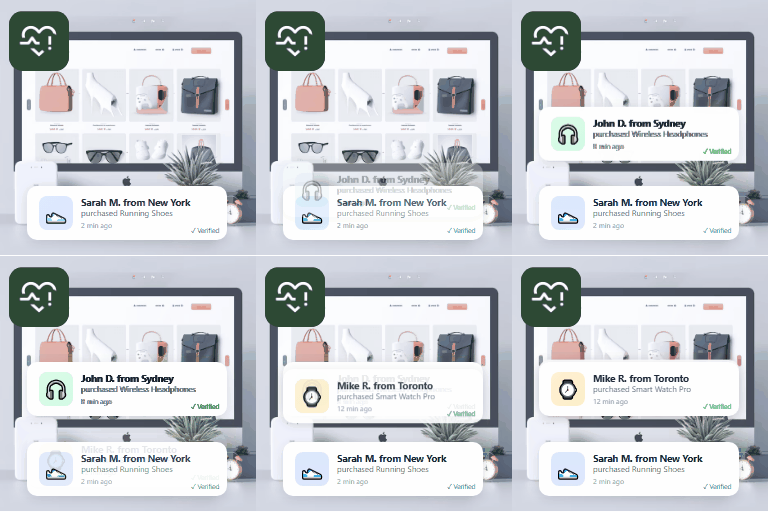
PiWeb Live sales notification for WooCommerce 是一款免費的外掛,能在您的 WooCommerce 商店中顯示即時銷售通知,提升顧客信任感並促進轉換率。透過即時銷售警示,讓訪客感受到購物的熱度與緊迫感。
【主要功能】
• 無需連接後端平台,簡單易用
• 顯示實際訂單及虛擬訂單
• 自訂通知訊息,使用短碼
• 完全控制通知外觀與位置
• 支援隱私保護選項
• 提供多種動畫效果選擇
外掛標籤
開發者團隊
② 後台搜尋「PiWeb Live sales notification for WooCommerce」→ 直接安裝(推薦)
📦 歷史版本下載
原文外掛簡介
Show recent sales notifications with ease! This free plugin adds a recent sales popup to your WooCommerce store, boosting trust with live sales alerts and real-time conversion triggers.
Try the Demo | Documentation
Here are some of the important features of the Live sales notification for WooCommerce:
Core features
No need to connect your WooCommerce store with a backend platform like other plugins require
Show original orders placed as a live sales feed to other visitors
There is no restriction on the number of products that will be shown, as other plugins have in their Free version
If you don’t have a large number of orders then you can show virtual orders as well
Virtual orders can be generated from visitors’ recent product views; in this case their recently viewed product will be shown in the notification. This will encourage the visitor to buy it.
Create virtual orders from your selected products
You can create a custom message that will be shown in the notification, e.g.: Mr. Dave from New York just purchased XYZ
You can customize the message using shortcodes like {date}, {time}, {first_name}, {city}, {state}, {country}, {product}, {price}
When the order is original, this shortcode information comes from the original order; when the order is virtual, this information is auto-generated for you
Set how old orders should be extracted for the notification; you can set this in weeks, months, and hours.
Select products from categories to create virtual orders
Fast and lightweight.
Boosts sales and conversion rate.
10 Prebuild theme for the notification popup; you can select any theme from the settings
Layout features
You can control the complete look and feel of the notification from the plugin settings
Disable notification on mobile; mobile breakpoint starts from 968px
Notification width, image width in the notification
Link image to product or not
Open link in a new tab or in the same tab
Background color of the notification
Position of the notification
Text color, font size, and weight of the notification text
You can even customize color, font size, and weight for each of the texts coming from shortcodes, so you can have different font size for {date}, and a different font size for {product}
You can disable the closing notification option for the user, so the user can’t close the notification
BENEFITS OF WooCommerce SALES feed
Make your online store trustworthy by showing others are buying from your site.
Shows that your WooCommerce site is popular and busy.
Creates a sense of urgency by showing how much stock is remaining.
Boosts your conversion rate by showing the sales feed.
Shows trending products by using WooCommerce notification.
Boosts your sales and conversion rate.
PRO features
Privacy protection: Give the option to customers to exclude their info from the live feed
It allows you to translate the message text; we have our own translation system for the message shown.
You can disable out of stock products from showing in notifications
You can choose from many animation options for showing and hiding the notification
Set different date and time formats for the shortcodes {date} and {time}
You can show notifications throughout the site, or you can control the notification pages from these conditions: front page, product page, cart page, checkout page, shop page, product category page
Premium support: We respond to all support topics within 24 hours
The free version shows 1-day-old orders in the popup; in PRO you can configure how old orders to show
Set background image for the sales popup
Admin can also exclude any order from appearing in the live sales feed
Dismiss notification option, so a buyer can disable the notification completely
Set how long the notification will remain disabled for that user
Show how long back the particular order was placed, e.g., “2 hours back”
Create urgency by showing stock left for the product
Set a fake stock amount that will be shown for the product where you don’t do stock management
Set product placeholder image
Utilize the visitor’s actual country in fake sales popups to create a sense of familiarity and trust, increasing the likelihood of their purchase.
Privacy
If you choose to opt in from the plugin settings, or submit optional feedback during deactivation, this plugin may collect basic technical information, including:
Plugin version
WordPress version
WooCommerce version
Site URL
Deactivation reason (if submitted)
This data is used solely to improve plugin quality, compatibility, and features. No personal or user-specific data is collected without consent.